
PrinterShare Premium Key
Screenshots

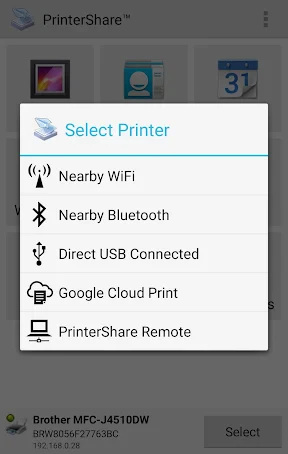


Description
About PrinterShare Premium Key Feature
PrinterShare Premium Key is an unlock code for the PrinterShare mobile application, transforming it from a basic utility into a powerful, ad-free printing solution. The core PrinterShare app facilitates printing documents, photos, emails, and web pages directly from smartphones or tablets to a wide array of printers, including those connected via USB, Bluetooth, Wi-Fi, or over the internet. The Premium Key removes usage restrictions, unlocks advanced features, and provides a seamless, professional-grade printing experience. It serves as a critical tool for users who require reliable, on-the-go printing without the limitations of the free version, effectively turning a mobile device into a versatile portable printing hub.
Chapter 1: Function
The core function of the PrinterShare app, activated by the Premium Key, is to enable direct mobile printing across diverse environments. It allows users to print documents, photos, contacts, and web pages from their Android or iOS device. The software supports multiple connection methods: direct printing via USB OTG or Bluetooth to a printer in close proximity, printing over a local Wi-Fi network to shared printers, and remote printing to printers located elsewhere via the internet. The Premium Key unlocks the ability to print to any printer without brand restrictions, removes page limits, and enables cloud printing from services like Google Drive and Dropbox. It also provides access to advanced print job management, including scheduling and detailed previews, making it a comprehensive mobile print spooler.
Chapter 2: Value
The primary value proposition of the PrinterShare Premium Key lies in its liberation of mobile printing from hardware and network constraints, delivering convenience, flexibility, and professional utility. Its key advantages are multifaceted. First, it offers universal printer compatibility, bypassing the need for manufacturer-specific apps or proprietary protocols, which is a significant advantage in mixed-printer environments. Second, it eliminates advertisements and usage quotas, ensuring a smooth, uninterrupted workflow crucial for business or urgent tasks. Third, the remote printing capability is a standout feature, allowing users to send print jobs to a home or office printer from anywhere with an internet connection, a boon for remote workers and travelers. Fourth, the Premium Key enhances document handling with features like print preview, page range selection, and multiple copy printing, providing control typically found on desktop systems. Ultimately, it transforms a ubiquitous smartphone into a powerful and reliable printing terminal, saving time and reducing dependency on traditional computers for printing tasks.
Chapter 3: Scenarios
The PrinterShare Premium Key is ideally suited for several key user groups and daily scenarios. Mobile professionals, such as sales representatives and field service technicians, frequently need to print contracts, invoices, or reports directly from their tablets or phones while at a client's site, using local or portable printers. Students and academics benefit from being able to print lecture notes, research papers, or boarding passes directly from their devices in libraries, campuses, or coffee shops without needing a laptop. Home users with multiple device types find it invaluable for printing photos from smartphones to a shared family printer or handling school projects seamlessly. Remote and hybrid workers constitute another primary group, as the app allows them to queue documents to their office printer before arriving or print a document at home while using their work phone. In essence, any individual or professional who prioritizes mobility, despises printing hassles, and requires dependable ad-hoc printing will find the Premium Key an essential upgrade.
Uninstall Instructions
For step-by-step guidance on how to safely remove this application from your device, please refer to our 《Uninstall Instructions》 document.
Pros
- bypasses cloud to print directly over local Wi-Fi
- supports legacy printers without manufacturer drivers
- enables mobile printing to nearby USB-connected printers
- cross-platform printing between Android
- iOS
- and PC
- offers ad-free experience with premium key unlock
Cons
- requires physical proximity for direct Wi-Fi mode
- premium key tied to device not cloud account
- no cloud print queue for offline printer handling
- complex setup for non-tech users in direct mode
- limited support for enterprise print management features
Frequently Asked Questions
What is PrinterShare Premium Key?
PrinterShare Premium Key is an unlock key for the PrinterShare mobile app. The core app enables printing directly from your Android or iOS device to most printers over a local Wi-Fi network, USB, or Bluetooth connection, without requiring a PC. The Premium Key unlocks advanced features like cloud printing (Google Cloud Print, Dropbox), remote printing over the internet, and removes ads. It is not a standalone printer driver but a utility that facilitates mobile printing.
Is PrinterShare free to use or paid?
The base PrinterShare app is free to download and use for basic local network printing with limitations, which include ads and the exclusion of cloud/remote printing features. PrinterShare Premium Key is a separate in-app purchase or standalone key purchase that upgrades the free app to a premium version. This one-time purchase permanently unlocks all advanced functions and removes advertisements. No subscription is required.
What printers and devices are compatible?
The app supports a wide range of printers from major brands (HP, Epson, Canon, etc.) connected via Wi-Fi, USB OTG (for Android), or Bluetooth. It is compatible with Android smartphones/tablets and iOS devices (iPhone/iPad). Printing over the internet requires the premium version. The app does not require specific printer drivers to be installed on your mobile device, as it uses its own technology to communicate directly with the printer.
How does remote printing work with the Premium Key?
Remote printing allows you to send print jobs to a printer at a different location (e.g., your home printer from your office). This requires the premium version. Both the mobile device and the target printer must have internet access. Typically, you need to have the PrinterShare desktop connector installed on a computer that is connected to the remote printer and left running. The mobile app then communicates with that connector over the internet to complete the print job.
What if the app cannot find or connect to my printer?
First, ensure your mobile device and printer are on the same Wi-Fi network for local printing. Restart both the printer and your device. For USB printing on Android, verify OTG support and use a certified cable. Check the app's official support site for a list of verified compatible printer models. If issues persist, the app provides a troubleshooting guide within its settings. For premium key activation issues, contact the developer's support through the official channels listed in the app store.
App Info
Technical Info
Recommended For You
CL Theme Card
Auto & Vehicles

Little Nightmares Comics
Comics

Keys simulator and cars sounds
Auto & Vehicles

PDF Pro-View PDF
Business

Messenger
Communication

Visible mobile
Communication

The Language of Letting Go
Books & Reference

Google Pixel Watch
Communication

Thumbtack for Professionals
Business

Mirror - Fullscreen Mirror App
Beauty

Coloring games: speed drawing
Art & Design

Hairstyles for short hair
Beauty

MERO - Programări Online
Beauty

Messenger - Texting App
Communication

Sunoco: Pay fast & save
Auto & Vehicles

Sky Tonight - Star Gazer Guide
Books & Reference

Learn To Draw Step By Step
Art & Design

Signal Private Messenger
Communication

LinkedIn: Jobs & Business News
Business

BlueDriver OBD2 Scan Tool
Auto & Vehicles