
Clip Studio Paint
Screenshots


Description
About Clip Studio Paint Features – The Ultimate Digital Art Studio
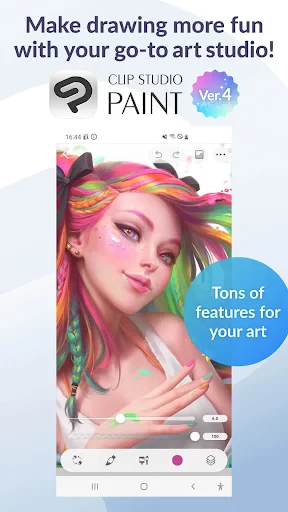
Clip Studio Paint, developed by CELSYS, is a professional-grade digital art application renowned worldwide among illustrators, comic artists, and animators. It transcends being a simple drawing tool by offering a comprehensive suite of features tailored for every stage of the creative process, from sketching and inking to coloring and animation. With its powerful brush engine, vast asset library, and intuitive vector capabilities, it has established itself as a formidable alternative to other industry-standard software. Available across Windows, macOS, iOS, and Android, Clip Studio Paint provides a seamless, cross-platform experience that caters to both hobbyists seeking a robust tool and professionals demanding precision and efficiency in their workflow.
Chapter 1: Function
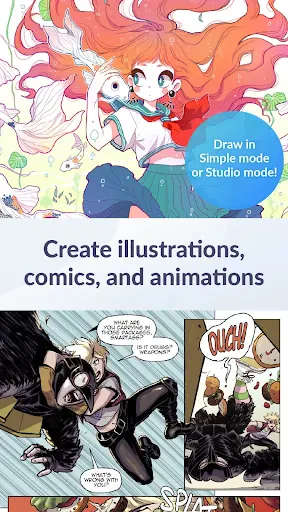
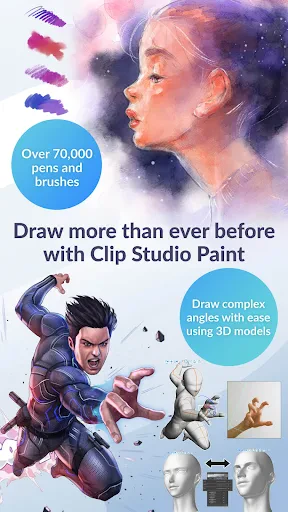
Clip Studio Paint's core functionality is built around a sophisticated, natural drawing experience. Its cornerstone is a highly customizable brush engine that realistically mimics traditional media like pencils, inks, watercolors, and oils. Artists can fine-tune every aspect of a brush or download thousands more from the integrated Clip Studio Assets store. For comic and manga creation, it offers specialized tools such as panel rulers, speed lines, tone layers, and advanced text editing for speech bubbles. The application supports multi-page management for long-form projects. Furthermore, it includes a robust animation module, allowing users to create frame-by-frame animations with timelines, onion skinning, and camera tools. Its vector layer support enables clean, scalable line art that remains editable after drawing, which is essential for professional illustration and design work.
Chapter 2: Value
The primary value proposition of Clip Studio Paint lies in its specialized, artist-centric design that prioritizes workflow efficiency and creative freedom over generic editing tools. Unlike all-purpose graphic suites, its features are meticulously crafted for narrative and illustrative art. A key advantage is its one-time purchase model (with optional subscription for extra services), which provides significant long-term value compared to purely subscription-based competitors. The integrated Clip Studio Assets community is a massive value add, offering millions of free and premium brushes, 3D models, backgrounds, and textures, drastically reducing asset creation time. Its performance is optimized for drawing, with minimal lag even with large canvases and multiple layers. The cross-platform compatibility, particularly with full-featured versions on tablets, allows artists to work anywhere without compromise. For comic artists, the automation of tedious tasks like panel splitting and screentone application is invaluable. The software's continuous development, driven by direct artist feedback, ensures it evolves to meet real-world professional needs, making it not just a tool, but a dedicated partner in the creative process.
Chapter 3: Scenarios
Clip Studio Paint's primary user groups are digital artists, illustrators, comic (manga/webtoon) creators, and animators. For the freelance illustrator, it is a daily driver for creating character designs, detailed illustrations, and client commissions, leveraging its brushes and color mixing tools to achieve a desired artistic style. Comic artists and mangaka rely on it for the entire production pipeline: laying out pages, drawing consistent line art with vector correction, adding tones and effects, and lettering dialogue, all within a single, organized workspace. Hobbyists and students find it accessible for learning digital art fundamentals, using its 3D poseable reference models to understand anatomy and perspective. In an everyday scenario, a webtoon creator might start a sketch on an iPad during their commute, refine the line art on a desktop PC at home, and use cloud synchronization to access the same file seamlessly. Animators utilize its timeline and drawing tools to create short animated sequences, GIFs, or full scenes, benefiting from its integration of drawing and motion. It is, therefore, the go-to solution for any creator whose work is rooted in drawing and storytelling.
Uninstall Instructions
For step-by-step guidance on how to safely remove this application from your device, please refer to our 《Uninstall Instructions》 document.
Pros
- offers desktop-level brush engine on mobile devices
- frame-by-frame animation support with timeline editor
- cloud sync allows seamless work continuation across devices
- massive asset library with user-created materials
- precise vector layers for scalable line art editing
Cons
- steep learning curve for full feature utilization
- subscription model required for all premium features
- large project files demand significant device storage
- complex interface can feel cluttered on smaller screens
- cloud services occasionally suffer regional latency issues
Frequently Asked Questions
What is Clip Studio Paint and what is it used for?
Clip Studio Paint is a professional-grade digital art application primarily designed for illustration, comic creation, and animation. Its core functions include advanced pen and brush engines for natural drawing, powerful comic panel management tools, and frame-by-frame animation capabilities. It is positioned as a leading software for artists and illustrators, offering features like vector layers, 3D model posing references, and extensive asset libraries. The app is widely used for creating digital paintings, manga, webtoons, and short animations.
Is Clip Studio Paint free to use, or does it require a subscription?
Clip Studio Paint is specifically optimized for illustrators and comic artists, with tools tailored for line art, screentones, and comic panel creation, which are less streamlined in general-purpose software. Its unique features include specialized pen stabilizers for smooth lines, perspective rulers, and a vast library of customizable comic assets. Unlike Photoshop's focus on photo editing, its core workflow is built from the ground up for drawing, animation, and sequential art, making it a preferred choice in those creative fields.
Can I use Clip Studio Paint without an internet connection?
Clip Studio Paint operates on a subscription model (Clip Studio Paint PRO/EX) for desktop and a freemium model on some mobile platforms. A free trial is available for a limited period. After the trial, a paid plan is required for continued use. Some versions, like Clip Studio Paint DEBUT, may have limited features but are available at a lower cost. In-app purchases are primarily for additional assets like brushes, materials, and 3D models from the integrated Clip Studio Assets store.
What devices and operating systems does Clip Studio Paint support?
Clip Studio Paint is available on Windows, macOS, iPadOS, Android, and Chromebook. It offers cross-platform compatibility, allowing projects to be synced across devices via its cloud service (requiring a separate subscription). The feature set is largely consistent, though the interface and some advanced tools may be optimized differently for desktop and touchscreen devices. It is adapted for use with styluses like the Apple Pencil and various graphics tablets.
How does Clip Studio Paint differ from other drawing apps like Photoshop?
Yes, once the software is installed and activated, Clip Studio Paint can be used offline for core drawing and creation tasks. An internet connection is required for initial installation, license verification, updating the software, accessing the Clip Studio Assets store, and using cloud sync features for saving or transferring files across devices. For uninterrupted standalone use on a single device, no constant connection is needed after activation.
App Info
Technical Info
Recommended For You

Invoice Maker & Estimate Maker
Business

Bible-Daily Bible Verse
Books & Reference

CloudLibrary
Books & Reference

Jotform - Form, Sign & Survey
Business

RateByFresh
Beauty

Joist Invoices for Contractors
Business

WEBTOON: Manga, Comics, Manhwa
Comics

OBD JScan
Auto & Vehicles

Chumba Casino Real Money ayuda
Comics

Spam Call Blocker for Android
Communication

Second Phone Number - 2Number
Communication

MM-Calendar
Books & Reference

Tor OBD2 Diagnostics
Auto & Vehicles

Boat Trader
Auto & Vehicles

Homebase: Employee Scheduling
Business

Filtre for Selfie
Beauty

iSharing: GPS Location Tracker
Communication

Messages: SMS Text Messenger
Communication

VistaCreate: Graphic Design
Art & Design

CEFCO Rewards
Auto & Vehicles