
MyFrontier
Screenshots
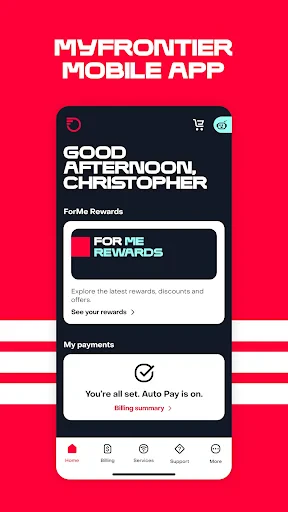
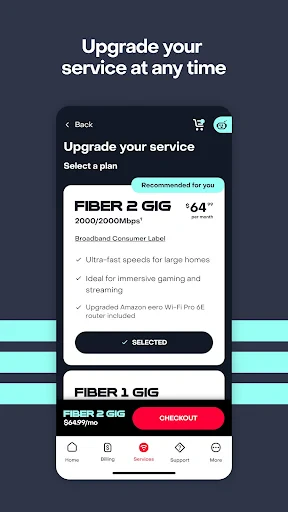
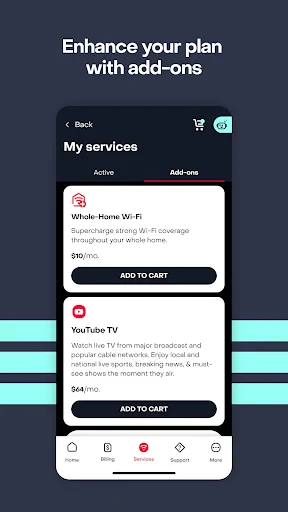
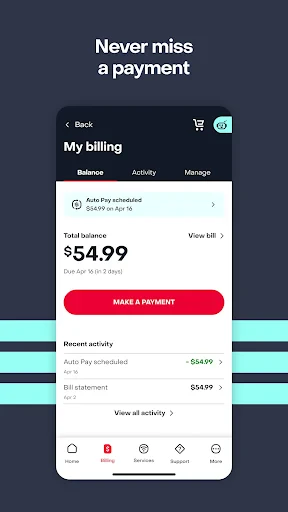
Description
About MyFrontier Feature
MyFrontier is the official customer management application for Frontier Communications subscribers, designed to provide a centralized and convenient platform for managing home internet, phone, and television services. This app serves as a digital gateway, empowering users to handle their accounts, troubleshoot issues, and explore service options directly from their mobile devices. It streamlines the customer experience by consolidating key functionalities into an intuitive interface, reducing the need for phone calls or website visits for routine tasks. MyFrontier reflects the company's commitment to offering modern, self-service tools that put control and information directly into the hands of its customers, enhancing both convenience and satisfaction in managing essential home services.
Chapter 1: Function
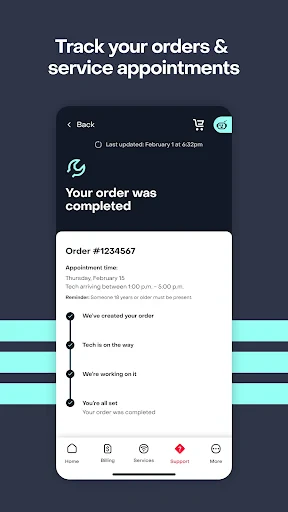
MyFrontier delivers a comprehensive suite of account management functions. Users can securely view and pay their bills, monitor current data usage, and review detailed billing history. The app facilitates service management, allowing customers to schedule appointments, track service visits, and upgrade or modify their existing plans. A core feature is its integrated troubleshooting toolkit, which includes guides for common issues and the ability to run diagnostics on Frontier-provided equipment, such as routers. Furthermore, it provides direct access to customer support via chat or phone, notifications for outages and account updates, and a resource library for understanding service features. Essentially, it consolidates the entire customer service lifecycle into a single, accessible mobile platform.
Chapter 2: Value
The primary value proposition of MyFrontier lies in its empowerment of customers through self-service efficiency and proactive transparency. It eliminates common pain points associated with traditional telecom customer service, such as long wait times and fragmented information. By enabling instant bill payments, usage monitoring, and plan changes, it offers unparalleled convenience, saving users valuable time. The app's diagnostic and troubleshooting tools provide immediate value, often allowing users to resolve connectivity issues without a service call, minimizing downtime. For Frontier, it reduces support costs and improves customer engagement. The app's real-time notifications about outages and account status foster trust and transparency, keeping customers informed. Its intuitive design ensures that users of all technical levels can manage their services effectively. Ultimately, MyFrontier transforms the customer relationship from a reactive, support-ticket-driven model to a proactive, user-controlled partnership, enhancing overall satisfaction and loyalty by making service management straightforward, immediate, and reliable.
Chapter 3: Scenarios
MyFrontier is ideally suited for Frontier's existing residential and small business customers who seek a modern, DIY approach to managing their telecommunications services. Key user groups include busy households where a member, often a parent or homeowner, is responsible for overseeing the family's internet and utility bills. They use the app to quickly pay monthly statements, check if the household is nearing its data cap, or temporarily restart the router after a connectivity hiccup. Small business owners rely on it to monitor service status crucial for operations and schedule service visits with minimal disruption. Another primary scenario involves troubleshooting; a user experiencing slow Wi-Fi can immediately run a diagnostic test via the app before considering a support call. Furthermore, customers contemplating a service upgrade can explore available plans and promotions at their leisure. The app is also valuable for frequent movers or new customers who use it to track installation appointments and manage account setup. In everyday use, it serves as the first and most convenient point of contact for all service-related needs, fitting seamlessly into the digital lifestyle of users who prefer managing tasks on their smartphones.
Uninstall Instructions
For step-by-step guidance on how to safely remove this application from your device, please refer to our 《Uninstall Instructions》 document.
Pros
- offline topographic maps with downloadable regions
- integrates public land boundaries and trail networks
- lightweight vector maps reduce mobile data usage
- tracks routes with minimal battery consumption
- crowdsourced trail condition updates from users
Cons
- requires download for full offline functionality
- specialized interface has a learning curve
- limited urban points of interest database
- premium layers need subscription for access
- route planning less intuitive than mainstream apps
Frequently Asked Questions
What is MyFrontier and what does it do?
MyFrontier is a companion app for Frontier Communications customers, categorized under Utilities. It allows users to manage their home internet, TV, and phone services. Core functions include viewing and paying bills, monitoring data usage, troubleshooting service issues, and managing account settings. The app provides a centralized dashboard for your Frontier services, enabling basic account management without needing to call customer service or visit the website.
Is the MyFrontier app free to use?
Yes, the MyFrontier mobile application is free to download and use. There are no in-app purchases or subscription fees for the app itself. However, it is designed exclusively for existing Frontier Communications service subscribers. To use its core features for bill payment and service management, you must have an active Frontier account. The app may require permissions like location for serviceability checks or notifications for billing alerts.
What devices and systems support the MyFrontier app?
The MyFrontier app is available for both iOS and Android devices. It can be downloaded from the Apple App Store for iPhones/iPads running a supported version of iOS and from the Google Play Store for Android phones and tablets. The app is primarily designed for mobile use by individual account holders or authorized users. There is no specific information provided about adaptation for wearables, smart TVs, or desktop operating systems.
How can I troubleshoot my service using the app?
The MyFrontier app includes self-service troubleshooting tools for common internet and connection problems. You can typically run a diagnostic test on your Frontier-provided router/modem directly through the app. It may guide you through steps like restarting your equipment or identifying outages in your area. For more complex technical issues not resolved via the app, it provides direct pathways to contact Frontier customer support or schedule a technician visit.
Can I manage multiple Frontier accounts with one app?
The MyFrontier app is primarily designed to manage a single primary service account per login. You can view and pay bills for the account you are logged into. For managing multiple, separate Frontier accounts (e.g., a business and a personal account), you would typically need to log out and log in with the credentials for each account. The app does not support a unified dashboard for multiple unrelated accounts within a single login session.
App Info
Technical Info
Recommended For You

OBD JScan
Auto & Vehicles

BUBBLE Comics. Russian heroes.
Comics

My SafeLink
Communication

Easy Hairstyles for Girls
Beauty

Tapas – Comics and Novels
Comics

AI Clothes Try-On: DressTry
Beauty

La Biblia en Español
Books & Reference

CL Theme Road
Auto & Vehicles

Snagajob - Jobs Hiring Now
Business

GettingOut Visits
Communication

АЗС Татнефть
Auto & Vehicles

Bible App by Olive Tree
Books & Reference

King James Bible - KJV Offline
Books & Reference
FPS Shooting Gun Games Offline
Comics

Life Bible
Books & Reference

World History Atlas
Books & Reference

CVTz50
Auto & Vehicles

Penny Puss 2.0
Business

Hushed: US Second Phone Number
Communication

FedEx Mobile
Business