
Blue Yonder Workforce
Screenshots


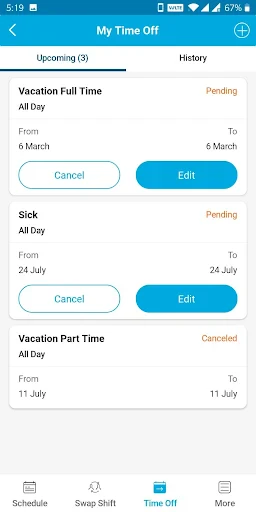

Description
About Blue Yonder Workforce Management Feature
Blue Yonder Workforce Management is a comprehensive, cloud-based solution designed to optimize labor planning, scheduling, time and attendance, and task management for frontline and hourly workers. It integrates advanced artificial intelligence and machine learning to help businesses, particularly in retail, manufacturing, and logistics, align their workforce with operational demands dynamically. The platform moves beyond traditional scheduling tools by providing data-driven insights that enable managers to make proactive decisions, control labor costs, improve employee engagement, and enhance overall operational efficiency. By serving as a central hub for workforce-related activities, it bridges the gap between strategic planning and real-time execution on the shop floor.
Chapter 1: Function
Blue Yonder Workforce Management delivers a suite of core functionalities centered on intelligent labor orchestration. Its primary module focuses on forecasting and scheduling, using predictive analytics to create accurate demand forecasts that automatically generate optimized staff schedules, considering factors like skills, availability, and labor regulations. The time and attendance system offers seamless clock-in/out mechanisms, often via mobile devices, and tracks hours worked against scheduled shifts, managing exceptions and overtime. Furthermore, the app includes task management capabilities, allowing managers to assign and track daily activities in real time, ensuring critical operational tasks are completed. Employee self-service features empower workers to view schedules, request shift swaps, and access payslips, fostering transparency and communication. Together, these functions create a closed-loop system for managing the entire employee lifecycle from planning to payment.
Chapter 2: Value
The value proposition of Blue Yonder Workforce Management lies in its ability to transform labor from a significant cost center into a strategic asset. Its key advantage is the powerful integration of AI-driven forecasting, which dramatically improves schedule accuracy, leading to reduced overstaffing and understaffing. This directly translates to substantial labor cost savings and increased sales opportunities through better customer service. The platform enhances compliance by automatically adhering to complex labor laws and union rules, mitigating the risk of costly violations. For the workforce, it boosts engagement and satisfaction by providing fair, predictable schedules and empowering self-service tools, which in turn reduces turnover. Operationally, real-time visibility into labor data and task completion enables managers to make agile adjustments, improving productivity and execution on the floor. By unifying planning, execution, and analysis within a single platform, Blue Yonder delivers a holistic view of workforce performance, driving continuous improvement and providing a tangible return on investment through optimized labor efficiency and enhanced operational agility.
Chapter 3: Scenarios
Blue Yonder Workforce Management primarily targets large and mid-sized businesses with complex, dynamic labor needs, especially in the retail, manufacturing, distribution, and logistics sectors. In retail, a store manager uses the app to create weekly schedules based on AI-predicted footfall, ensuring enough cashiers and floor staff during peak hours. Employees use their smartphones to clock in, receive task lists for restocking or cleaning, and swap shifts seamlessly when needed. In a warehouse setting, a logistics supervisor leverages the tool to schedule crews for inbound and outbound shipments based on forecasted volume, assigns specific picking and packing tasks, and monitors real-time attendance to quickly address any staffing gaps. The solution is also critical for HR and operations directors who need to control labor budgets, ensure compliance across multiple locations, and analyze productivity reports to identify trends and training opportunities. Essentially, it serves any organization seeking to replace reactive, manual workforce processes with a proactive, intelligent system that benefits both management and frontline employees in their daily routines.
Uninstall Instructions
For step-by-step guidance on how to safely remove this application from your device, please refer to our 《Uninstall Instructions》 document.
Pros
- real-time labor demand forecasting for warehouse shifts
- integrates with existing WMS and ERP systems seamlessly
- mobile-first schedule swapping for frontline workers
- AI-driven shift recommendations to fill gaps
- compliance tracking for labor regulations and breaks
Cons
- requires substantial historical data for accurate forecasts
- complex initial setup and integration process
- mobile app lacks offline functionality for remote areas
- highly customized to logistics
- not general workforce
- steep learning curve for non-technical managers
Frequently Asked Questions
What is Blue Yonder Workforce and what does it do?
Blue Yonder Workforce is a workforce management application designed for the logistics, supply chain, and retail industries. Its core function is to help businesses manage labor operations, including scheduling, time and attendance tracking, task management, and communication. It positions itself as a tool to optimize labor productivity and ensure compliance with workforce regulations. The app typically connects to a backend enterprise system for centralized management.
Is Blue Yonder Workforce free to use for employees?
Blue Yonder Workforce is not a consumer app available for public download. Access is provided by an employer who has a contract with Blue Yonder. For the end-user employee, there is typically no direct cost. The app itself does not have in-app purchases. All licensing and fees are handled at the enterprise level between the company and Blue Yonder.
What devices and systems does the app support?
Blue Yonder Workforce is designed for mobile use in industrial and retail settings. It is available for both iOS and Android devices. The app is optimized for smartphones and tablets. It requires a stable internet connection (Wi-Fi or cellular) to sync data with the central management platform. Specific version requirements can vary, so users should check their device's app store for current compatibility details.
How does the app handle clocking in and out for shifts?
The app provides digital time clock functionality. Employees can clock in and out directly from their mobile device, often using features like GPS or geofencing to verify location at a specific job site. It may also support scanning barcodes or using Bluetooth beacons. All time entries are recorded in real-time and sent to the manager's dashboard for review and payroll processing, replacing traditional paper timesheets or physical clocks.
What should I do if the app crashes or won't load my schedule?
First, ensure your device has an active internet connection and is running a supported OS version. Try force-closing and restarting the app. If the problem persists, clear the app's cache or reinstall it (login credentials will be required). For all technical issues, employees must contact their company's internal system administrator or HR/operations team, as they manage the Blue Yonder account and provide direct support. There is no public consumer support hotline.
App Info
Technical Info
Recommended For You

CVTz50
Auto & Vehicles

Dress Up Royal Princess Doll
Beauty

Portable WiFi - Mobile Hotspot
Communication

Advent Magnificat 2024
Books & Reference

Upwork for Freelancers
Business

Glassdoor | Jobs & Community
Business

Phone by Grice
Communication

Kiwi Browser - Fast & Quiet
Communication

Perfect Viewer Donation 2
Comics

PixAI: AI Anime Art Generator
Art & Design

dēzl™
Auto & Vehicles

My Firestone
Auto & Vehicles

FaceSwap: Aging & Cartoon Me
Beauty

Proton Mail: Encrypted Email
Communication

Bible Hub
Books & Reference

WAMR: Reveal deleted messages!
Communication

漫畫集 - 追漫神器
Comics

CCW – Concealed Carry 50 State
Books & Reference

Whoosh
Auto & Vehicles

randstad: jobs for workers
Business