
OBD Auto Doctor: OBD2 Scanner
Screenshots



Description
About OBD Auto Doctor: OBD2 Scanner Feature
OBD Auto Doctor is a professional-grade mobile application that transforms a smartphone or tablet into a sophisticated onboard diagnostics tool. By connecting to a vehicle's OBD2 port via a compatible Bluetooth or Wi-Fi adapter, the app provides deep insights into a car's health and performance. It caters to a wide audience, from curious car owners and DIY enthusiasts to professional mechanics, offering a powerful yet user-friendly alternative to expensive standalone scan tools. The app's core mission is to demystify vehicle diagnostics, making critical data accessible and actionable for anyone looking to understand, maintain, or troubleshoot their automobile.
Chapter 1: Function
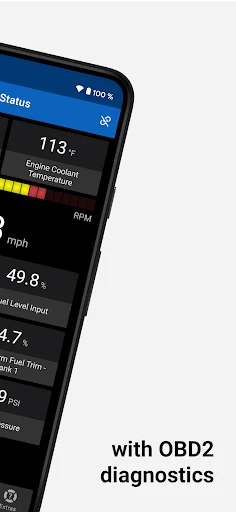
OBD Auto Doctor serves as a comprehensive vehicle diagnostics interface. Its primary function is to read, clear, and monitor Diagnostic Trouble Codes (DTCs) from a vehicle's Engine Control Unit (ECU) and other systems. Beyond code scanning, the app displays real-time sensor data, allowing users to view parameters like engine RPM, coolant temperature, vehicle speed, fuel pressure, and oxygen sensor voltages in customizable dashboards or graph formats. It supports advanced functions such as freeze frame data review, which captures vehicle conditions at the moment a fault occurs, and readiness monitors status checks for emissions testing. The app can also perform active tests on certain components and log data over time for detailed analysis. Its intuitive design organizes complex information into clear menus, making essential functions easily accessible for both quick checks and in-depth diagnostics.
Chapter 2: Value
The value proposition of OBD Auto Doctor lies in its potent combination of professional capability, cost-effectiveness, and user empowerment. Unlike basic code readers, it offers deep, granular access to live data streams and advanced diagnostic functions typically found in expensive shop-grade scanners, but at a fraction of the cost. Its key advantages are multifaceted. First, it promotes proactive vehicle maintenance by enabling users to monitor their car's vital signs and address minor issues before they escalate into major repairs, potentially saving significant money. Second, it demystifies car troubles; instead of relying solely on a mechanic's interpretation, users can see the raw data and trouble codes themselves, leading to more informed discussions and decisions. Third, its portability and logging capabilities are invaluable for diagnosing intermittent problems that may not appear during a short garage visit. Users can record data while driving to capture elusive faults. Furthermore, the app supports a vast array of vehicle makes and models from 1996 onward, covering standard OBD2 protocols and many manufacturer-specific codes. This universality makes it a versatile, long-term tool for any car owner. Ultimately, it shifts control and knowledge to the user, transforming a smartphone into a powerful instrument for vehicle stewardship and financial savings.
Chapter 3: Scenarios
OBD Auto Doctor is ideally suited for several key user groups and everyday situations. The primary audience is the DIY car enthusiast or home mechanic who prefers to perform basic maintenance and troubleshooting. For them, the app is essential when a check engine light illuminates, allowing them to read the code, research the issue, and decide if it's a simple fix like a loose gas cap or requires professional attention. Another significant user group is used car buyers; the app can be used during a pre-purchase inspection to scan for hidden fault codes or verify the status of emissions readiness monitors. Everyday drivers find value in monitoring real-time fuel efficiency data to adopt more economical driving habits. For those experiencing specific problems—such as rough idling, stalling, or poor performance—the data logging feature helps pinpoint the cause by recording sensor readings during a drive. Even professional mechanics may use it as a convenient supplemental tool for quick scans or for its excellent data visualization and logging features. Common scenarios include clearing an airbag light after seat sensor repair, resetting an oil change reminder, diagnosing an elusive intermittent electrical fault, or simply satisfying curiosity about what a car's computer is reporting during daily commutes or long trips.
Uninstall Instructions
For step-by-step guidance on how to safely remove this application from your device, please refer to our 《Uninstall Instructions》 document.
Pros
- live data graphing for pinpointing intermittent engine issues
- reads manufacturer-specific codes beyond generic OBD2 PIDs
- permanent DTC clearing after confirming a successful repair
- works offline for diagnostics in areas with poor connectivity
- custom dashboard allows monitoring of specific vehicle parameters
Cons
- advanced features require a paid pro version upgrade
- interface complexity may overwhelm casual home mechanics
- performance varies with the quality of the ELM327 adapter used
- no built-in repair database or suggested fixes for codes
- real-time graphing can drain smartphone battery quickly
Frequently Asked Questions
What is OBD Auto Doctor and what does it do?
OBD Auto Doctor is a professional automotive diagnostic app that works as an OBD2 scanner. It connects to your car's OBD2 port via a compatible Bluetooth or Wi-Fi adapter. Its core function is to read diagnostic trouble codes (DTCs), clear check engine lights, and display real-time sensor data like RPM, speed, and coolant temperature. It helps users monitor vehicle health and identify potential issues.
Is the app free to use or are there in-app purchases?
The app itself is free to download and install. It offers basic OBD2 scanning features like reading and clearing codes. However, advanced features such as advanced diagnostics, full sensor data logging, and vehicle-specific repair information require a one-time Pro upgrade purchase within the app. The app does not have subscription fees, but you must purchase a compatible OBD2 adapter separately.
What devices and car models is this app compatible with?
OBD Auto Doctor requires a compatible OBD2 Bluetooth or Wi-Fi adapter (not included) to connect to your vehicle. The mobile app is available for Android and iOS devices. It supports cars, light trucks, and SUVs manufactured after 1996 in the US and after 2001 in Europe that are equipped with a standard OBD2 port. Compatibility for specific advanced features varies by vehicle make and model.
How accurate is the real-time data and diagnostics?
The app displays data directly read from your vehicle's Engine Control Unit (ECU) via the standardized OBD2 protocol. Therefore, the accuracy of real-time parameters (e.g., fuel trim, oxygen sensor voltage) depends on your vehicle's sensors and ECU. While it provides professional-grade data access, it is a diagnostic tool, not a mechanic. Interpreting complex codes or data may require technical knowledge.
Can I use this app to permanently fix my car's problems?
No. OBD Auto Doctor is a diagnostic and information tool designed to help you read trouble codes and monitor data. Clearing a check engine light only resets the warning; it does not repair the underlying mechanical or electrical fault. The app can help identify issues, but actual repairs should be performed by a qualified technician based on a comprehensive diagnosis.
App Info
Technical Info
Recommended For You

Face scan - How old do I look
Beauty

Duo Call - Dual Global Calling
Communication

Shonen Jump Manga & Comics
Comics

Sketchbook
Art & Design

Wear OS by Google Smartwatch
Communication

Tracer (Donation Package)
Art & Design

Phone Call App & WiFi Call Any
Communication

NIV Bible version, Offline app
Books & Reference

iVerify Basic
Business

Quran Majeed – القران الكريم
Books & Reference

Carista OBD2
Auto & Vehicles

WebNovel
Books & Reference

Leonardo.Ai - Image Generator
Art & Design

ReadEra Premium – ebook reader
Books & Reference

Beauty Plus Princess Camera
Beauty

Zebra Comics: Webtoons & Manga
Comics

Men's Hair Cuts & Hairstyles
Beauty

EPUB Reader for all books
Books & Reference

Orbot: Tor for Android
Communication

CEFCO Rewards
Auto & Vehicles