
Paycor Mobile
Screenshots


Description
About Paycor Mobile Features – Streamlining Workforce Management on the Go
Paycor Mobile is a dedicated mobile application designed to empower employees and managers with direct access to their human capital management (HCM) systems. Developed by Paycor, a leading provider of HR software, this app transforms smartphones into portable hubs for essential workforce tasks. It bridges the gap between the administrative backend and the daily needs of the modern workforce, offering a secure and intuitive platform for handling payroll, schedules, time tracking, and HR-related information from anywhere, at any time.
Chapter 1: Function
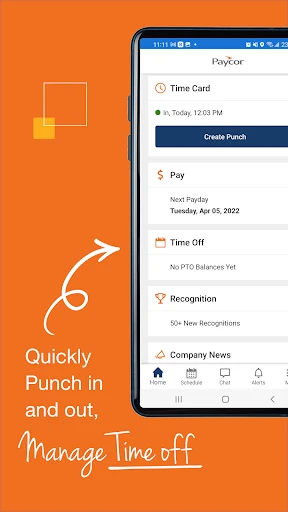
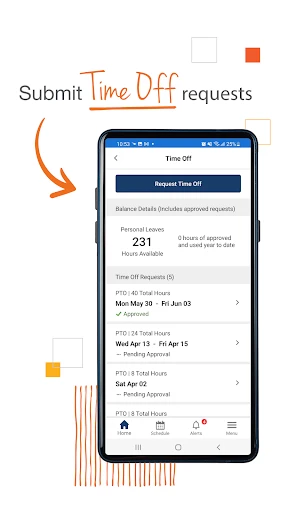
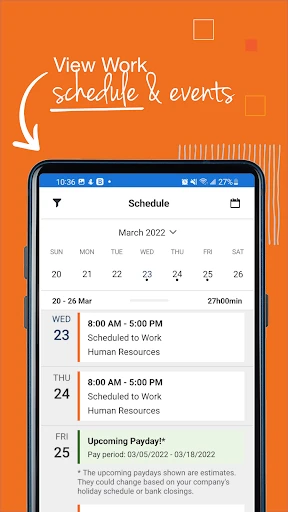
Paycor Mobile consolidates core workforce management functions into a user-friendly mobile interface. For employees, the app serves as a personal dashboard to view and manage pay stubs, access tax documents like W-2s, and monitor earnings and deductions in real-time. A central feature is its time and attendance capability, allowing users to clock in and out, review timesheets, and submit time-off requests directly from their devices. For managers, the app provides tools to approve employee timecards, manage schedules, and review team attendance. It also facilitates basic HR tasks, enabling employees to update personal information and view company directories. Essentially, it acts as a streamlined extension of Paycor's comprehensive HCM platform, putting critical day-to-day operational functions literally in the palm of the user's hand.
Chapter 2: Value
The primary value proposition of Paycor Mobile lies in its dual empowerment of both the workforce and management through enhanced accessibility, efficiency, and transparency. For employees, it offers unprecedented convenience and self-service autonomy. Gone are the days of waiting for paper stubs or needing a desktop to request time off; financial and schedule information is instantly accessible, fostering greater financial awareness and work-life balance. For managers and business owners, the app drives operational efficiency by accelerating the approval workflow for timekeeping and time-off, reducing administrative bottlenecks and potential payroll errors. This real-time management capability ensures more accurate labor data and compliance. The app's secure, centralized platform also enhances data accuracy and reduces the administrative burden on HR departments by deflecting routine inquiries. By digitizing and mobilizing these essential processes, Paycor Mobile helps organizations modernize their HR operations, improve employee satisfaction through easy-to-use tools, and ultimately save valuable time and resources across the entire organization, contributing to a more engaged and productive workplace.
Chapter 3: Scenarios
Paycor Mobile is ideally suited for two primary user groups within organizations that utilize Paycor's HCM platform: hourly and salaried employees, and their managers. For frontline hourly workers in industries like retail, hospitality, or healthcare, the app is indispensable. A nurse can clock in from a hospital ward, a retail associate can swap shifts while commuting, and a restaurant server can check their tip earnings after a shift. For remote or field-based employees, it provides a reliable way to log work hours and stay connected to HR resources without visiting an office. Managers, from shift supervisors to small business owners, benefit significantly. A restaurant manager can approve time-off requests between service rushes, a construction foreman can verify crew hours from the job site, and a retail store manager can adjust schedules in response to daily staffing needs. The app seamlessly integrates into daily routines, supporting scenarios where quick action, immediate information access, and mobility are critical, thereby serving as a vital tool for the dynamic, on-the-go nature of modern work.
Uninstall Instructions
For step-by-step guidance on how to safely remove this application from your device, please refer to our 《Uninstall Instructions》 document.
Pros
- real-time access to pay stubs and tax forms on mobile
- biometric login streamlines secure clock-in/out
- personalized alerts for schedule changes and approvals
- offline mode for viewing key documents without signal
- integrates with company-specific payroll and HR policies
Cons
- requires employer enrollment in Paycor's HR platform
- limited functionality for complex scheduling requests
- notification settings are managed by employer admin
- no direct chat or communication with HR representatives
- interface varies significantly by employer's customization
Frequently Asked Questions
What is Paycor Mobile and what does it do?
Paycor Mobile is an employee self-service app for workforce management. It allows employees to access their work-related information, including viewing pay stubs, managing time-off requests, checking work schedules, and updating personal details. The app serves as a mobile portal for company HR and payroll services provided by Paycor.
Is Paycor Mobile free to use for employees?
Yes, Paycor Mobile is free for employees to download and use. There are no subscription fees or in-app purchases for the standard employee features. Access requires valid login credentials provided by your employer, who contracts with Paycor for HR and payroll services. The app itself does not charge individual users.
What devices and systems are compatible with Paycor Mobile?
Paycor Mobile is available for iOS and Android devices. You can download it from the Apple App Store for iPhones/iPads running supported iOS versions or from the Google Play Store for Android smartphones and tablets. Specific version requirements are listed on the respective app store pages.
How do I view my pay stubs and tax documents in the app?
After logging in, navigate to the 'Pay' or 'My Money' section. Your current and historical pay stubs are listed there for viewing and download. Tax documents like W-2s are typically found in a 'Tax' or 'Documents' section within the app when they are issued by your employer. You can export or print these PDF documents.
What should I do if I forget my login password?
Use the 'Forgot Password' link on the app's login screen. You will need to verify your identity, often via email or security questions linked to your Paycor account. For login issues not resolved through self-service, you must contact your company's HR or payroll administrator, as they manage employee account access within the Paycor system.
App Info
Technical Info
Recommended For You

Merlin Bird ID by Cornell Lab
Books & Reference

AnExplorer Pro File Transfer
Business

AAWireless for Android Auto™
Auto & Vehicles

CarMax: Used Cars for Sale
Auto & Vehicles

Beauty Plus Princess Camera
Beauty

Etsy Seller: Manage Your Shop
Business

Battle Royale Chapter5 Season2
Books & Reference

Calibre Sync
Books & Reference

Cloned Voices
Comics

CarLink: MirrorLink & Car Play
Auto & Vehicles

Remodel AI - Home Renovation
Art & Design

TurboScan™ Pro: PDF scanner
Business

CamToPlan
Business

DMV Practice Test Pro 2024
Auto & Vehicles

Bible Homescreen - Read Now
Books & Reference

FIXD OBD2 Scanner
Auto & Vehicles

SmartWatch & BT Sync Watch App
Communication

Blink Charging Mobile App
Auto & Vehicles

FantacyStory: novels, fictions
Books & Reference

Cat Maker: Cat Emoji Sticker
Art & Design