
Stripe Dashboard
Screenshots



Description
About Stripe Dashboard Feature – Overview
The Stripe Dashboard is the central command center for businesses using Stripe's financial infrastructure. It is a comprehensive web-based interface that provides merchants, developers, and business owners with real-time visibility and control over their payments, revenue, and customer data. As the primary access point to the Stripe ecosystem, the dashboard consolidates complex financial operations into an intuitive and secure platform. It enables users to monitor transactions, manage subscriptions, analyze business performance, and configure advanced payment features without requiring deep technical expertise. Designed for scalability, it serves startups and enterprises alike, transforming raw financial data into actionable insights and streamlining the entire revenue operations workflow.
Chapter 1: Function
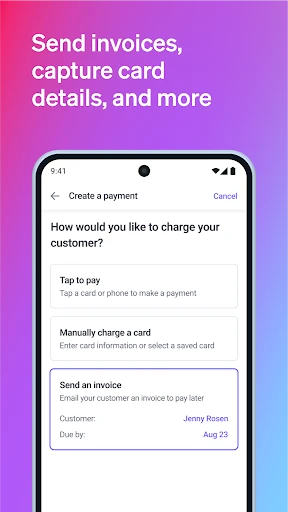
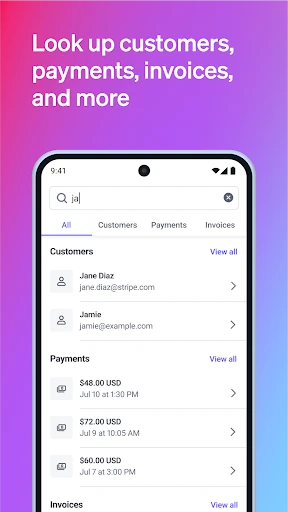
The Stripe Dashboard delivers a robust suite of core functions essential for managing online financial operations. Primarily, it serves as a real-time transaction ledger, allowing users to view, search, and filter every payment, refund, and transfer. Users can issue refunds and handle disputes directly from the interface. For subscription-based businesses, the dashboard provides full lifecycle management for recurring revenue, including plan creation, customer billing portal configuration, and monitoring subscription statuses. It also functions as a developer hub for managing API keys, webhook endpoints, and testing configurations in Stripe's test mode. Furthermore, it facilitates payout tracking, showing the status and composition of scheduled bank transfers. Finally, it offers integrated tools for managing customer profiles, payment methods, and invoicing, creating a unified operational view.
Chapter 2: Value
The Stripe Dashboard's primary value proposition lies in its ability to demystify and centralize complex financial operations, saving businesses significant time and reducing operational risk. Its key advantage is the consolidation of disparate data—payments, subscriptions, customers, and reporting—into a single, coherent interface, eliminating the need to switch between multiple systems. This integration provides unparalleled real-time visibility into cash flow and business health. The dashboard turns raw data into actionable intelligence through customizable reports and analytics, helping businesses identify trends and make data-driven decisions. Its security and reliability are enterprise-grade, offering peace of mind with features like detailed audit logs and granular user permission controls. For developers, the seamless integration between the dashboard's configuration tools and Stripe's powerful APIs accelerates implementation and troubleshooting. Ultimately, it scales effortlessly with a business, from handling the first payment to managing millions of transactions, without compromising on performance or usability. The intuitive design reduces the learning curve, allowing finance, support, and executive teams to find the information they need quickly, thereby increasing overall organizational efficiency and focusing resources on growth rather than administrative overhead.
Chapter 3: Scenarios
The Stripe Dashboard is indispensable for a wide range of users and daily scenarios. Firstly, it is the daily workspace for founders and business operators of online SaaS companies and e-commerce stores. They use it to monitor daily revenue, track key metrics like monthly recurring revenue (MRR) and churn, and manage customer subscriptions and invoices. Secondly, finance and operations teams rely on it for reconciliation, generating financial reports, and overseeing the payout process to their bank accounts. In a common support scenario, a customer service representative accesses the dashboard to quickly locate a customer's payment history and process a refund, resolving issues within minutes. Developers and system administrators use it extensively during integration and maintenance phases to review API event logs, configure webhooks, and manage authentication keys. Additionally, entrepreneurs launching a new product use the dashboard's test mode to simulate payments and perfect their checkout flow before going live. For growing businesses, the dashboard's analytics are consulted in weekly strategy meetings to assess the performance of different product lines or marketing campaigns based on real-time revenue data.
Uninstall Instructions
For step-by-step guidance on how to safely remove this application from your device, please refer to our 《Uninstall Instructions》 document.
Pros
- real-time revenue graphs with granular filtering options
- unified view for payments
- subscriptions
- and invoices
- automated fraud detection via machine learning models
- instant access to detailed payout reconciliation data
- configurable live-mode and test-mode environment toggling
Cons
- steep learning curve for advanced reporting features
- no built-in bulk edit for disputed transactions
- api-heavy workflows can slow down manual operations
- limited customization for dashboard alert thresholds
- requires stable internet for real-time data synchronization
Frequently Asked Questions
What is Stripe Dashboard and what is it used for?
Stripe Dashboard is a web-based business management platform designed for online merchants. Its core function is to provide a centralized interface for managing payments, tracking revenue, analyzing customer data, and handling business operations like issuing refunds or managing disputes. It serves as the primary control panel for businesses that use Stripe to accept payments online, in apps, or in person.
Is Stripe Dashboard free to use, and what are the costs?
Access to the Stripe Dashboard itself is free. However, you incur fees on successful transactions processed through Stripe. The pricing is pay-as-you-go, with standard rates per transaction (e.g., 2.9% + $0.30 for online card payments in the US). There are no monthly fees or charges solely for using the dashboard interface to manage your account. Detailed pricing for different products and countries is available on Stripe's website.
What devices and systems are compatible with Stripe Dashboard?
Stripe Dashboard is a responsive web application accessible from any modern desktop or mobile web browser (like Chrome, Safari, or Firefox) on systems including Windows, macOS, iOS, and Android. No dedicated mobile app download is required. It is designed for business administrators and requires an internet connection and a Stripe account to log in.
How does Stripe Dashboard handle security and data privacy?
Stripe Dashboard is built on Stripe's PCI DSS Level 1 certified infrastructure, the highest standard in the payments industry. All sensitive data is encrypted. Access is controlled via secure login, and you can enable two-factor authentication. Stripe acts as a data processor under regulations like GDPR, and the dashboard provides tools to manage customer data requests. Detailed security information is available in Stripe's documentation.
Where can I get support for issues with the Dashboard?
Support is primarily provided through Stripe's comprehensive online documentation, API references, and community forums. For direct assistance, you can contact Stripe Support via email or chat directly from within the Dashboard's help section. The availability of dedicated support channels (like phone) may depend on your account type and region. There is no information about traditional in-person or hardware maintenance.
App Info
Technical Info
Recommended For You

Learn Drawing
Art & Design

Shopify - Your Ecommerce Store
Business

ReadEra – book reader pdf epub
Books & Reference

Receipt Scanner: Easy Expense
Business

Boat Trader
Auto & Vehicles

Lalatoon - Comics & Webtoon
Comics

Draw Anime: AR Drawing Sketch
Art & Design

Animic AI: Anime Generator
Art & Design

CosmoProf Beauty
Beauty

Remodel AI - Home Renovation
Art & Design

Hangouts
Communication

FPL
Business

Mirror - Makeup and Shaving
Beauty

Tapas – Comics and Novels
Comics

Driver Pulse by Tenstreet
Business

Sephora: Buy Makeup & Skincare
Beauty

Typology Paris - Skincare
Beauty

Booksy for Customers
Beauty

Clay Box
Art & Design

Taximeter
Auto & Vehicles