
My Verizon For Business
Screenshots
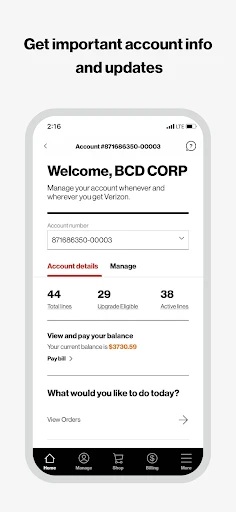

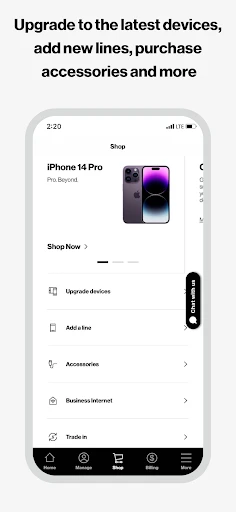

Description
About My Verizon For Business Feature – Streamlining Business Communications and Management
My Verizon For Business is a dedicated mobile application designed to empower business customers of Verizon with centralized control over their telecommunications services. It serves as a comprehensive digital portal, allowing administrators and employees to manage wireless accounts, devices, and expenses from a single, secure platform. The app bridges the gap between complex business telecom needs and efficient, on-the-go management, providing real-time insights and tools tailored for the dynamic requirements of modern enterprises, from small businesses to large organizations.
Chapter 1: Function
The core functionality of My Verizon For Business revolves around account management and operational oversight. Users can view and pay bills, monitor data usage across all lines in near real-time, and receive detailed usage alerts to avoid overages. The app facilitates device management, enabling users to activate new lines, upgrade devices, and troubleshoot common issues directly. It provides access to business-specific support, including live chat and dedicated phone numbers. Furthermore, administrators can manage user permissions, review plan details, and analyze spending trends. The app also integrates service management, allowing users to schedule technician appointments, track outages, and manage other Verizon services like Fios for Business, consolidating multiple business tools into one accessible interface.
Chapter 2: Value
The primary value proposition of My Verizon For Business lies in its ability to enhance operational efficiency and provide financial clarity for businesses. By consolidating management tasks into a single application, it significantly reduces the time and complexity traditionally associated with handling business telecom accounts. A key advantage is the real-time visibility into data usage and spending, which empowers businesses to make informed decisions, optimize their plans, and control costs proactively, preventing bill shock. The app's robust administrative controls allow for secure delegation of tasks, ensuring that employees have the access they need while maintaining overall account security and policy compliance. Its dedicated business support channel ensures that issues are resolved with an understanding of commercial priorities, minimizing potential downtime. For businesses utilizing multiple Verizon services, the unified view simplifies oversight, turning telecom management from a fragmented chore into a streamlined, strategic function. This centralized, insightful, and responsive tool ultimately supports business continuity and agility, allowing teams to focus on core operations rather than administrative overhead.
Chapter 3: Scenarios
My Verizon For Business is ideally suited for a range of professional users and everyday situations. The primary target groups include small to medium business owners, IT administrators, office managers, and finance personnel responsible for overseeing company communications and expenses. For a business owner, the app is invaluable for quickly approving a new mobile line for a hire or checking the monthly bill during a financial review. An IT manager might use it to diagnose a connectivity issue for a remote employee or to monitor collective data usage before a busy quarter to ensure the plan remains adequate. Office administrators can efficiently handle device upgrades for the team or submit a support ticket for a malfunctioning business internet line without lengthy phone calls. In daily use, scenarios include receiving and heeding a data usage alert to avoid throttling, instantly downloading an invoice for accounting reconciliation, or using the in-app chat to resolve a billing query while commuting. It effectively serves any business stakeholder who requires immediate, mobile access to manage and optimize the company's Verizon services.
Uninstall Instructions
For step-by-step guidance on how to safely remove this application from your device, please refer to our 《Uninstall Instructions》 document.
Pros
- centralized dashboard for multi-line business account management
- real-time data usage alerts per device to prevent overages
- one-click integration with Verizon's business support services
- streamlines complex billing for multiple business plans
- dedicated business-grade network status and outage info
Cons
- requires a Verizon Business account for full access
- interface can be overwhelming for small teams initially
- advanced features like API integration need technical setup
- limited third-party tool compatibility compared to general platforms
- real-time alerts depend on Verizon's network reporting latency
Frequently Asked Questions
What is My Verizon For Business app?
My Verizon For Business is a mobile application designed for business customers of Verizon. Its core function is to provide centralized management of your business wireless account, services, and devices. You can view usage, pay bills, manage plans, add or remove lines, and get support. It is positioned as a self-service portal for administrators and employees on Verizon business plans.
Is the My Verizon For Business app free to use?
Yes, the My Verizon For Business application is free to download and use. However, it requires an active Verizon Wireless business account to access its features. There are no in-app purchases for the core management functions. All charges are related to your Verizon service plan, devices, and add-ons, which are managed through the app.
What devices and systems does this app support?
The My Verizon For Business app is available for both iOS and Android devices. It can be downloaded from the Apple App Store and Google Play Store. It is optimized for smartphones and tablets. The app requires a compatible device running a recent version of the operating system (specific version requirements are listed on the app store pages) and an active internet connection.
How do I pay my business bill in the app?
To pay your bill, log in, navigate to the 'Billing' section, and select 'Make a Payment'. You can pay using a saved payment method or add a new one. The app supports one-time payments and allows you to set up Auto Pay. You can also view current and past bills, analyze charges, and download PDF invoices. Payment processing is secure and typically reflects in your account immediately.
Can I manage employee lines and data usage with this app?
Yes, account administrators can manage employee lines directly within the app. You can view data usage per line, upgrade or change service plans, activate new devices, and suspend lines if needed. The app provides tools to set data usage alerts and monitor overall account activity. For complex changes or specific enterprise-level features, contacting Verizon business support through the app is recommended.
App Info
Technical Info
Recommended For You

imo video calls and chat HD
Communication

Invoice2go: Easy Invoice Maker
Business

DMV Practice Test Pro 2024
Auto & Vehicles

MANGA Plus by SHUEISHA
Comics

AlfaOBD
Auto & Vehicles

Outlined Watch Face
Art & Design

Fresha for business
Beauty

PERFUMIST Perfumes Advisor
Beauty

Hairstyles for short hair
Beauty

ComiQuest - Comic Reader
Comics

Rain Instant Pay
Business

Chumba Casino Real Money ayuda
Comics

Phone Mirror app - True Mirror
Beauty

Tarteel ترتيل - Memorize Quran
Books & Reference

Fashion Design Sketches Book
Art & Design

DaVinci - AI Image Generator
Art & Design

Whova - Event & Conference App
Business

Passport Photo: ID Photo Print
Art & Design

Duo Mobile
Business

Floor Plan Creator
Art & Design