
OBDeleven VAG car diagnostics
Screenshots



Description
About OBDeleven VAG Car Diagnostics Feature
OBDeleven is a professional-grade diagnostic and coding tool designed specifically for vehicles within the Volkswagen Audi Group (VAG) family. It transforms a standard smartphone or tablet into a powerful vehicle interface, enabling users to perform deep diagnostics, read and clear fault codes, access real-time data, and customize hidden features in their cars. By bridging the gap between advanced garage tools and enthusiast accessibility, it empowers VAG vehicle owners with unprecedented control and insight into their vehicle's electronic systems.
Chapter 1: Function
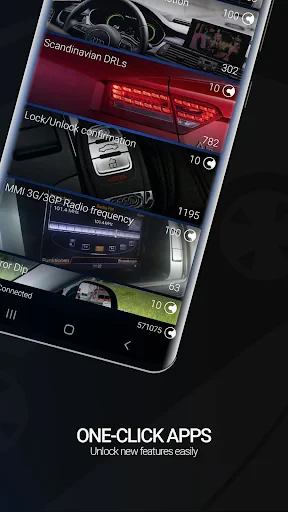
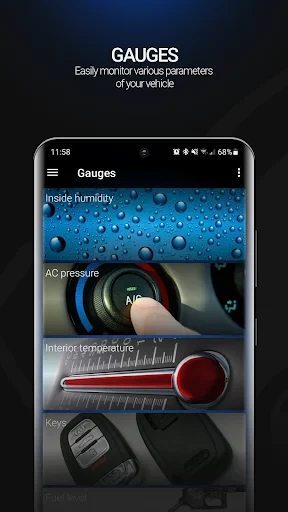
OBDeleven's core functionality revolves around its hardware dongle and companion mobile application. The device plugs into the vehicle's OBD-II port, establishing a secure connection to the car's various control units (ECUs). Through the app, users can perform comprehensive health scans to read diagnostic trouble codes (DTCs) and access detailed descriptions for troubleshooting. Beyond diagnostics, the app provides live data streaming, allowing monitoring of sensor values like engine temperature and fuel pressure in real-time. A standout feature is its one-click 'Apps' for coding and adaptation, which let users easily activate or deactivate specific vehicle functions—such as enabling needle sweeps on the instrument cluster or adjusting convenience features—without requiring advanced technical knowledge of hexadecimal coding.
Chapter 2: Value
The primary value proposition of OBDeleven lies in its potent combination of professional capability, cost-effectiveness, and user-friendly design. For a fraction of the cost of traditional professional diagnostic tools, it delivers extensive access to VAG-specific systems, rivaling the functionality of more expensive alternatives. Its key advantages are multifaceted. First, it offers deep vehicle integration, supporting long-coding and adaptations across a wide range of VAG models, providing genuine customization power. Second, the intuitive mobile interface, particularly the curated one-click apps, demystifies complex coding processes, making advanced vehicle personalization accessible to non-experts. Third, it serves as a powerful diagnostic aid, not only identifying problems but also providing clear explanations and potential solutions, which can save significant time and money on mechanic visits. Finally, the tool fosters a proactive ownership experience, allowing users to monitor vehicle health, log data, and perform resets, thereby enhancing both understanding and maintenance of the vehicle. This blend of empowerment, savings, and convenience solidifies its value for any engaged VAG owner.
Chapter 3: Scenarios
OBDeleven primarily targets VAG vehicle owners who possess an interest in understanding, maintaining, or personalizing their cars. The first key user group is the DIY enthusiast and car hobbyist who enjoys performing their own maintenance, troubleshooting check engine lights, or customizing vehicle features to suit personal preference. The second group includes more technically inclined owners seeking professional-level diagnostics to verify issues before a garage visit or to reset service indicators after independent maintenance. Everyday use cases are diverse. A user might employ the app to diagnose an intermittent warning light, clear an airbag fault code after seat sensor repair, or monitor fuel trims to assess engine performance. For customization, common scenarios include activating features like rear LED taillight animations, enabling automatic mirror folding on lock, or customizing the infotainment system's startup logo. It is also invaluable for pre-purchase inspections of used VAG cars, providing a detailed health report. Essentially, OBDeleven finds its place in the glovebox of any VAG owner who values self-reliance, customization, and a deeper connection with their vehicle's technology.
Uninstall Instructions
For step-by-step guidance on how to safely remove this application from your device, please refer to our 《Uninstall Instructions》 document.
Pros
- one-touch coding for VAG cars via smartphone
- real-time vehicle data logging and graphing
- access to long-coding helper for advanced tweaks
- extensive pre-made 'apps' for specific functions
- bluetooth connectivity works without extra cables
Cons
- requires in-app credit purchases for many functions
- advanced diagnostics need a paid 'pro' subscription
- bluetooth adapter drains car battery if left plugged
- limited to Volkswagen
- Audi
- Skoda
- Seat vehicles
- real-time data streaming can have slight latency
Frequently Asked Questions
What is OBDeleven and what core functions does it provide?
OBDeleven is a professional diagnostic and coding tool specifically designed for Volkswagen Group (VAG) vehicles. Its core functions include reading and clearing fault codes, viewing live data from vehicle control units, performing basic adaptations and service resets, and enabling/disabling various features via coding and adaptations. It transforms a compatible smartphone or tablet into a powerful diagnostic scanner for cars from brands like Audi, Volkswagen, Škoda, and Seat.
Is OBDeleven free to use or does it require purchases?
The OBDeleven app itself is free to download. However, full functionality requires the purchase of a physical Bluetooth OBD2 adapter (NextGen Pro) to connect to your vehicle. The app operates on a credit-based system for advanced coding and adaptations; a starter pack usually includes initial credits. For unlimited access to most features, a paid annual or lifetime 'Ultimate' subscription is available, which is the primary in-app purchase model.
Which car models and devices is OBDeleven compatible with?
OBDeleven is compatible with most Volkswagen Group vehicles from approximately 1996 onward, supporting brands like Audi, VW, Škoda, Seat, and Porsche. The app requires a smartphone or tablet running Android 5.0+ or iOS 11.0+ with Bluetooth 4.0+. The hardware connection requires the official OBDeleven NextGen Pro Bluetooth adapter. Full feature availability varies by specific vehicle model, year, and electronic architecture.
How does OBDeleven differ from generic OBD2 scanners?
Unlike generic OBD2 tools that only read generic engine codes, OBDeleven provides deep, brand-specific access to all control units in VAG vehicles (e.g., infotainment, lighting, comfort systems). Its unique feature is 'One-Click Apps,' which allow users to enable/disable specific features (like needle sweep or video-in-motion) with a single tap, simplifying complex coding processes typically reserved for professional dealership tools.
What should I do if the device fails to connect to my car?
First, ensure your car ignition is on (or engine running), the OBDeleven adapter is firmly plugged into the OBD2 port, and your phone's Bluetooth is enabled. Restart the app and your phone. Check the official website or support section for compatibility with your specific car model. If problems persist, contact OBDeleven official support via their website. They provide troubleshooting guides but do not offer phone support. The adapter has a limited warranty as per the retailer's policy.
App Info
Technical Info
Recommended For You

Kiwi Browser - Fast & Quiet
Communication

Flowbird Parking
Auto & Vehicles

UC Browser-Safe, Fast, Private
Communication

Asana: Where work connects
Business

CarMax: Used Cars for Sale
Auto & Vehicles

Opera Mini: Fast Web Browser
Communication

Pixelcut AI Photo Editor
Art & Design

Draw Anime: AR Drawing Sketch
Art & Design

FX File Explorer: Plus License
Business

Workday
Business

CaptionCall
Communication

Resume Builder - CV Maker
Business

GigU
Auto & Vehicles

UKG Ready
Business

Marathon ARCO Rewards
Auto & Vehicles

Sketchbook Lite - Artbook
Art & Design

AI Art Generator: Photo, Draw
Art & Design

Hushed: US Second Phone Number
Communication

IPSY: Personalized Beauty
Beauty

Beauty Make Up Photo Editor
Beauty