
Desygner: Graphic Design Maker
Screenshots


Description
About Desygner: Graphic Design Maker Feature
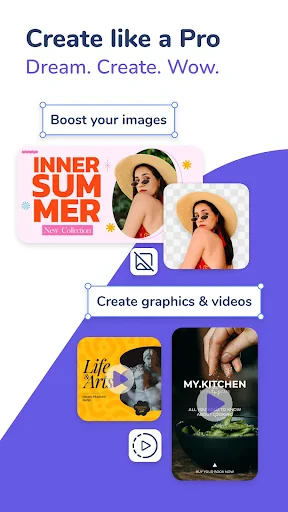
Desygner is a versatile graphic design application tailored for users seeking to create professional-quality visual content without the complexity of advanced design software. It operates seamlessly across web and mobile platforms, offering a user-friendly interface that simplifies the design process. The app provides an extensive library of pre-designed templates, customizable elements, and integrated access to stock assets, enabling users to efficiently produce a wide array of materials such as social media graphics, marketing collateral, presentations, and personal projects. Desygner distinguishes itself by emphasizing real-time collaboration and brand kit management, making it a practical tool for both individual creators and teams aiming to maintain visual consistency and streamline their design workflows.
Chapter 1: Function
Desygner's core functionality centers on an intuitive, drag-and-drop design editor that empowers users to create visuals quickly. Users can start from a vast collection of professionally designed templates categorized by use case—social media posts, flyers, logos, brochures, and more. The editor allows for deep customization of every element: text, images, shapes, and backgrounds. Key functional features include the ability to upload personal fonts and logos, apply filters and effects to photos, and utilize a built-in photo editor for basic adjustments. Furthermore, the app supports multi-page document creation, essential for items like presentations or reports. A significant functional pillar is the Brand Kit, where users can save brand colors, fonts, and logos for consistent application across all designs. The platform also facilitates direct publishing or sharing, with options to download designs in various formats including PNG, JPG, and PDF.
Chapter 2: Value
The primary value proposition of Desygner lies in its ability to democratize professional graphic design, saving users significant time and resources. Its major advantage is accessibility; it requires no prior design expertise, lowering the barrier to entry for small business owners, marketers, educators, and content creators. The app delivers substantial value through efficiency. The pre-sized templates for all major social media platforms eliminate guesswork, while the extensive asset library, including millions of free photos and icons, reduces the need for external resources. The collaborative features add team value, allowing multiple users to edit, comment, and approve designs in real-time, which accelerates project timelines and improves communication. For organizations, the Brand Kit feature is invaluable for enforcing brand identity, ensuring all produced materials are on-brand, which enhances professional credibility. Unlike some competitors, Desygner offers a robust free tier, and its premium plans are cost-effective, providing advanced features like background removal, premium templates, and high-resolution exports without the subscription cost of high-end professional software. This combination of ease-of-use, collaboration, brand management, and affordability positions Desygner as a comprehensive and practical solution for everyday design needs.
Chapter 3: Scenarios
Desygner's primary target users encompass small to medium business owners, marketing professionals, social media managers, educators, nonprofit organizers, and individual content creators. For a small business owner, a typical scenario involves quickly designing daily promotional posts for Facebook and Instagram, creating a consistent menu update, or producing a flyer for a local event—all while maintaining brand colors and logo placement. A social media manager at a startup might use the app's collaboration features to draft a campaign's visual assets, share them with team members for feedback, and make revisions in real-time before scheduling posts. Educators find value in creating engaging classroom posters, presentation slides, and certificates with ease. Nonprofit organizers utilize the tool to design fundraising event invitations and impact report infographics without hiring a designer. Furthermore, individuals planning personal events like weddings or birthday parties use Desygner to craft custom invitations, photo collages, and thank-you cards. In all these scenarios, the common thread is the need for speed, simplicity, visual consistency, and professional output without the overhead of complex software or large budgets.
Uninstall Instructions
For step-by-step guidance on how to safely remove this application from your device, please refer to our 《Uninstall Instructions》 document.
Pros
- one-tap resize adapts designs for all social platforms
- brand kit auto-applies logos
- fonts
- and colors
- offline editing works without internet connectivity
- real-time collaboration for team projects
- integrates with major stock photo and cloud services
Cons
- advanced template edits require premium subscription
- complex vector editing tools are limited
- large collaborative projects may experience sync delays
- brand kit feature is exclusive to higher-tier plans
- offline mode lacks access to cloud-based assets
Frequently Asked Questions
What is Desygner and what can I create with it?
Desygner is a graphic design application for creating visual content. Its core function is to provide templates and tools for designing social media graphics, marketing materials, presentations, posters, and basic videos. It positions itself as an accessible design maker for users without professional skills, offering a drag-and-drop editor, a library of stock photos and design assets, and brand kit features for consistent styling.
Is Desygner free to use, and what do paid plans offer?
Desygner operates on a freemium model. The free version offers access to core design tools, templates, and basic exports with watermarks. Paid subscriptions (like Pro or Team plans) remove watermarks, provide premium templates and assets, advanced editing features, higher-resolution exports, and team collaboration tools. In-app purchases for specific premium assets may also be available.
What devices and systems does Desygner support?
Desygner is a multi-platform application. It is available as a web app for use in desktop browsers and as a native mobile application for both iOS (iPhone/iPad) and Android devices. This allows users to start a project on one device and continue editing on another, provided they are logged into the same account. An internet connection is required for most functions.
How does Desygner's collaboration and brand kit feature work?
Desygner's collaboration feature allows team members to share, comment on, and edit designs in real-time. The brand kit function, typically in paid plans, enables users to upload and save company logos, fonts, and color palettes centrally. This ensures all team designs maintain consistent branding by automatically applying these predefined assets to new projects, streamlining the design process.
Can I use my own images and fonts in Desygner designs?
Yes, Desygner allows you to upload and use your own images, logos, and custom fonts. You can import media from your device's library, cloud storage services like Dropbox, or directly via a URL. For custom fonts, upload is generally supported in paid subscription plans. This feature is essential for creating fully customized designs that align with specific brand guidelines.
App Info
Technical Info
Recommended For You

Messenger - Texting App
Communication

Calls Blacklist PRO - Blocker
Communication

iScanner - PDF Scanner App
Business

FolderSync Pro
Communication

Package Tracker - pkge Mobile
Business

HerBible--Verses&Prayer
Books & Reference

Workday
Business

Calibre Sync
Books & Reference
CL Theme Card
Auto & Vehicles

UKG Ready
Business

Flowt Wear
Auto & Vehicles

TeamSpeak 3 - Voice Chat
Communication

Auto Sync for Android/Car Play
Auto & Vehicles

Firefox Focus: No Fuss Browser
Communication

Opera GX: Gaming Browser
Communication

Pi Browser
Communication

ReadEra – book reader pdf epub
Books & Reference

Men's Hair Cuts & Hairstyles
Beauty

Bible Study - Verse & Audio
Books & Reference

ArtistAI: AI Photo Generator
Art & Design