
Guide For Stardew
Screenshots


Description
About Guide For Stardew Valley Feature – Your Ultimate Farming Companion
Guide For Stardew Valley is a comprehensive companion application designed for players of the beloved farming simulation game, Stardew Valley. It serves as an all-in-one digital reference tool, meticulously organizing the game's vast amount of information—from crop schedules and fish locations to villager gifts and crafting recipes—into an easily searchable and intuitive format. The app streamlines the planning and management of in-game activities, empowering both new farmers and seasoned veterans to optimize their gameplay experience without constant external browsing. By centralizing critical data and offering strategic insights, it transforms complex game mechanics into approachable guidance, allowing players to focus on the joy of building their ideal farm and engaging with Pelican Town's charming community.
Chapter 1: Function
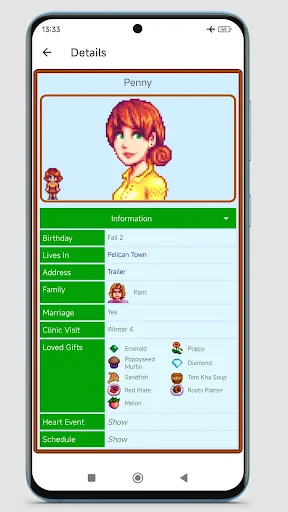
Guide For Stardew Valley operates as an extensive offline database and interactive planner for the game. Its core functions revolve around providing instant access to categorized information. Key features include a detailed catalog of all crops, listing their seasons, growth times, seed costs, and sale prices. It offers a complete fish and bug encyclopedia with location, time, and weather conditions for catching them. The app includes a social tracker for all villagers, detailing their loved and liked gifts, schedules, and heart events. Furthermore, it encompasses comprehensive sections for crafting recipes, cooking, artifacts, minerals, and community center bundles. A standout function is the interactive Community Center checklist, allowing users to track their progress in real-time. Additional utilities like a calendar for planning festivals and birthdays, and a profit calculator for comparing crop values, round out its robust functional suite, making it an indispensable toolkit for strategic farm management.
Chapter 2: Value
The primary value proposition of Guide For Stardew Valley lies in its ability to significantly enhance gameplay efficiency and depth without spoiling the sense of discovery. Its key advantage is the consolidation of fragmented information from multiple wikis and forums into a single, user-friendly, and ad-free interface, saving players considerable time and frustration. The app adds tangible value through intelligent organization and searchability, enabling quick answers to specific questions—like what gift to give Sebastian on a rainy day—which preserves gameplay immersion. Unlike a standard browser search, it offers curated, accurate, and game-version-specific data, ensuring reliability. The interactive checklists and planners provide proactive value, helping users set and achieve in-game goals systematically, from completing the Community Center in Year 1 to maximizing profit from ancient fruit wine. For a game as rich and complex as Stardew Valley, this app transforms overwhelming data into manageable, actionable knowledge. It empowers players to experiment with advanced strategies and explore content they might otherwise miss, thereby extending the game's longevity and enriching the overall experience. It is a tool that respects the player's time while deepening their engagement with the game's world.
Chapter 3: Scenarios
Guide For Stardew Valley primarily targets two user groups: new players seeking foundational guidance and experienced players pursuing optimization and completion. For beginners overwhelmed by the game's open-ended nature, the app acts as a gentle mentor. It helps them understand seasonal cycles, learn villager preferences to build relationships, and avoid common pitfalls like planting crops too late in the season. They use it daily to check what resources are needed for upcoming tool upgrades or which fish are available during their current play session. For veteran farmers, the app is a strategic command center. They utilize it for meticulous long-term planning, such as orchestrating a perfectly timed crop rotation for the greenhouse, min-maxing artisan goods production, or tracking down the last rare artifact for the museum. Completionists rely heavily on the bundle trackers and collection checklists to methodically achieve 100% perfection. In everyday use, a player might quickly open the app to confirm the best fishing spot for a midnight carp, plan the next day's farm chores and social visits, or look up the recipe for a rare crafting item like the Iridium Band before a mining expedition.
Uninstall Instructions
For step-by-step guidance on how to safely remove this application from your device, please refer to our 《Uninstall Instructions》 document.
Pros
- provides real-time in-game time and weather tracking
- offers interactive checklists for crops and villagers
- bundled bundle solver with visual item references
- works offline with a lightweight
- fast interface
- includes secret notes and rare event timelines
Cons
- no direct save file integration or syncing
- lacks community center progress tracking per save
- item data lacks mod or update customization options
- requires manual input for farm layout planning
- limited to one game version's content database
Frequently Asked Questions
What is Guide For Stardew and what does it do?
Guide For Stardew is a comprehensive companion app for the popular farming simulation game Stardew Valley. It provides detailed, searchable information on in-game items, characters, recipes, fish, artifacts, and farm planning. The app functions as an offline database, allowing players to quickly look up crop growth times, villager gift preferences, bundle requirements, and other game mechanics without leaving the game or searching online. It is designed to enhance the gameplay experience by serving as a quick reference tool.
Is Guide For Stardew free to use or does it have in-app purchases?
Guide For Stardew is typically offered as a free application. However, it may include optional in-app purchases. These purchases are generally for removing advertisements or for accessing premium features, such as advanced planning tools or exclusive content. The core reference functionality is usually available without any cost. For the most accurate and current information regarding its pricing model, please check the details listed on your device's official app store page before downloading.
On which devices and platforms is Guide For Stardew available?
Guide For Stardew is primarily available as a mobile application for both Android and iOS devices. It is designed for smartphones and tablets. The app is a standalone reference tool and does not connect directly to the Stardew Valley game itself, meaning it can be used regardless of whether you play on PC, console, or mobile. It is not typically available as a desktop application. Always verify compatibility with your specific device model and operating system version on the app store listing.
How does the farm planning feature work in this app?
The farm planning feature allows you to design and visualize your farm layout before implementing it in the actual game. You can select from different farm map types (Standard, Riverland, Forest, etc.) and then place buildings, crops, trees, and decorations on a grid. The tool helps you optimize space and plan crop rotations by showing growth cycles and seasonal limitations. It is a separate simulation and does not automatically transfer your plan to the game; you manually recreate the design in Stardew Valley based on your app blueprint.
Does the app's information update with new game content?
The developer of Guide For Stardew aims to update the app's database following major official updates to Stardew Valley, such as the addition of new items, characters, or features. However, update timing and completeness are not guaranteed and depend on the third-party developer's schedule. The app does not auto-update its content from the game; you must download new versions of the app from the store. For information on whether a specific game patch is supported, please check the app's version history or official developer notes.
App Info
Technical Info
Recommended For You

Al Quran MP3 Audio Offline App
Books & Reference

Wikipedia
Books & Reference

ThriftBooks: New & Used Books
Books & Reference

Signal Private Messenger
Communication

Coloring games: speed drawing
Art & Design

AI Logo Generator, Logo Maker
Art & Design

English-Myanmar Dictionary
Books & Reference

Vault - Hide Pics, App Lock
Business

Clip Studio Paint
Art & Design

Cover Hunter - 3v3 Team Battle
Comics

Inbox Homescreen
Communication

Motive Driver
Business

Remove Background From Video
Beauty

Burner: Second Phone Number
Communication

Galatea: Books & Audiobooks
Books & Reference

The Language of Letting Go
Books & Reference

Staffmark WorkNOW
Business

Microsoft Power BI
Business

AI Hairstyle Try On・Wigs・Bangs
Beauty

Easy Pose - 3D pose making app
Art & Design