
AI Logo Generator, Logo Maker
Screenshots




Description
About AI Logo Generator, Logo Maker Feature – Smart Design at Your Fingertips
AI Logo Generator, Logo Maker is a mobile application that leverages artificial intelligence to empower individuals and businesses to create professional-grade logos effortlessly. It eliminates the need for extensive design skills or expensive software by providing an intuitive, step-by-step process. Users simply input their brand name, select preferred styles, icons, and colors, and the AI engine generates a multitude of unique logo concepts within seconds. The app serves as a comprehensive branding toolkit, offering not only logo creation but also editing tools, high-resolution downloads, and brand asset management, making it an all-in-one solution for establishing a visual identity directly from a smartphone.
Chapter 1: Function
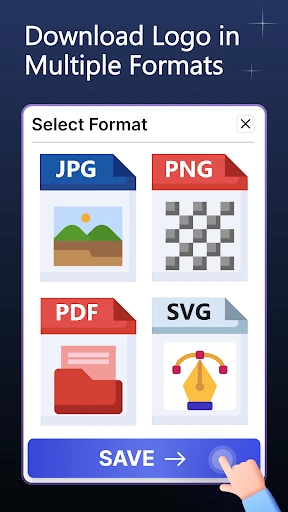
The core function of AI Logo Generator is to transform user ideas into visual logos through an automated, AI-driven design process. Upon launching the app, users are guided to enter their company name and slogan. They then browse and select from a vast library of industry-specific icons and symbols. The next step involves choosing a color palette, either from predefined schemes or custom selections, and picking a font style that aligns with the brand's personality. The AI synthesizes these inputs, generating hundreds of logo variations in different layouts and compositions. Users can further refine their chosen design using built-in editing tools to adjust colors, spacing, and element placement. Finally, the app allows for the export of the final logo in high-resolution PNG and vector formats suitable for both digital and print use.
Chapter 2: Value
The primary value proposition of AI Logo Generator lies in its democratization of professional design, offering significant advantages in speed, cost, and accessibility. Firstly, it provides immense time efficiency; what traditionally takes days with a designer can be accomplished in minutes, enabling rapid prototyping and iteration for startups and entrepreneurs. Secondly, it is highly cost-effective, presenting a budget-friendly alternative to hiring professional design agencies, which is particularly valuable for small businesses, freelancers, and side hustlers. The AI engine itself is a key advantage, ensuring originality by generating unique combinations rather than offering templated designs, thus helping brands stand out. Furthermore, the app's all-in-one ecosystem extends beyond mere generation. It includes a brand kit feature to store logos, colors, and fonts, and provides mockup generators to visualize the logo on business cards, websites, and merchandise. This seamless integration from concept to application delivers exceptional convenience and cohesive brand management directly in the user's pocket, making professional branding accessible to all.
Chapter 3: Scenarios
The app primarily targets small business owners, startups, solo entrepreneurs, and content creators who need to establish a credible brand identity quickly and without a large budget. A common scenario is a freelance graphic designer needing a personal brand logo for their website and social media profiles; they can use the app to experiment with concepts and finalize a design that reflects their creative style. Another key user group includes local business owners, such as cafe or boutique shop proprietors, who require a logo for their storefront signage, menus, and marketing materials. They can generate options on the spot during a planning meeting. Additionally, online sellers on platforms like Etsy or Shopify use the app to create distinctive logos for their shops to build brand recognition. Event organizers planning a conference or community festival also find it invaluable for crafting a thematic logo for promotions and merchandise. In everyday use, the app serves as an immediate brainstorming tool, a solution for last-minute design needs, and a central hub for managing all brand assets.
Uninstall Instructions
For step-by-step guidance on how to safely remove this application from your device, please refer to our 《Uninstall Instructions》 document.
Pros
- generates multiple logo concepts in under a minute
- offers style-specific editing tools like 'modern' or 'vintage'
- exports high-resolution vector files for professional use
- requires no design software installation or expertise
- suggests color palettes based on industry keywords
Cons
- limited fine-grained control over individual design elements
- premium assets locked behind a subscription paywall
- outputs can sometimes feel generic without multiple iterations
- requires a stable internet connection for AI processing
- brand identity guidelines not included in basic packages
Frequently Asked Questions
What is AI Logo Generator, Logo Maker?
AI Logo Generator, Logo Maker is a graphic design application focused on creating professional logos. Its core function is to use artificial intelligence to generate custom logo designs based on user-input keywords and style preferences. Users can then edit colors, fonts, and layouts within the app. It is positioned as a tool for entrepreneurs, small businesses, and individuals needing quick, affordable branding solutions without requiring design expertise.
Is AI Logo Generator free to use?
The app typically operates on a freemium model. You can download it for free and access basic features, which may include generating a limited number of logos or using a subset of templates and editing tools. To export high-resolution files, remove watermarks, or access the full library of assets and advanced AI features, an in-app subscription or one-time purchase is required. The app itself does not require additional physical equipment.
What devices and systems does this logo maker support?
AI Logo Generator, Logo Maker is primarily designed for mobile platforms. It is commonly available for both iOS (via the App Store) and Android (via Google Play) devices, including smartphones and tablets. The app is generally optimized for recent versions of these operating systems. There is no information regarding a dedicated desktop or web version; its core functionality is adapted for touchscreen use on mobile devices.
How does the AI logo creation feature work?
The AI feature works by analyzing your input. You start by entering your brand name, optional slogan, and selecting industry categories. Then, you choose preferred styles, colors, or symbols. The AI algorithm processes this data to generate multiple unique logo concepts. These AI-generated drafts serve as a starting point, which you can then fully customize using the app's built-in editor to change every element until you are satisfied with the design.
Can I use the logos I create for commercial purposes?
Yes, once you have purchased a premium plan or the appropriate license within the app, you own the full commercial rights to the final logo design you create. This allows you to use it on your website, merchandise, marketing materials, and for business branding without legal issues. It is crucial to review the app's specific Terms of Service for detailed licensing information, especially regarding font and icon usage, to ensure full compliance.
App Info
Technical Info
Recommended For You

Kobo | eBooks & Audiobooks
Books & Reference

BambooHR
Business

VSD Viewer for Visio Drawings
Business

Magnificat Lenten 2025
Books & Reference

iFnovel - Books,Web Novel
Books & Reference

DC UNIVERSE INFINITE
Comics

Daily Bible Devotion & Prayer
Books & Reference

mobile.de - car market
Auto & Vehicles

Vivaldi Browser - Fast & Safe
Communication

Virtual Dyno PRO
Auto & Vehicles

Face Swap Magic: AI Avatars
Art & Design

Lyft Driver
Business

GroupMe
Communication

Vector Ink: SVG, Illustrator
Art & Design

PayPal Business
Business

Fiverr - Freelance Service
Business

漫畫集 - 追漫神器
Comics

GoTo
Business

Poster Maker - Flyer Maker
Art & Design

IRMO AI Video Photo Generator
Art & Design