
ElevenReader - Text to Speech
Screenshots



Description
About ElevenReader - Text to Speech Feature
ElevenReader is a sophisticated text-to-speech application that transforms written content into natural-sounding, high-quality audio. Utilizing advanced AI-powered voice synthesis technology, it offers users a versatile and accessible tool for listening to digital text across various formats and platforms. The app is designed to cater to a wide audience, from busy professionals and students to individuals with visual impairments or reading difficulties, providing a seamless auditory reading experience.
Chapter 1: Function
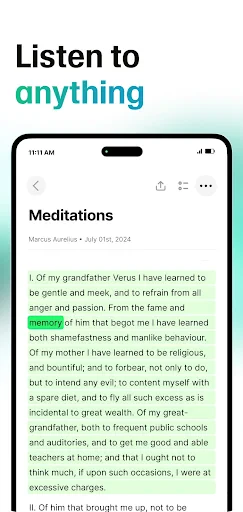
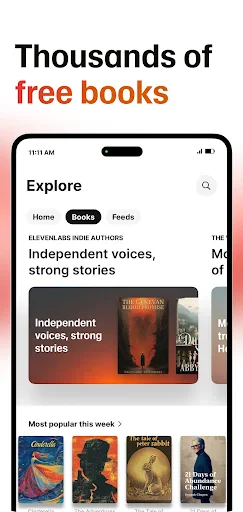
ElevenReader's core functionality revolves around its powerful text-to-speech engine. The app can read aloud text from a multitude of sources, including web pages, PDF documents, eBooks, and clipboard-copied content. Users can import files directly or use the built-in browser to navigate to articles. A central feature is the selection of highly realistic AI voices, available in multiple languages and accents, which deliver speech with natural intonation and rhythm. The app includes essential playback controls for speed adjustment, play, pause, and skip. It also offers background playback capability, allowing audio to continue while using other apps or with the screen off. Basic text highlighting as it is read enhances the follow-along experience, making it a comprehensive tool for converting static text into dynamic spoken word.
Chapter 2: Value
The primary value proposition of ElevenReader lies in its combination of cutting-edge voice quality and user-centric flexibility. Unlike many robotic-sounding TTS engines, ElevenReader leverages state-of-the-art AI models to produce voices that are remarkably human-like, with expressive cadence and clear pronunciation, significantly reducing listener fatigue. This high fidelity transforms listening into a pleasant and engaging activity rather than a mechanical chore. A key advantage is its ability to boost productivity and learning. Users can consume articles, reports, or books while commuting, exercising, or performing other tasks, effectively multitasking and reclaiming time. For students and researchers, it aids in proofreading and comprehension by engaging a different sensory channel. Its accessibility value is immense, serving as a vital tool for those with dyslexia, visual impairments, or other reading challenges, promoting digital inclusion. Furthermore, the app's support for various document formats and its offline functionality for downloaded voices ensure reliability and convenience without constant internet dependency. By turning any digital text into a personal audiobook, ElevenReader delivers tangible value in education, accessibility, productivity, and entertainment.
Chapter 3: Scenarios
ElevenReader is ideally suited for several key user groups and daily scenarios. Students and lifelong learners form a major cohort, using the app to listen to textbook chapters, research papers, or foreign language articles, reinforcing material through auditory learning and aiding in dense subject matter comprehension. Professionals and busy individuals utilize it during their daily commute or gym sessions to stay informed by listening to industry news, lengthy emails, or curated reports, optimizing downtime. It is an indispensable accessibility tool for individuals with visual impairments, dyslexia, or conditions like ADHD, enabling independent access to digital written content that might otherwise be difficult to navigate. Avid readers who experience eye strain or simply enjoy audiobooks can use it to convert web novels or personal document collections into listenable formats. Additionally, language learners benefit from hearing correct pronunciation and intonation in their target language. In everyday use, a user might activate ElevenReader to have the morning news read aloud during breakfast, listen to a saved PDF manual while completing hands-on work, or unwind by having a web article narrated before sleep, showcasing its integration into diverse daily routines.
Uninstall Instructions
For step-by-step guidance on how to safely remove this application from your device, please refer to our 《Uninstall Instructions》 document.
Pros
- offers over 200 highly realistic ai voices
- seamlessly converts ebooks and web articles
- background playback with system media controls
- creates custom voices from short audio samples
- precise speed and pitch adjustment per voice
Cons
- premium voices require a subscription
- custom voice feature demands high-quality audio
- offline listening needs file pre-download
- complex ui for first-time accessibility users
- large library management lacks advanced sorting
Frequently Asked Questions
What is ElevenReader and what does it do?
ElevenReader is a text-to-speech (TTS) application that converts digital text into spoken audio. Its core function is to read aloud various text content, such as e-books, articles, documents, and web pages, allowing for hands-free listening. It positions itself as a tool for accessibility, productivity, and multitasking, enabling users to consume written content audibly.
Is ElevenReader free to use or does it require payment?
ElevenReader operates on a freemium model. The core app is free to download and includes basic TTS functionality. However, advanced features, such as premium high-quality AI voices, unlimited reading time, offline listening, and ad-free experience, typically require a subscription or one-time in-app purchase. No additional hardware is needed beyond a compatible device.
What devices and operating systems does ElevenReader support?
ElevenReader is primarily designed for mobile devices. It is available for iOS on the Apple App Store and for Android on Google Play. The app is generally optimized for smartphones and tablets. There is no information regarding support for desktop operating systems like Windows or macOS. It is suitable for a wide user group, including students, professionals, and individuals with visual impairments or reading difficulties.
How does the voice quality and customization in ElevenReader work?
The app utilizes advanced neural text-to-speech technology to generate natural-sounding AI voices. Unique features include a selection of multiple voice options (often varying by language and accent), adjustable speech rate and pitch, and possibly voice customization tools. The technical quality aims for human-like intonation and clarity, distinguishing it from basic robotic TTS systems.
Can I listen to content offline with ElevenReader?
Offline listening is a feature typically associated with the premium version of ElevenReader. After downloading the necessary voice data and the content to be read within the app, users can listen without an internet connection. The free version may require a persistent online connection for audio synthesis. Users should check the specific in-app information for current offline functionality details.
App Info
Technical Info
Recommended For You

CarGurus: Used & New Cars
Auto & Vehicles

Handshake Jobs & New Careers
Business

My Bible - Verse+Audio
Books & Reference

MTS Urent
Auto & Vehicles

O'Reilly Pro
Business

Bible Daily, KJV Bible + Audio
Books & Reference

RSA Authenticator (SecurID)
Communication

Email - Email Login
Communication

Sephora: Buy Makeup & Skincare
Beauty

Pi Browser
Communication

Daily Bible Study: Audio, Plan
Books & Reference

Magic Doodle: Glow Art Drawing
Art & Design

Messages
Communication

SketchPad - Doodle On The Go
Art & Design

Beauty Calculator Pretty Scale
Beauty

POCKET COMICS: Premium Webtoon
Comics

Blinq: Digital Business Card
Business

Battle Royale Chapter5 Season2
Books & Reference

Weargram
Communication

Chevron
Auto & Vehicles