
Libby, the Library App
Screenshots
Description
About Libby, the Library App Feature – Your Digital Library Card
Libby, the Library App, is a groundbreaking digital service that seamlessly connects users with their local public library's collection of ebooks, digital audiobooks, and magazines. Developed by OverDrive, it serves as a modern, user-friendly portal to free digital content, requiring only a valid library card for access. The app elegantly bridges the gap between traditional library services and contemporary digital consumption, offering a legal, cost-free alternative to commercial subscription services. With its intuitive interface and robust functionality, Libby has redefined how millions of readers worldwide discover, borrow, and enjoy literature and other media directly on their personal devices.
Chapter 1: Function
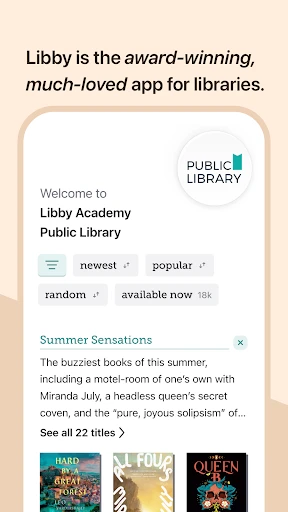
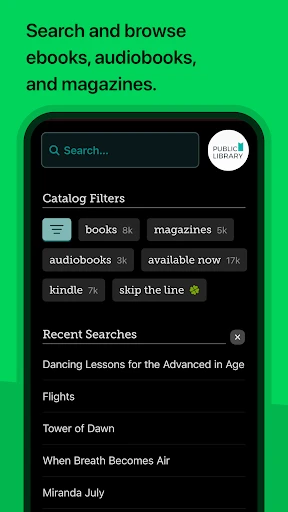
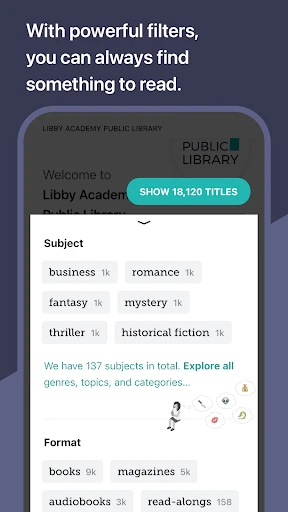
Libby's core function is to facilitate the borrowing and consumption of digital library materials. Upon linking one or more library cards, users can browse their library's entire digital catalog, search for specific titles, authors, or subjects, and place holds on popular items. The app allows for instant borrowing of available titles, which are then delivered directly to the user's device for online or offline enjoyment. It features a built-in ebook reader and audiobook player with customizable settings like font size, brightness, and narration speed. Users can manage their loans, holds, and reading history across multiple linked libraries from a single, unified dashboard. The app also sends timely notifications for due dates and hold availability, and enables seamless returns or renewals with a single tap, ensuring a streamlined and organized reading experience.
Chapter 2: Value
The primary value proposition of Libby lies in providing unlimited access to a vast world of knowledge and entertainment entirely for free, democratizing reading in the digital age. Its key advantage is the elimination of financial barriers associated with purchasing books or subscribing to premium services, making it an invaluable resource for avid readers, students, and budget-conscious individuals. The app aggregates content from numerous publishers, offering bestsellers, classics, niche titles, and educational materials without cost to the user. Beyond cost savings, Libby offers unparalleled convenience. It consolidates the borrowing process, removing the need to physically visit a library. Its smart recommendation engine and curated lists help users discover new interests. The ability to sync reading progress, bookmarks, and notes across all devices ensures a continuous experience whether on a phone, tablet, or computer. Furthermore, by supporting public libraries, Libby reinforces essential community institutions. It provides a sustainable model for digital consumption, as titles are automatically returned, eliminating late fees and ensuring equitable access for all patrons. This combination of free access, extensive selection, user-centric design, and community support establishes Libby as an indispensable tool for modern readers.
Chapter 3: Scenarios
Libby's primary target users are public library patrons who own smartphones or tablets and prefer digital content. This encompasses a wide demographic, including students researching for projects or seeking textbook alternatives, commuters listening to audiobooks during travel, and parents borrowing children's ebooks for bedtime stories. It is ideal for avid readers who consume multiple books monthly and wish to manage their reading list efficiently without financial strain. Everyday use cases are diverse. A user might browse newly added titles during a lunch break, place a hold on a anticipated new release, and receive a notification days later when it becomes available. Another might download several audiobooks for a long road trip, enjoying them offline. Book clubs can utilize Libby to ensure all members have simultaneous access to the same title. Lifelong learners can explore non-fiction and magazines on various hobbies. In essence, Libby integrates into daily routines wherever and whenever someone seeks to read, learn, or be entertained, transforming idle moments into opportunities for engagement with a world of free digital content.
Uninstall Instructions
For step-by-step guidance on how to safely remove this application from your device, please refer to our 《Uninstall Instructions》 document.
Pros
- seamlessly borrows ebooks and audiobooks with a library card
- offline reading mode syncs progress across all personal devices
- customizable holds and tags for managing multiple library accounts
- integrated audiobook player with sleep timer and speed control
- zero-cost access to vast
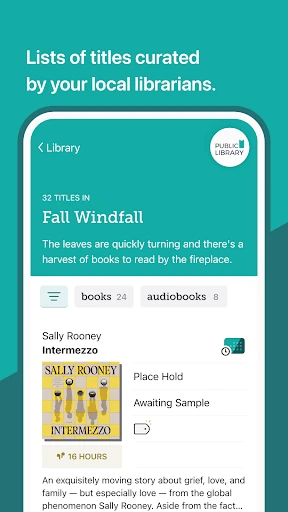
- curated collections from local libraries
Cons
- title availability depends entirely on your library's specific subscriptions
- borrowing periods and hold waitlists are non-negotiable and fixed
- limited discovery features compared to commercial retail platforms
- requires a valid physical library card for initial digital setup
- no option to purchase titles permanently within the app ecosystem
Frequently Asked Questions
What is Libby and what does it do?
Libby is a free library reading app developed by OverDrive. Its core function is to allow you to borrow digital content, such as ebooks and audiobooks, from your local public library using your valid library card. The app provides a seamless browsing, borrowing, and reading/listening experience, positioning itself as a digital gateway to your library's collection.
Is Libby completely free to use?
Yes, the Libby app itself is completely free to download and use. There are no in-app purchases or subscription fees. Access to digital titles is granted through your free library membership. You only need a valid library card from a participating library. Some libraries may offer additional paid services, but core borrowing through Libby is free.
What devices and systems does Libby support?
Libby is widely adapted for most modern devices. It is available for iOS (iPhone/iPad), Android phones and tablets, and Windows/macOS computers via a web browser at libbyapp.com. The app syncs your reading progress and loans across devices. It also supports sending ebooks to Kindle e-readers in the U.S. Audiobooks and ebooks can be enjoyed directly within the app.
How does Libby handle popular or new book availability?
Like a physical library, popular titles in Libby often have waitlists due to digital licensing models. You can place a hold on borrowed titles and get notified when available. The number of copies and loan periods (typically 7-21 days) are set by your library. Titles are automatically returned at the end of the loan, eliminating late fees. Availability varies by library.
What should I do if I have technical issues with the app?
For technical support, Libby provides extensive in-app help (menu > Help) with guides and troubleshooting. For account-specific issues like card problems or holds, contact your local library directly as they manage your membership. For general app functionality issues, you can seek help from OverDrive Support via their official website. There is no direct phone-based after-sales hotline.
App Info
Technical Info
Recommended For You

Adobe Capture: Illustrator,Ps
Art & Design

Madison Reed App - Hair Color
Beauty

Birthday Invitation Card Maker
Art & Design

Holy Bible Time-Verses&Audio
Books & Reference

کتابراه: کتاب الکترونیک و صوتی
Books & Reference

Dictionary.com: English Words
Books & Reference

Chat Cloner Secretly View Chat
Communication

DScanner - Camera Scanner
Business
Readict -One Click Away Novels
Books & Reference

Mister Car Wash
Auto & Vehicles

BeenVerified Background Search
Communication

Planity
Beauty

Zoom Workplace
Business

AI Logo Generator, Logo Maker
Art & Design

Car-Part.com Used Auto Parts
Auto & Vehicles

Blessed - Bible verse & Prayer
Books & Reference

GIF Sticker & WAsticker
Communication

Al QURAN - القرآن الكريم
Books & Reference

All Email Connect
Communication

EOBD Facile: OBD 2 Car Scanner
Auto & Vehicles