
ThinkDiag+
Screenshots
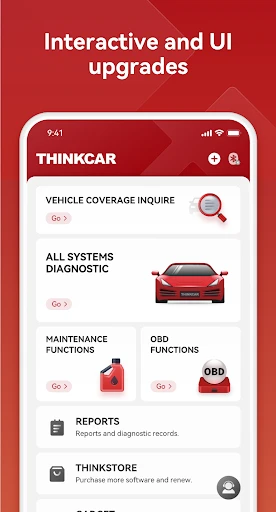
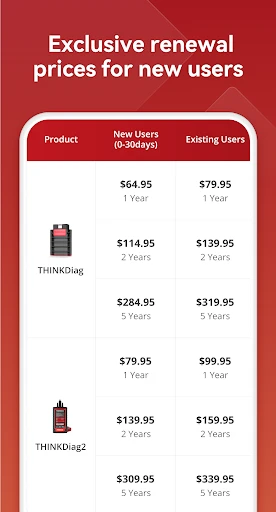

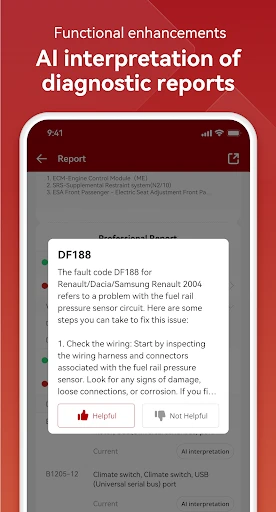

Description
About ThinkDiag+ Feature - Professional Vehicle Diagnostics at Your Fingertips
ThinkDiag+ is a professional-grade vehicle diagnostic application designed to bridge the gap between advanced car scanning tools and everyday users. Paired with a compatible Bluetooth OBD2 adapter, it transforms a smartphone or tablet into a powerful diagnostic workstation. The app supports a vast range of vehicle makes and models, offering deep system scans, real-time data monitoring, and advanced service functions. It empowers car owners, DIY enthusiasts, and semi-professional mechanics to understand their vehicle's health, troubleshoot issues, and perform essential maintenance tasks without an immediate trip to the repair shop.
Chapter 1: Function
ThinkDiag+'s core functionality revolves around comprehensive vehicle communication and data analysis. It performs full-system scans to read and clear Diagnostic Trouble Codes (DTCs) from the engine, transmission, ABS, airbag, and other control modules. Beyond code reading, the app displays live data streams, allowing users to monitor sensor parameters like RPM, coolant temperature, fuel pressure, and oxygen sensor voltages in real-time. It features special functions such as resetting service lights, performing adaptations, and activating components for testing. The app also supports coding and programming for specific vehicle models, enabling customization of certain electronic features. All diagnostic reports and data logs can be saved and exported for further analysis or sharing with a professional mechanic.
Chapter 2: Value
The primary value proposition of ThinkDiag+ lies in its democratization of professional automotive diagnostics. It offers significant cost savings by enabling users to identify problems early and accurately, preventing unnecessary repairs and expensive shop diagnostic fees. For DIYers, it provides deep, manufacturer-level access to vehicle systems, fostering a better understanding of car mechanics and enabling confident maintenance and repair work. Its key advantages include extensive vehicle coverage, supporting Asian, European, and American cars with advanced protocols. The user interface is intuitively designed, presenting complex data in clear graphs and organized menus. Regular updates ensure compatibility with newer vehicle models and enhanced feature sets. Compared to basic OBD2 scanners, ThinkDiag+ delivers OEM-level functionality, such as module coding and system adaptations, which are typically reserved for expensive dealership tools. This transforms a smartphone into a versatile, portable, and powerful diagnostic asset, offering professional-grade insights that promote proactive vehicle care, enhance safety, and extend the vehicle's lifespan through informed maintenance decisions.
Chapter 3: Scenarios
ThinkDiag+ primarily targets automotive DIY enthusiasts, semi-professional mechanics, and technically inclined car owners who prefer hands-on vehicle management. It is invaluable for individuals performing routine maintenance, such as diagnosing a check engine light before an emissions test, resetting an oil service indicator after a change, or monitoring live data to troubleshoot intermittent issues like rough idling. Small independent repair shops and mobile mechanics can utilize it as a cost-effective, supplementary diagnostic tool for quick scans and basic coding tasks. The app is also highly useful for used car buyers seeking to inspect a vehicle's electronic health, or for owners of performance vehicles who wish to monitor engine parameters in real-time. Everyday use cases include reading fault codes after a warning light appears, verifying repair success by clearing codes and confirming they do not return, and using active tests to check components like fuel pumps or thermostat operation, all performed conveniently from the driver's seat or home garage.
Uninstall Instructions
For step-by-step guidance on how to safely remove this application from your device, please refer to our 《Uninstall Instructions》 document.
Pros
- real-time vehicle diagnostics via bluetooth obd2 adapter
- advanced bi-directional control for specific system tests
- comprehensive brand-specific code definitions and live data
- performs key programming and adaptations without dealership
- detailed graphing and logging of sensor data streams
Cons
- requires a compatible proprietary bluetooth adapter
- advanced coding features need separate
- costly credits
- complex interface with steep learning curve for novices
- full functionality limited to specific car makes/models
- live data streaming can drain mobile device battery quickly
Frequently Asked Questions
What is ThinkDiag+ and what does it do?
ThinkDiag+ is a professional-grade automotive diagnostic application designed for car owners and technicians. Its core function is to connect to a compatible OBD2 Bluetooth adapter, allowing you to read and clear diagnostic trouble codes (DTCs), view live sensor data, and perform advanced system scans on your vehicle. It provides detailed reports to help identify potential issues, positioning itself as a powerful tool for vehicle maintenance and troubleshooting.
Is ThinkDiag+ free to use or are there in-app purchases?
ThinkDiag+ requires the purchase of a compatible OBD2 Bluetooth hardware adapter to function. The app itself may have a free version with basic features, but full functionality typically requires a paid license or subscription. This unlocks advanced diagnostics, special functions for specific car systems, and continuous software updates for new vehicle models. Please check the official app store listing for the current pricing model.
What vehicles and devices is ThinkDiag+ compatible with?
ThinkDiag+ is compatible with a wide range of vehicles, primarily those using OBD2 protocols (common for cars from 1996 onward in the US and later in other regions). It supports many car brands, including Asian, European, and American models. The app requires a compatible ThinkDiag-branded Bluetooth adapter and a smartphone or tablet running Android or iOS. Specific compatibility details for your vehicle should be verified on the official website.
How do I connect ThinkDiag+ to my car?
To connect, first plug the ThinkDiag Bluetooth adapter into your vehicle's OBD2 port, typically located under the dashboard near the steering column. Then, enable Bluetooth on your mobile device, open the ThinkDiag+ app, and follow the in-app pairing instructions. Ensure the ignition is turned to the 'ON' position (engine can be off). The app will guide you through selecting your vehicle's make, model, and year to establish a proper diagnostic connection.
Can ThinkDiag+ perform advanced functions like coding or programming?
ThinkDiag+ focuses on comprehensive diagnostics, code reading/clearing, and live data streaming. While it offers some special functions like service light resets for certain models, it is not primarily designed for deep-level ECU coding or programming often required for feature activation. For advanced programming tasks, dedicated professional tools are typically needed. The app's official documentation specifies its supported function list for different vehicle systems.
App Info
Technical Info
Recommended For You

VistaCreate: Graphic Design
Art & Design

Madison Reed App - Hair Color
Beauty

Microsoft Teams
Business

RhymeZone Rhyming Dictionary
Books & Reference

GetCode - Virtual Number SMS
Business

Email - Fast and Smart Mail
Communication

Adblock Browser: Fast & Secure
Communication

Bookshelf-Your virtual library
Books & Reference

Phoner 2nd Phone Number + Text
Communication

Beauty Camera - Selfie Camera
Beauty

Housecall Pro
Business

Time Clock: Easy Tracker
Business

Job Search by ZipRecruiter
Business

Videa: AI Video Maker, Effects
Art & Design

CVTz50
Auto & Vehicles

Glitter Beauty Coloring Pages
Art & Design

Minicraft Crafting Building
Comics

Learn to Draw Anime by Steps
Art & Design

JW Library
Books & Reference

Cover Hunter - 3v3 Team Battle
Comics