
Selfie Camera - Photo Effects
Screenshots


Description
About Selfie Camera - Photo Effects Feature
Selfie Camera - Photo Effects is a specialized mobile application designed to elevate the standard smartphone selfie into a creative and polished photograph. It transcends the basic functionality of a built-in camera app by integrating a comprehensive suite of real-time filters, beauty enhancement tools, and playful effects. Targeted primarily at social media enthusiasts, content creators, and anyone looking to improve their personal photo gallery, the app provides an all-in-one solution for capturing, editing, and sharing visually appealing self-portraits directly from a mobile device. Its core philosophy centers on making professional-grade photo manipulation simple, instant, and accessible to users of all skill levels, thereby transforming everyday moments into shareable works of art.
Chapter 1: Function
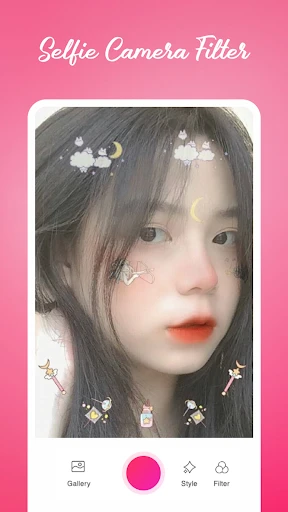
The app's core functionality is built around a powerful real-time capture and editing engine. Upon launching, users are greeted with a camera interface that immediately applies a preview of selected filters and beauty effects. Key functions include a robust collection of artistic filters ranging from vintage tones to modern cinematic looks. The beauty toolkit offers granular controls for skin smoothing, blemish removal, face slimming, eye enlarging, and teeth whitening, all adjustable in intensity. Beyond static filters, the app provides dynamic AR stickers, animated frames, and theme-based overlays that react to facial movements. It also includes essential photography tools such as timer shoot, gesture control, gridlines, and flash modes. After capture, users can dive into a detailed edit mode to further refine their photos with cropping, brightness, contrast, and saturation adjustments before saving to their device or sharing directly to social platforms.
Chapter 2: Value
The primary value proposition of Selfie Camera - Photo Effects lies in its ability to democratize high-quality photo enhancement, saving users time and effort while boosting confidence in their digital self-presentation. Its key advantage is the seamless integration of capture and edit workflows, eliminating the need to switch between multiple apps for a complete result. The real-time application of complex effects allows users to see the final outcome before taking the picture, fostering creativity and experimentation. The app's extensive and regularly updated library of filters and AR content, often themed around seasons or trends, ensures content remains fresh and engaging. From a technical standpoint, sophisticated face detection algorithms ensure that beauty effects appear natural and are applied accurately to facial features without distorting the overall image. This focus on natural enhancement, rather than heavy-handed alteration, provides significant value to users seeking an improved yet authentic look. Furthermore, the app's intuitive design lowers the barrier to entry, making advanced photo editing accessible without a steep learning curve. By consolidating professional tools into a user-friendly package, it delivers exceptional convenience and empowers users to produce consistently high-quality selfies that stand out in crowded social feeds, thereby enhancing personal branding and social engagement.
Chapter 3: Scenarios
The app's primary target users are social media active individuals, including teenagers, young adults, and influencers who regularly share visual content on platforms like Instagram, TikTok, Snapchat, and Facebook. It is equally valuable for professionals building a personal brand online, such as bloggers, freelancers, and small business owners who need a polished profile picture. Everyday use cases are abundant. A user preparing for a video call might use the subtle beauty filters to ensure a fresh, camera-ready appearance. Friends gathering for a group selfie can apply fun AR stickers or themed frames to commemorate an event. A traveler can use the app's scenic filters to enhance a selfie taken at a landmark before instantly posting it. Content creators rely on its diverse effects to produce engaging material for their followers without needing desktop editing software. In daily life, the app serves as a quick tool for boosting confidence before a self-portrait, experimenting with different aesthetic styles, or simply adding a layer of fun and creativity to mundane moments, making it a versatile companion for both casual and dedicated photography enthusiasts.
Uninstall Instructions
For step-by-step guidance on how to safely remove this application from your device, please refer to our 《Uninstall Instructions》 document.
Pros
- real-time AR filters adapt to complex lighting conditions
- one-tap background replacement using portrait matting
- saves custom filter formulas for consistent personal style
- offline processing for all core editing functions
- minimal interface with gesture-based parameter adjustments
Cons
- advanced matting requires consistent subject contrast
- custom filter formulas cannot be shared cross-platform
- high-resolution RAW processing limited to newer devices
- no cloud sync for personalized filter library
- background replacement struggles with fine hair details
Frequently Asked Questions
What is Selfie Camera - Photo Effects and its main functions?
Selfie Camera - Photo Effects is a photography app focused on real-time beautification and creative filters for selfies. Its core functions include applying various skin-smoothing effects, makeup filters, and face-altering features like virtual hairstyles or accessories. It also provides standard photo editing tools such as cropping and adjusting brightness. The app is designed for quick, on-device processing to enhance self-portraits before sharing on social media.
Is the app free to use, or does it have in-app purchases?
The app is free to download and use with basic features. However, it offers in-app purchases to unlock premium content, such as exclusive filters, advanced beautification tools, or an ad-free experience. Some effects or high-resolution saves might require a one-time purchase or subscription. No additional physical equipment is needed beyond a standard smartphone camera.
What devices and operating systems does this app support?
Selfie Camera - Photo Effects is typically available for both iOS and Android devices. It generally supports recent versions of these operating systems (e.g., iOS 12+ or Android 8.0+). The app is optimized for smartphones with front-facing cameras and does not require specialized hardware. It is designed for general consumer use, particularly for individuals interested in social media and personal photography.
How does the app handle user photos and privacy?
The app processes photos locally on your device for immediate effects, meaning images are not automatically uploaded to external servers for basic editing. However, certain advanced features or cloud saves might require an internet connection and data transmission. We recommend reviewing the app's privacy policy for specifics on data collection and usage. For safety, avoid using the app for sensitive or confidential photographs.
Can I use the edited photos commercially?
No, the edited photos are intended for personal, non-commercial use, such as social media sharing. The app's filters and effects may incorporate licensed digital assets, and the terms of service typically prohibit using the output for commercial purposes like advertising or resale. For commercial projects, you must ensure you have the rights to all original content and comply with the app's End User License Agreement (EULA).
App Info
Technical Info
Recommended For You

ArcStory - AI Comic generator
Comics

Contacts
Communication

My Best Colors
Beauty

Cryptoguru: Trading Simulator
Business

VirtuNum - Virtual Number
Communication

Magic Beauty Makeup Camera
Beauty

PDF Pro-View PDF
Business

Kiwi Browser - Fast & Quiet
Communication

VSD Viewer for Visio Drawings
Business

Messages
Communication

Color by Number for Adults
Art & Design

Librera PRO - Book reader
Books & Reference

Car-Part.com Used Auto Parts
Auto & Vehicles

طاقچه؛ کتاب الکترونیکی و صوتی
Books & Reference

Mens Hairstyles And Haircuts
Art & Design

Ink AI – Tattoo design maker
Art & Design

AI Logo Generator, Logo Maker
Art & Design

Car Launcher Pro
Auto & Vehicles

WhenToWork Employee Scheduling
Business

Draw Anime: Paint & Sketch App
Art & Design