
Picify: AI Art Editor
Screenshots



Description
About Picify: AI Art Editor Feature - Transforming Images with Intelligent Creativity
Picify: AI Art Editor is a cutting-edge mobile application that leverages advanced artificial intelligence to redefine digital image editing and artistic creation. It empowers users, from casual photo enthusiasts to aspiring digital artists, to transform ordinary photos into extraordinary artworks with minimal effort. By utilizing sophisticated AI models, the app provides a suite of tools that go beyond traditional filters, enabling style transfer, object manipulation, background alteration, and the generation of entirely new visual elements. Its core philosophy centers on making professional-grade artistic effects accessible through an intuitive, user-friendly interface, thereby democratizing the process of digital art creation. Picify stands at the intersection of technology and creativity, offering a seamless platform where imagination is the only limit.
Chapter 1: Function
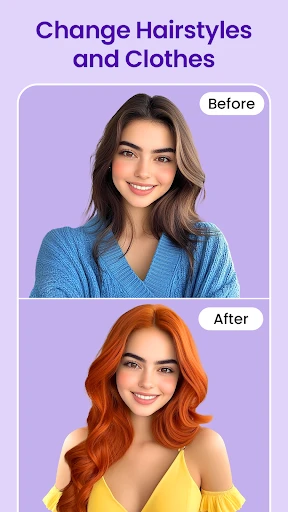
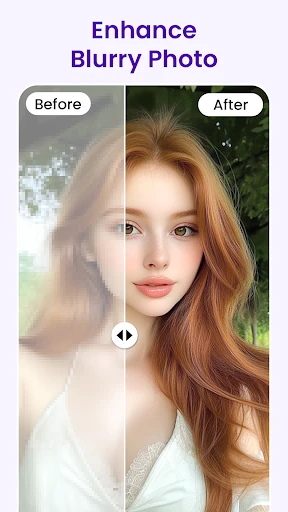
Picify: AI Art Editor is built upon a robust framework of AI-driven functionalities designed to simplify complex editing tasks. Its primary core function is AI Style Transfer, which allows users to apply the distinctive artistic techniques of famous paintings or any custom style to their own photographs instantly. Another key feature is the AI Object Editor, enabling smart selection, removal, or replacement of objects within an image with startling accuracy. The app also includes AI Background Changer, which can isolate subjects and place them against new, AI-generated or user-provided backdrops seamlessly. Furthermore, it offers AI Enhance tools for automatic photo upscaling, noise reduction, and color correction. For generative creativity, features like AI Sketch to Image and Text to Image allow users to create artwork from simple doodles or descriptive prompts. All these functions are packaged within a streamlined workflow, requiring just a few taps to achieve dramatic results.
Chapter 2: Value
The value proposition of Picify lies in its ability to bridge the gap between technical expertise and creative aspiration. Its foremost advantage is the unprecedented ease and speed with which users can produce high-quality, unique artworks. Unlike conventional editing software that demands a steep learning curve, Picify's AI interprets user intent, automating intricate processes like layer masking and detail matching. This saves significant time and lowers the barrier to entry for sophisticated visual creation. Secondly, the app offers exceptional versatility and quality. The AI models are trained on vast datasets, ensuring that style transfers are coherent, object edits are realistic, and generated elements blend naturally with the original image. This delivers professional outcomes suitable for social media, personal projects, or even commercial concepts. Thirdly, it fosters creativity by providing a sandbox for experimentation. Users can explore hybrid artistic styles, conceptualize impossible scenes, or refine mundane photos into captivating pieces, all without expensive software or hardware. Finally, its continuous updates with new AI models and features ensure users have access to the forefront of creative technology, making it a continually evolving toolkit. This combination of accessibility, power, and innovation establishes Picify as a valuable asset for anyone looking to enhance their visual content.
Chapter 3: Scenarios
Picify: AI Art Editor caters to a diverse spectrum of users across various everyday scenarios. Primary target groups include social media enthusiasts and content creators who constantly seek to produce eye-catching, original imagery for platforms like Instagram, TikTok, or YouTube. They use the app to quickly generate standout profile pictures, engaging post visuals, or thematic content that aligns with trends. Digital artists and designers utilize it as a brainstorming or prototyping tool to experiment with styles and compositions before committing to detailed work. Photography hobbyists employ its enhancement and editing features to rescue imperfect shots or add artistic flair to their portfolios. In educational or personal scenarios, students might use it to create compelling visuals for presentations, while individuals can transform personal photos into unique gifts, such as stylized family portraits or custom artwork for home decor. Small business owners and marketers find value in creating appealing promotional graphics or product mockups without hiring a professional designer. In essence, any scenario requiring the quick transformation of a visual idea or existing image into a polished, creative, and shareable asset represents a perfect use case for Picify, making it a versatile companion for both professional and personal creative expression.
Uninstall Instructions
For step-by-step guidance on how to safely remove this application from your device, please refer to our 《Uninstall Instructions》 document.
Pros
- generates complex art styles from simple text prompts
- offers one-tap background removal for any subject
- applies style transfer locally without cloud upload
- creates cohesive themed art sets from one reference image
- maintains high resolution in all AI-generated edits
Cons
- premium style models require separate one-time purchases
- batch processing limited to five images per operation
- advanced text-to-image consumes daily generation credits
- real-time style preview requires a recent processor
- no collaborative or cloud project saving features
Frequently Asked Questions
What is Picify and what can it do?
Picify is an AI-powered photo editing and art generation app. Its core function is to transform your photos into various artistic styles, such as paintings, sketches, or digital art, using artificial intelligence. It also includes standard photo editing tools for adjustments and enhancements. The app positions itself as an all-in-one creative tool for easily applying complex artistic effects.
Is Picify free to use or does it have in-app purchases?
Picify is free to download and use with basic features. However, it operates on a freemium model. Advanced AI art filters, high-resolution exports, and certain premium editing tools require a subscription or one-time in-app purchases. The app may display ads in the free version. Specific pricing details are available within the app's store section.
What devices and systems is Picify compatible with?
Picify is primarily designed for mobile devices. It is available for both iOS and Android platforms. You can download it from the Apple App Store and Google Play Store. The app is optimized for smartphones and may offer a varying feature set on tablets. It does not require any additional external hardware to function.
How does the AI art generation feature work?
The AI art generation in Picify works by processing your uploaded photo through neural networks trained on specific art styles. You select a desired style (e.g., Van Gogh, anime, watercolor), and the AI algorithm redraws your image to match that aesthetic. It performs this processing locally on your device or on cloud servers, depending on the complexity, to maintain image quality and detail.
Can I use the AI-generated artwork commercially?
Picify's terms of service typically state that users retain rights to their original uploaded photos. However, the rights to the AI-generated artwork and its commercial usage are governed by the app's license agreement. It is crucial to review the app's End User License Agreement (EULA) within the app or on its official website for specific, detailed information on commercial rights and limitations.
App Info
Technical Info
Recommended For You

Messenger: Text Messages
Communication

Drawing Desk: Learn to Draw
Art & Design

randstad: jobs for workers
Business

Christmas Photo Frames & Cards
Beauty

Logo Maker : Logo Creator
Art & Design

Autolink
Auto & Vehicles

Gencraft - AI Art Generator
Art & Design

WEBTOON: Manga, Comics, Manhwa
Comics

iDraw
Art & Design

Sketchbook Lite - Artbook
Art & Design

Readict -One Click Away Novels
Books & Reference

Librera PRO - Book reader
Books & Reference

Meta Ads Manager
Business

Simple Drawing - Sketchbook
Art & Design

NIV Bible version, Offline app
Books & Reference

Microsoft Designer
Art & Design

Tayasui Sketches
Art & Design

NAPA PROLink
Auto & Vehicles

Pixel Studio: pixel art editor
Art & Design

EasyTether Pro
Communication