
ReadAnywhere
Screenshots



Description
About ReadAnywhere Feature – Your Universal Reading Companion
ReadAnywhere is a versatile cross-platform reading application designed to synchronize your digital library across all devices. It empowers users to seamlessly access their e-books, documents, and articles on smartphones, tablets, and computers, regardless of operating system. The app focuses on delivering a consistent, distraction-free reading experience by unifying content storage and progress tracking in the cloud. By breaking the barriers of device and format limitations, ReadAnywhere positions itself as a central hub for personal and professional reading, ensuring that your last-read page and personal annotations are always at your fingertips whenever and wherever you choose to read.
Chapter 1: Function
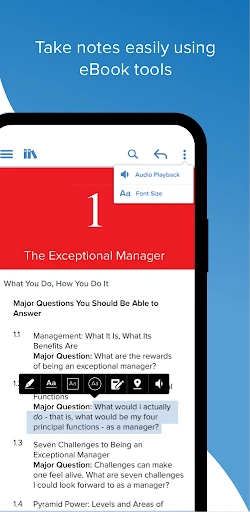
ReadAnywhere's core functionality revolves around universal access and synchronization. The app allows users to upload and organize a wide array of reading materials, including EPUB, PDF, and MOBI files, into a personal cloud library. Its primary function is to automatically sync reading progress, bookmarks, highlights, and notes across every device where the app is installed. Whether you switch from a phone during a commute to a tablet at home, the app opens precisely where you left off. It also incorporates essential reading tools such as adjustable fonts, themes, and spacing for comfort, along with a robust search function within documents and the entire library. The app acts as a single, persistent bookshelf that travels with the user.
Chapter 2: Value
The fundamental value proposition of ReadAnywhere lies in its liberation of the reading experience from physical and digital constraints. Its key advantage is the profound convenience of a unified reading ecosystem. For avid readers and professionals who consume content across multiple devices, the time saved and frustration avoided by automatic synchronization is immense. No longer must one manually search for the last page or transfer files via email; ReadAnywhere handles it invisibly. Furthermore, it adds value by preserving the user's intellectual engagement—highlights and marginal notes made on a laptop remain visible on a phone, creating a continuous thread of thought. This seamless integration enhances comprehension and retention for study or research. Compared to platform-specific readers or disparate apps, ReadAnywhere offers a cohesive, vendor-agnostic solution. It respects the user's existing digital library without locking them into a single store or format. The app's clean, customizable interface provides a consistent visual environment, reducing cognitive load and allowing deeper immersion in the text. Ultimately, its value is measured not in features alone, but in the uninterrupted flow it brings to the habit of reading, making it easier and more appealing to read more, anywhere.
Chapter 3: Scenarios
ReadAnywhere primarily serves multi-device users whose reading habits are dynamic and context-dependent. A key target group includes students and academics who research across campus computers, personal laptops, and tablets; they benefit from having all reference materials and annotations synchronized for seamless study sessions. Professionals who commute are another core audience, allowing them to start a business report on an office desktop and continue reading it on their smartphone during transit. Avid leisure readers who own both an e-ink reader for home and a phone for on-the-go reading also find immense utility in maintaining a single, progressing library. Everyday use cases are varied: a user might read a novel on a tablet before bed, then switch to their phone the next day in a waiting room, picking up without a hitch. Another might annotate a PDF contract on a work computer and later review those notes from a personal device at home. The app is ideal for book club members who need to quickly reference past highlights during discussions, regardless of the device at hand. In essence, any situation where reading is fragmented across locations and times is where ReadAnywhere integrates and simplifies the experience.
Uninstall Instructions
For step-by-step guidance on how to safely remove this application from your device, please refer to our 《Uninstall Instructions》 document.
Pros
- instantly extracts text from any app or image for editing
- one-tap translation and summarization without switching apps
- operates fully offline ensuring privacy for sensitive content
- minimalist overlay UI avoids disrupting the original workflow
- supports 100+ file formats including obscure document types
Cons
- requires frequent screen overlay permission reactivations
- complex PDF layouts often lose formatting during extraction
- no cloud sync limits cross-device text library access
- handwritten text recognition accuracy drops below 60%
- background operation drains 15-20% additional battery hourly
Frequently Asked Questions
What is ReadAnywhere and what does it do?
ReadAnywhere is a cross-platform e-reader application designed to sync and display your digital book collection across multiple devices. Its core function is to provide a unified reading experience, allowing you to start reading on one device and seamlessly continue on another. It supports common ebook formats like EPUB and PDF. The app focuses on customizable reading settings such as font size, background color, and night mode to reduce eye strain.
Is ReadAnywhere free to use, or does it have in-app purchases?
ReadAnywhere is free to download and use for its basic syncing and reading functions. However, it offers optional in-app purchases for advanced features. These may include premium formatting tools, extended cloud storage space for your personal library beyond a free tier, or ad removal. All costs and specific features for premium tiers are clearly listed within the app's settings or store page.
On which devices and operating systems is ReadAnywhere available?
ReadAnywhere is available on iOS for iPhone/iPad, Android phones and tablets, and as a web app for desktop browsers (like Chrome and Safari). It requires iOS 13.0 or later, or Android 8.0 and up. The app is designed for general readers and does not require specialized hardware. Syncing your library and progress requires an internet connection and a free user account.
How does the cross-device syncing feature work?
The syncing feature requires you to create a free account. Once logged in on your devices, the app automatically uploads your reading progress, bookmarks, and notes to its secure cloud service. When you open the same book on another logged-in device, it retrieves this data, allowing you to continue from the last page. You must manually add your own EPUB/PDF files to the app's library on one device for them to sync.
What should I do if my book highlights or progress fail to sync?
First, ensure all devices are connected to the internet and you are logged into the same account. Try manually triggering a sync from the app's menu. If issues persist, check for app updates in your device's store, as updates often fix sync bugs. For persistent problems, you can contact support via the 'Help' section within the app, which provides a form to submit details about your device and the specific error encountered.
App Info
Technical Info
Recommended For You

Typology Paris - Skincare
Beauty

Yelp for Business
Business

Moonstories
Books & Reference

Hair Color Changer: Change you
Beauty

Bible Daily, KJV Bible + Audio
Books & Reference

T Shirt Design - T Shirts Art
Art & Design

N6_Theme for Car Launcher app
Auto & Vehicles

Beauty Makeup Editor & Camera
Beauty

2nd Phone Number - Call & Text
Communication

Tattoo Maker - Tattoo Design
Art & Design

Boost Mobile
Communication

CL Theme Road
Auto & Vehicles

Beauty Camera -AI Photo Editor
Beauty

Mangamo Manga & Comics
Comics

AR Drawing - Trace Drawing App
Art & Design

BikeWale- Bikes & Two Wheelers
Auto & Vehicles

Skincare Routine
Beauty

Christmas Photo Frames & Cards
Beauty

Tapas – Comics and Novels
Comics

Shipt: Shopper and Driver
Business