
Jobber: Field Service Software
Screenshots

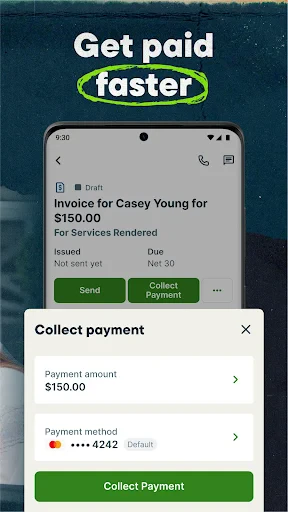



Description
About Jobber Field Service Software Features – Streamlining Service Business Operations
Jobber is a comprehensive field service management software designed for small to medium-sized home service businesses. It serves as an all-in-one solution to manage the entire customer lifecycle, from initial inquiry and scheduling to invoicing and payment. By integrating key operational functions into a unified platform accessible on both desktop and mobile devices, Jobber empowers service providers such as cleaners, landscapers, plumbers, and HVAC technicians to work more efficiently, enhance customer communication, and grow their businesses systematically.
Chapter 1: Function
Jobber's core functionality revolves around centralizing and automating daily business operations. Its scheduling module provides a visual calendar for dispatching jobs to team members, allowing for drag-and-drop adjustments and sending automated reminders to both clients and field crews. The customer relationship management (CRM) component maintains detailed client profiles, service history, and notes. For financials, the app enables quick creation and sending of professional quotes and invoices directly from the job site, with support for online payments. Additionally, it includes route optimization to plan efficient daily travel, time tracking, and tools for requesting customer reviews. All data syncs seamlessly across devices, ensuring office staff and field technicians have real-time access to the same information.
Chapter 2: Value
The primary value proposition of Jobber lies in its ability to save time, reduce administrative overhead, and improve cash flow for service businesses. By consolidating disparate tools into a single platform, it eliminates the need for juggling multiple apps for scheduling, invoicing, and communication. This integration minimizes errors and double-entry, freeing up business owners to focus on service delivery rather than paperwork. A key advantage is the significant enhancement in professional appearance and customer experience. Automated reminders, prompt online quotes, and easy digital payment options make interactions seamless for clients, fostering trust and encouraging repeat business. Furthermore, Jobber provides valuable business insights through reporting features, helping owners track profitability, crew productivity, and sales pipelines. The mobile-first design ensures technicians in the field have all necessary job details, customer instructions, and the ability to capture signatures and payments on the spot, which accelerates revenue collection. Ultimately, Jobber delivers a robust yet user-friendly system that scales with a growing business, directly contributing to operational efficiency and revenue growth.
Chapter 3: Scenarios
Jobber is ideally suited for owner-operated or small to medium-sized teams in the home service sector. Primary user groups include residential cleaners, lawn care and landscaping professionals, plumbing, HVAC, and electrical contractors, as well as handymen and painters. Typical use cases begin with a business owner receiving a service inquiry via phone or web. They quickly generate and send a quote using Jobber from their office computer. Once approved, the job is scheduled on the shared calendar, and the assigned technician receives all details on their mobile app. On the day of service, the tech uses the app for navigation, accesses property access codes or client notes, and logs work performed. Upon completion, they can instantly generate and email an invoice, collect a signature electronically, and process a credit card payment on-site using a card reader. For recurring services like weekly lawn mowing or monthly cleaning, Jobber automates the entire cycle with scheduled visits and automated invoicing. Managers use the desktop dashboard to monitor daily routes, track team progress, and run end-of-month reports on revenue and expenses.
Uninstall Instructions
For step-by-step guidance on how to safely remove this application from your device, please refer to our 《Uninstall Instructions》 document.
Pros
- automates scheduling and dispatching for field teams
- integrates invoicing and payment processing on-site
- offers client portal for real-time communication
- provides route optimization for efficient travel
- works fully offline with automatic cloud sync
Cons
- requires stable internet for initial setup and sync
- complex feature set may overwhelm very small teams
- mobile app lacks some desktop reporting features
- custom quote templates need manual configuration
- per-user pricing scales cost with team size growth
Frequently Asked Questions
What is Jobber and what does it do?
Jobber is a field service management software designed for small to medium-sized businesses. Its core functions include scheduling jobs, dispatching teams, creating quotes and invoices, and processing payments. It centralizes client communication and job details, aiming to streamline operations from initial inquiry to final payment. The app serves as a mobile and desktop hub for managing service businesses like cleaning, landscaping, HVAC, and plumbing.
Is Jobber free to use, and what are the costs?
Jobber is not a free app. It operates on a subscription model with multiple paid tiers (e.g., Core, Connect, Grow). Each tier offers different features and limits on the number of users and clients. A free trial is typically available for new users to test the platform. Subscription fees are billed monthly or annually. There are no mandatory in-app purchases, but it integrates with payment processors which may have their own transaction fees.
What devices and systems does Jobber support?
Jobber is a cross-platform application. It offers a full-featured web dashboard for desktop computers accessible through major browsers. For mobile field use, dedicated native apps are available for download on both iOS (iPhone/iPad) and Android devices. This allows technicians to access schedules, client info, and update job status on-site. The system requires an active internet connection for full synchronization.
How does Jobber handle customer communication and invoicing?
Jobber includes tools to automate and track customer interactions. Users can send quotes, invoices, and service reminders directly from the app via email or SMS. It allows for online payment acceptance through integrated gateways like Stripe. All communication history with a specific client is logged in their profile. However, initiating phone calls or sending custom marketing emails outside its templates may require using linked external services.
Can I use Jobber offline, and what is the support policy?
Jobber's mobile apps offer limited offline functionality for viewing assigned schedules and client details. However, critical actions like updating job statuses or sending invoices require an internet connection to sync with the cloud. Jobber provides customer support primarily through email and an online help center with articles and tutorials. Phone support availability may depend on the subscription plan. They do not offer on-site installation or maintenance services.
App Info
Technical Info
Recommended For You

StyleKorean
Beauty

Ecosia - Safe Internet Browser
Communication

InnoCaption Live Call Captions
Communication

MyWalmart
Business

Chevron
Auto & Vehicles

DriveTime Used Cars for Sale
Auto & Vehicles

Blue Yonder Workforce
Business

Ulta Beauty: Makeup & Skincare
Beauty

Simple Drawing - Sketchbook
Art & Design

Session - Private Messenger
Communication

DailyBible Lite - KJV Version
Books & Reference

PayByPhone
Auto & Vehicles

O’Reilly First Call VIN Scan
Auto & Vehicles

طاقچه؛ کتاب الکترونیکی و صوتی
Books & Reference

Upwork for Freelancers
Business

ScanBizCards Premium
Business

밀리의 서재 - 독서와 무제한 친해지리
Books & Reference

AR Drawing : Trace Anything
Art & Design

Oremus - Catholic Bible&Prayer
Books & Reference

Boost Mobile
Communication