
Perfect Viewer PDF&DJVU Plugin
Screenshots
Description
About Perfect Viewer PDF&DJVU Plugin Feature
The Perfect Viewer PDF&DJVU Plugin is a specialized extension designed to enhance the capabilities of the popular Perfect Viewer comic and document reader app. Perfect Viewer itself is a versatile application for managing and reading digital comics, e-books, and images on Android devices. This official plugin specifically adds robust support for PDF and DJVU file formats, two widely used standards for digital documents and scanned books. By integrating this plugin, users transform Perfect Viewer from a primarily image-based reader into a comprehensive document viewer capable of handling complex, text-heavy, and professionally formatted files. It bridges a critical functionality gap, allowing enthusiasts and professionals alike to consolidate their reading of graphic novels, magazines, and technical documents within a single, familiar interface. The plugin operates seamlessly within the host app, maintaining its core principles of customization, performance, and user control while extending its reach to essential document formats.
Chapter 1: Function
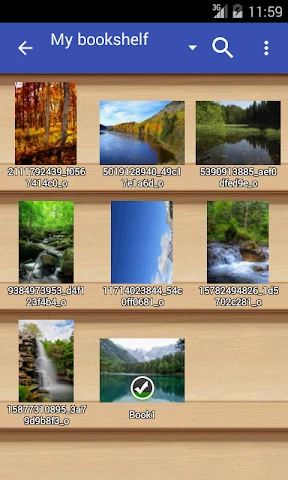
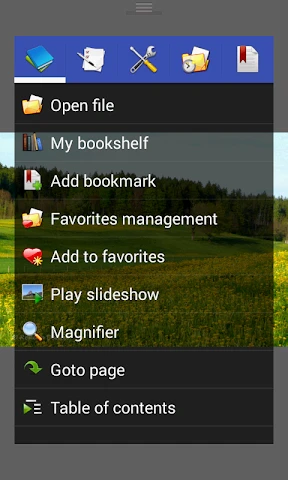
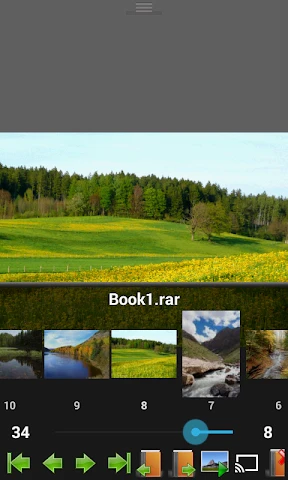
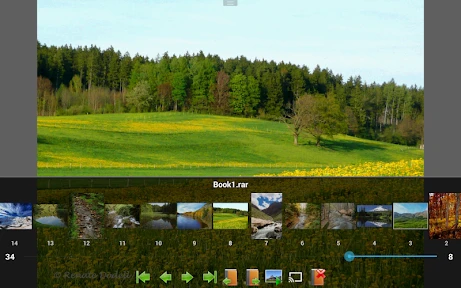
The core function of the Perfect Viewer PDF&DJVU Plugin is to decode and render PDF and DJVU files within the Perfect Viewer application environment. Upon installation and activation, the plugin registers these file formats with the main app. When a user opens a PDF or DJVU file, the plugin takes over the rendering process. It provides essential viewing functionalities such as smooth zooming, both manual and automatic cropping of margins, and reflowing of text for easier reading on smaller screens. For PDFs, it supports various compression types and can handle documents with embedded fonts and complex layouts. For the DJVU format, renowned for its high compression of scanned documents, the plugin enables clear display of page images and extracted text layers. It integrates with Perfect Viewer's existing navigation system, allowing users to jump to specific pages, use bookmarks, and navigate through the document using familiar gestures and hardware key configurations. The plugin also respects the app's settings for color modes, screen orientation locks, and reading direction, ensuring a consistent user experience across all supported file types.
Chapter 2: Value
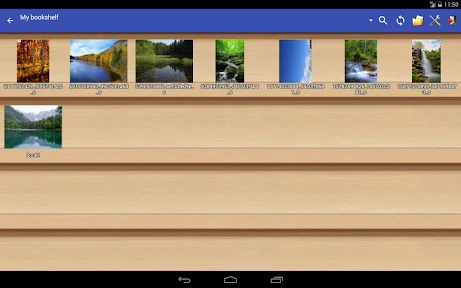
The primary value proposition of the Perfect Viewer PDF&DJVU Plugin lies in its ability to create a unified, powerful, and customizable reading hub on Android devices. Its key advantage is the elimination of the need for separate, standalone PDF or DJVU reader apps. For long-time users of Perfect Viewer, this plugin preserves their invested time in customizing the main app's interface, library management, and reading workflows, while dramatically expanding the scope of readable content. The value is further amplified by Perfect Viewer's renowned performance optimization; the plugin is designed to be lightweight and efficient, ensuring that even large PDF or complex DJVU files are handled without excessive battery drain or lag, a common issue with generic document viewers. Another significant advantage is the depth of customization it inherits. Users can fine-tune rendering settings, apply screen filters for night reading, and control hardware buttons precisely for document navigation, options often lacking in simpler viewers. For researchers, students, or professionals who manage mixed libraries of comics, magazines, and technical manuals, this consolidation saves storage space and cognitive load. Furthermore, as an official plugin, it guarantees a high degree of compatibility and stability with the main application, receiving updates that keep pace with core improvements, ensuring a reliable and integrated solution for handling critical document formats within a preferred ecosystem.
Chapter 3: Scenarios
The Perfect Viewer PDF&DJVU Plugin primarily serves users who already rely on Perfect Viewer for their digital comics and image-based reading and need to incorporate formal documents into their mobile library. A key user group includes comic enthusiasts and manga collectors who also read scanned art books, graphic design portfolios, or industry magazines distributed in PDF or DJVU formats. They benefit from having all visual and illustrative content in one app with consistent controls. Another major group comprises students and academics. A student might use Perfect Viewer for leisure comic reading and, with this plugin, can seamlessly switch to reviewing lecture slides, academic papers, or scanned textbook chapters in DJVU format, all within the same optimized environment. Researchers and professionals who handle technical manuals, datasheets, or archival scanned documents find immense value in the plugin's ability to manage DJVU's compact size for scanned pages without sacrificing clarity. Everyday use cases involve opening a downloaded research paper in PDF during a commute, referring to a DJVU-format service manual while performing a task, or leisurely browsing a digitally scanned vintage magazine. The plugin effectively caters to any user seeking a one-stop, highly configurable reading solution that bridges the worlds of casual image viewing and serious document reference on their Android device.
Uninstall Instructions
For step-by-step guidance on how to safely remove this application from your device, please refer to our 《Uninstall Instructions》 document.
Pros
- enables direct reading of PDF/DJVU within Perfect Viewer
- maintains the original manga/comic reading workflow
- supports complex PDF layouts and scanned book formats
- integrates as a seamless plugin without separate app switching
- extends Perfect Viewer's library to include document formats
Cons
- requires manual plugin installation and activation
- limited to Perfect Viewer's existing UI and navigation
- performance varies with large or image-heavy PDF files
- no text reflow or advanced PDF editing features
- dependent on the host app's update cycle for compatibility
Frequently Asked Questions
What is the Perfect Viewer PDF&DJVU Plugin?
The Perfect Viewer PDF&DJVU Plugin is an add-on module for the Perfect Viewer comic book reader app on Android. Its core function is to enable the main app to open and display PDF and DJVU format documents, which are not natively supported. It essentially extends Perfect Viewer's positioning from a comic reader to a versatile document viewer, allowing users to read e-books, manuals, or scanned documents in these formats within a familiar interface.
Is the plugin free to use or does it require payment?
The Perfect Viewer PDF&DJVU Plugin is a paid application. It is not free and typically requires a one-time purchase through the Google Play Store. There is no subscription model. The main Perfect Viewer app is free, but to unlock PDF and DJVU support, this separate plugin must be bought. No additional in-app purchases or equipment are needed after the initial purchase.
What devices and Android versions are supported?
The plugin is designed specifically for Android devices. It requires the main Perfect Viewer app to be installed first. For compatibility, it generally supports a wide range of Android versions, typically from older versions like Android 4.0 up to the latest releases. However, for optimal performance and compatibility with newer system features, it is recommended to check the current requirements listed on its Google Play Store page, as these may be updated by the developer.
How do I use the plugin to open my PDF files?
First, ensure both Perfect Viewer and the plugin are installed. Open the Perfect Viewer app. Navigate to the folder containing your PDF or DJVU file using the app's built-in file browser. Tap on the PDF file. Perfect Viewer will automatically utilize the installed plugin to render and display the document. You can then use Perfect Viewer's standard controls for zooming, scrolling, and navigating pages, similar to reading a comic book.
The plugin fails to open some PDFs. What can I do?
This is a common problem related to the plugin's technical characteristics. It may struggle with PDFs using advanced encryption, complex form elements, or certain proprietary compression. Ensure your file is not password-protected. Try opening the file in another PDF app to confirm it's not corrupted. The plugin focuses on rendering page images and basic text, not interactive features. For after-sales support, you can contact the developer via the email listed on the Play Store page, though response times are not guaranteed.
App Info
Technical Info
Recommended For You

Future Self Face Aging Changer
Art & Design

Infinite Painter
Art & Design

Jooble — Job Search App
Business

Phone Mirror app - True Mirror
Beauty

FaxCover Pro Create Cover Page
Business

Translator Woman's Voice - TTS
Comics

Pixel Studio: pixel art editor
Art & Design

Stripe Dashboard
Business

Rain Instant Pay
Business

PDF Reader: Edit & Convert PDF
Business

Cryptoguru: Trading Simulator
Business

FAX App: Send Faxes from Phone
Business

CL theme 3D Glass
Auto & Vehicles

Clipboard
Business

USAA DriveSafe
Auto & Vehicles

GizmoHub
Communication

Discount Tire
Auto & Vehicles

Glam AI
Beauty

Beauty Camera Selfie Makeup
Beauty

Online chat, calls - Gem Space
Communication