
DScanner - Camera Scanner
Screenshots



Description
About DScanner - Camera Scanner Feature
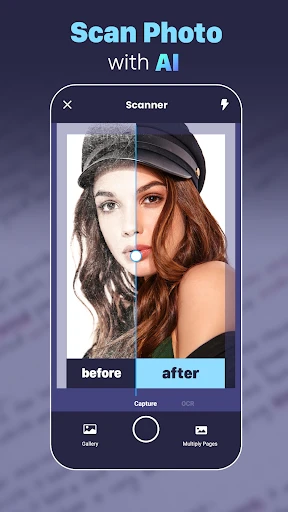
DScanner - Camera Scanner is a powerful mobile document scanning and management application. It transforms the camera on a smartphone into a portable scanner, enabling users to quickly digitize various physical documents, receipts, notes, and whiteboards. The app is designed with a focus on simplicity, efficiency, and high-quality output, catering to the needs of students, professionals, and anyone looking to organize their paper-based information. By leveraging advanced image processing technology, DScanner goes beyond simple photography to create clear, professional-looking digital documents that are easy to store, share, and manage.
Chapter 1: Function
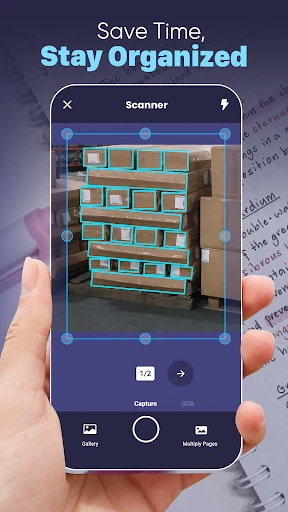
DScanner's core functionality revolves around capturing, enhancing, and exporting documents. The process begins with using the device's camera to take a photo of a document. The app then automatically detects the document's edges, corrects perspective distortion, and crops it precisely. Following this, powerful image filters are applied to enhance the scan. Users can choose modes like Black & White for text documents, Color for preserving original hues, or Photo for images. The app automatically removes shadows and improves contrast to ensure text is sharp and backgrounds are clean. Once scanned, documents can be organized into custom folders, renamed, and annotated with text, drawings, or signatures. Finally, scans can be exported in multiple formats including high-quality PDF or JPEG and shared via email, cloud storage services, or other applications directly from the app.
Chapter 2: Value
The primary value proposition of DScanner lies in its ability to replace bulky physical scanners with a convenient, always-available tool in your pocket, while delivering exceptionally high-quality results. Its key advantages are multifaceted. First, it offers superior scan quality through intelligent image processing. The automatic edge detection and perspective correction ensure documents look flat and professionally scanned, not like skewed photos. The advanced filter suite, particularly the optimized Black & White mode, makes text documents crisp and printer-ready, significantly outperforming a standard camera shot. Second, it emphasizes efficiency and ease of use. The scanning process is remarkably fast, often requiring just a single tap for automatic capture and enhancement. This streamlines workflow for users who need to digitize multiple pages quickly. Third, it provides robust organization and utility features. The ability to create multi-page PDFs, add annotations or signatures, and organize files into folders transforms scattered photos into a structured digital filing cabinet. Furthermore, its seamless integration with cloud platforms like Google Drive, Dropbox, and iCloud ensures documents are backed up and accessible across all devices. Compared to many basic scanning apps, DScanner often provides a more refined balance of automatic intelligence and manual control, giving users reliable results without unnecessary complexity, making it a valuable tool for boosting personal and professional productivity.
Chapter 3: Scenarios
DScanner is ideally suited for a wide range of users across academic, professional, and personal contexts. Students form a primary user group, utilizing the app to scan lecture notes from whiteboards, digitize textbook pages for study guides, and archive assignment sheets. Professionals, especially those who are mobile or work in office environments, rely on it to quickly capture business cards, contracts, receipts for expense reports, and meeting notes, enabling efficient document workflow without needing a desktop scanner. Freelancers and small business owners use it to manage invoices, client forms, and project sketches. In everyday life, families find it useful for preserving children's artwork, scanning important household documents like warranties and manuals for safekeeping, and digitizing old photographs. Common use cases include scanning a multi-page contract to email for remote signing, capturing a recipe from a cookbook to save in a digital collection, instantly archiving a receipt by scanning it right after a purchase, and creating a clear digital copy of a paper form to fill out electronically. For anyone seeking to reduce paper clutter, ensure important documents are backed up, or simply need a reliable way to convert physical information into a versatile digital format on the go, DScanner provides an effective and straightforward solution.
Uninstall Instructions
For step-by-step guidance on how to safely remove this application from your device, please refer to our 《Uninstall Instructions》 document.
Pros
- scans documents with a single tap using auto-capture
- batch mode processes multiple pages into one PDF
- offline functionality ensures privacy and availability
- edge detection works accurately on textured surfaces
- exports to cloud services without file size limits
Cons
- no built-in OCR for text recognition in free version
- manual cropping required for complex document layouts
- advanced filters like 'photo to text' require a subscription
- lacks collaborative annotation tools for team editing
- auto-color correction can oversaturate some old documents
Frequently Asked Questions
What is DScanner and what does it do?
DScanner is a document scanning app for iOS. It uses your device's camera to quickly digitize papers, receipts, whiteboards, and photos into high-quality PDF or JPG files. Its core functions include automatic edge detection, perspective correction, and image enhancement to create clear, readable scans suitable for archiving, sharing, or professional use.
Is DScanner free to use, or does it have in-app purchases?
The app uses real-time edge detection technology. When you point your camera at a document, it automatically identifies its borders and captures the image when held steady. It then corrects perspective and crops out the background, simulating a flatbed scanner. For best results, ensure the document is on a contrasting surface with good lighting.
Can DScanner perform OCR to make scanned text searchable?
DScanner is a free app to download and use for basic scanning. It offers optional in-app purchases, typically a Pro upgrade, which unlocks advanced features like unlimited scans, higher resolution exports, OCR (text recognition), cloud storage integrations, and ad removal. The core scanning functionality remains accessible without payment.
What devices and systems is DScanner compatible with?
DScanner is designed for Apple devices. It is available on the App Store for iPhone and iPad. It requires a compatible iOS or iPadOS version, as specified on its App Store page. The app is optimized for use on both newer and older Apple hardware that supports the required operating system.
How does the automatic document detection feature work?
Optical Character Recognition (OCR) is a key feature of DScanner, but it is typically part of the premium Pro version. With OCR, the app can recognize text within your scans, allowing you to create searchable PDFs or copy and edit the extracted text. This feature supports multiple languages. The free version may have limited or no OCR functionality.
App Info
Technical Info
Recommended For You

Pixl - Face Retouch & Blemish
Beauty

Challenger Comics Viewer
Comics

Dayforce
Business

Link Messenger
Communication
OpenDocument Reader Pro
Business

Lalatoon - Comics & Webtoon
Comics

Skincare Routine: FeelinMySkin
Beauty

Ascension | Bible & Catechism
Books & Reference

Grubhub for Drivers
Business

PayPal Business
Business

Mahjong Dots Elimination
Comics

Hiya: Spam Blocker & Caller ID
Communication

Beauty Calculator Pretty Scale
Beauty

Bible For Women-Holy Bible App
Books & Reference

FedEx Mobile
Business

Square Point of Sale: Payment
Business

FaxCover Pro Create Cover Page
Business

Webmotors: comprar carro
Auto & Vehicles

Speak and Translate Languages
Communication

MTS Urent
Auto & Vehicles