
Auto Sync for Android/Car Play
Screenshots


Description
About Auto Sync for Android/Car Play Feature – Seamless Connectivity on the Road
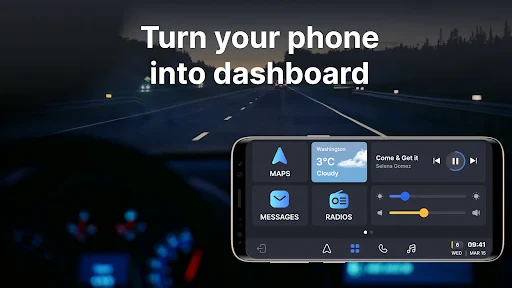
Auto Sync for Android/Car Play is a dedicated connectivity application designed to bridge Android smartphones with CarPlay-enabled vehicle infotainment systems. It facilitates a wireless, integrated experience by mirroring essential phone functions onto the car's dashboard display. The app prioritizes driver safety and convenience, allowing users to access navigation, communication, and media controls through the familiar, vehicle-optimized CarPlay interface without handling their phones. It serves as a crucial tool for modern drivers seeking a cohesive and intelligent in-car ecosystem, transforming the vehicle into an extension of their digital life with minimal setup and intuitive operation.
Chapter 1: Function
The core function of Auto Sync for Android/Car Play is to establish a stable and responsive wireless connection between an Android device and a CarPlay system. Once paired, the app mirrors a curated suite of applications from the phone onto the car's touchscreen. This enables drivers to use Google Maps, Waze, or other navigation apps directly through the CarPlay interface. It also manages communications by providing access to contacts, call logs, and messaging apps for hands-free calls and voice-controlled message dictation. Furthermore, the app integrates media playback, allowing users to control music and podcast streams from services like Spotify or local libraries using the car's controls or voice commands. Its background synchronization ensures that directions, messages, and media queues are seamlessly transferred and updated between the phone and the car system.
Chapter 2: Value
The primary value proposition of Auto Sync for Android/Car Play lies in its ability to break down ecosystem barriers, delivering a premium, integrated CarPlay experience to Android users. Its key advantage is enhanced driver safety; by projecting a simplified, large-interface version of essential apps onto the car display, it significantly reduces distractions, allowing drivers to keep their eyes on the road and hands on the wheel. The convenience factor is substantial, as it automates the connection process and centralizes control, eliminating the need to fumble with multiple devices. The app also adds value through customization and intelligence. It often learns user habits, suggesting frequent destinations or preferred playlists. Compared to standard Bluetooth pairing, it offers a richer, more interactive interface with superior visual navigation and voice assistant integration. For users invested in the Android ecosystem but driving cars with CarPlay, this app is an indispensable solution that preserves their preferred mobile services while leveraging the automotive-optimized CarPlay environment. It represents a cost-effective alternative to upgrading vehicle hardware, extending the functionality and longevity of existing car systems.
Chapter 3: Scenarios
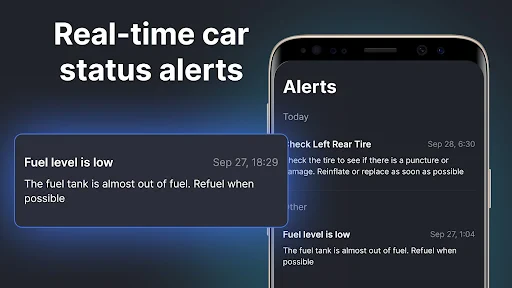
The primary target users for Auto Sync for Android/Car Play are Android smartphone owners who drive vehicles equipped with Apple CarPlay but lack native Android Auto support. This includes professionals and commuters who rely heavily on Google services for navigation and scheduling, needing safe access to Google Maps and calendar alerts during their daily drives. Ride-share and delivery drivers constitute another key group, as the app enables efficient, hands-free management of route planning and customer communications, which is critical for their productivity and safety. Families and frequent travelers also benefit greatly, using the app for long road trips to provide passengers with easy access to shared music playlists and audiobooks through the car's speakers, while the driver follows turn-by-turn directions on the larger screen. Everyday use cases involve automatically launching the app and syncing when entering the car, using voice commands to send texts or change songs, and receiving real-time traffic alerts visually on the dashboard. It transforms the in-car experience from a disconnected hassle into a smoothly integrated, productive, and entertaining journey.
Uninstall Instructions
For step-by-step guidance on how to safely remove this application from your device, please refer to our 《Uninstall Instructions》 document.
Pros
- seamlessly mirrors phone interface onto car display
- supports touch
- knob
- and voice control simultaneously
- operates offline for core navigation and media functions
- minimal battery drain during extended driving sessions
- automatically adjusts UI for daylight and night modes
Cons
- requires specific phone models for full feature access
- initial wireless pairing process can be inconsistent
- limited third-party app integration beyond major services
- high-resolution maps consume significant storage space
- real-time traffic updates need constant cellular data
Frequently Asked Questions
What is Auto Sync for Android/Car Play?
Auto Sync for Android/Car Play is a utility app designed to automatically mirror and control your Android smartphone's screen and apps on a vehicle's infotainment system that supports Car Play or Android Auto. Its core function is to provide a seamless, wired or wireless connection to project navigation, music, messaging, and other selected apps onto the car's display for safer and more convenient access while driving.
Is this app free to use with full features?
The app typically operates on a freemium model. A basic version may be available for free with limited functionality or a trial period. To access all features like wireless connectivity, specific app integrations, or an ad-free experience, a one-time purchase or subscription is usually required. Please check the current listing on the Google Play Store for precise pricing and in-app purchase details.
What are the device and system requirements?
The app requires an Android smartphone (typically running Android 9.0 or later) and a compatible vehicle infotainment system that supports either Apple Car Play or Android Auto. A stable USB connection or Bluetooth/Wi-Fi for wireless functionality is necessary. It is not designed for iPhones or standalone tablet use. Specific model compatibility can vary.
How does it handle phone calls and notifications?
The app is designed to integrate calls and notifications into the car's system interface. When connected, incoming calls can be answered via the car's controls, and notifications from permitted apps (like messages) may be read aloud or displayed briefly. The core focus is on minimizing driver distraction, so full phone screen mirroring for all notifications is often restricted for safety.
What if the app fails to connect to my car?
First, ensure your phone's OS, the app, and your car's firmware are updated. Use a high-quality original USB cable if connecting wired. For wireless, verify both Bluetooth and Wi-Fi are enabled. Restarting the app, your phone, and the car's infotainment system can resolve temporary glitches. The developer's official website or support channel should provide a troubleshooting guide. There is no information about in-person repair services.
App Info
Technical Info
Recommended For You

Gmail
Communication

Google Play Books & Audiobooks
Books & Reference

Pray Daily - KJV Bible & Verse
Books & Reference

Tattoo AI - Tattoo Design
Art & Design

Sephora: Buy Makeup & Skincare
Beauty
Car Key: Smart Car Remote Lock
Auto & Vehicles

Online chat, calls - Gem Space
Communication

Adobe Capture: Illustrator,Ps
Art & Design

Amazon Seller
Business

Kelley Blue Book: We Know Cars
Auto & Vehicles

Video AI - AI Hug & Kiss Maker
Art & Design

Cover Hunter - 3v3 Team Battle
Comics

Yaelokre OC Maker
Art & Design

АЗС Татнефть
Auto & Vehicles

My Straight Talk: Mobile App
Communication

Thumbnail Maker - Channel art
Art & Design

HHAeXchange
Business

Find a Grave
Books & Reference

Phoner 2nd Phone Number + Text
Communication

Clay Box
Art & Design