
Sketchbook Lite - Artbook
Screenshots


Description
About Sketchbook Lite - Artbook Feature
Sketchbook Lite - Artbook is a streamlined digital drawing and painting application designed for artists, designers, and hobbyists seeking a professional yet accessible creative tool. It offers a focused set of features that emulate the natural feel of traditional sketching while leveraging the advantages of digital creation. The app provides an intuitive interface and a variety of virtual brushes and tools, allowing users to capture ideas, practice techniques, and create finished artwork directly on their mobile devices. It stands as a lightweight version of more complex suites, prioritizing core drawing functionality and a distraction-free canvas for spontaneous creativity and structured projects alike.
Chapter 1: Function
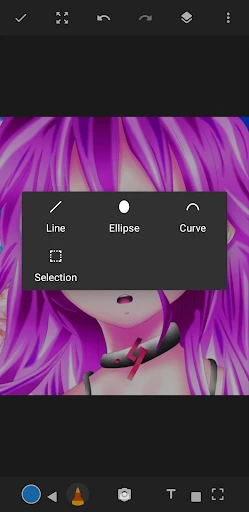
Sketchbook Lite - Artbook centers its functionality on providing a realistic and responsive drawing experience. Its core is a versatile brush engine featuring pencils, inks, markers, and airbrushes, each with customizable settings for size, opacity, and texture to mimic real-world media. The app supports multiple layers with blend modes, offering essential control for building complex illustrations. Tools like a steady stroke for smoother lines, an intuitive color picker, and basic transformation options for scaling and rotating elements are included. The canvas is infinite and can be zoomed in for detailed work. Fundamental utilities such as undo/redo, canvas flipping, and image import round out its primary toolset, enabling the complete process from initial sketch to refined artwork within a clean, user-friendly interface.
Chapter 2: Value
The primary value of Sketchbook Lite - Artbook lies in its balanced offering of professional-grade tools within a simplified, approachable package. Its key advantage is delivering a high-fidelity drawing experience without the overwhelming complexity or cost of advanced desktop software, making digital art creation accessible to a broader audience. The app's interface is meticulously designed to minimize clutter, allowing the canvas to take center stage and fostering immersive focus. The brush behavior and pressure sensitivity support, when used with a stylus, provide a remarkably natural feel that closely replicates drawing on paper, which is a significant draw for traditional artists transitioning to digital. Furthermore, by being a 'Lite' version, it ensures smooth performance on a wide range of devices, eliminating lag and frustration. It serves as both an excellent starting point for beginners to learn digital art fundamentals and a reliable, portable sketchbook for professionals to jot down ideas. This combination of performance, authenticity, and accessibility provides substantial value, empowering users to create anytime, anywhere, without compromising on the essential qualities of a serious art tool.
Chapter 3: Scenarios
Sketchbook Lite - Artbook caters to a diverse range of users across various creative scenarios. Aspiring artists and students find it an ideal platform for daily practice, gesture drawing, and studying color theory without investing in expensive materials. Professional illustrators and concept artists utilize it as a digital pocket sketchbook for capturing inspiration, creating quick thumbnails, and developing compositions on the go. Designers use it for UI/UX wireframing, fashion sketches, or brainstorming design concepts in a fluid, informal medium. Hobbyists and doodlers enjoy it for leisurely drawing, creating personalized greetings, or annotating photos. In everyday use, common scenarios include a commuter sketching a portrait during a train ride, a student visually noting ideas from a lecture, a designer quickly mocking up a logo concept in a coffee shop, or an individual engaging in mindful drawing as a form of relaxation. The app effectively supports any scenario requiring immediate, portable, and serious creative expression.
Uninstall Instructions
For step-by-step guidance on how to safely remove this application from your device, please refer to our 《Uninstall Instructions》 document.
Pros
- offers a minimalist
- distraction-free canvas for quick sketching
- lightweight core preserves device storage and memory resources
- essential brush set is highly responsive with low input lag
- one-tap gallery access streamlines reviewing and organizing drafts
- interface adapts seamlessly to both phones and tablets
Cons
- lacks layer support
- limiting complex digital art creation
- no cloud sync or export options beyond local saving
- brush customization and advanced blending tools are absent
- fixed canvas sizes without resolution or DPI adjustments
- primarily suited for drafts
- not finished illustration work
Frequently Asked Questions
What is Sketchbook Lite - Artbook?
Sketchbook Lite - Artbook is a free digital drawing and painting application designed for artists and hobbyists. It provides a streamlined set of core tools for sketching, painting, and illustrating directly on your mobile device. The app positions itself as an accessible and portable art studio, focusing on essential brushes, layers, and blending tools to facilitate creative expression without overwhelming complexity.
Is Sketchbook Lite completely free to use?
Yes, the app is fundamentally free to download and use. It offers a core set of brushes, layers, and tools at no cost. However, it may include optional in-app purchases for advanced brush packs, premium features, or to remove advertisements. The app does not require any additional physical equipment to function, operating solely through touch or stylus input on your device.
What devices and systems is the app compatible with?
Sketchbook Lite - Artbook is primarily designed for mobile platforms. It is available for both Android and iOS devices, including smartphones and tablets. For optimal performance, especially when working with multiple layers or high-resolution canvases, a device with adequate RAM and a responsive touch screen or stylus support is recommended. Specific minimum OS version requirements are listed on the app's official store page.
How does its layer functionality work?
The app supports a foundational layer system, allowing you to separate elements of your artwork onto different, stackable levels. You can create, delete, reorder, and adjust the opacity of individual layers. This is a standard technical feature in digital art apps, enabling non-destructive editing and complex compositions. The free version includes a set number of layers per canvas, which may be expanded through in-app purchases or by upgrading to a pro version.
Can I export my artwork in high resolution?
Yes, Sketchbook Lite - Artbook allows you to export your finished artwork. You can typically save your work to your device's gallery in common image formats like PNG or JPEG. The export resolution is generally tied to the canvas dimensions you set at the beginning of your project. For professional printing or detailed sharing, it is advisable to start with a large canvas size. The app does not apply heavy compression by default, preserving the quality of your original work.
App Info
Technical Info
Recommended For You

VSD Viewer for Visio Drawings
Business

Fresha for business
Beauty

Color Wheel
Art & Design

IRMO AI Video Photo Generator
Art & Design
Drawing Pad Pro - Sketchpad
Art & Design

Autolist: Used Car Marketplace
Auto & Vehicles

InnoCaption Live Call Captions
Communication

Tapas – Comics and Novels
Comics

투믹스
Comics

Phone Mirror app - True Mirror
Beauty

PayPal Business
Business

League of Comic Geeks
Comics

GroupMe
Communication

BimmerCode for BMW and MINI
Auto & Vehicles

King James Bible (KJV)
Books & Reference
OpenDocument Reader Pro
Business

My SafeLink
Communication

Getcontact
Communication

Beauty Camera & Makeup Camera
Beauty

FantacyStory: novels, fictions
Books & Reference