
JW Library
Screenshots



Description
About JW Library App Features
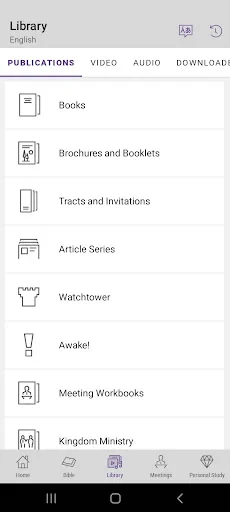
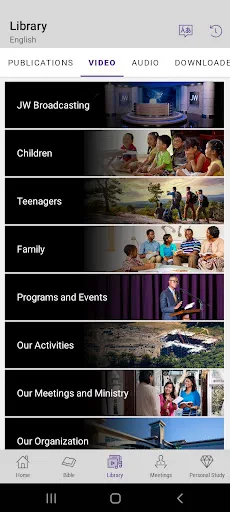
JW Library is an official application developed by Jehovah's Witnesses, designed as a comprehensive digital resource for personal study, research, and group meetings. It provides free access to a vast collection of biblical publications, including the Bible in hundreds of languages and various translations, along with books, brochures, magazines, music, and videos. The app is renowned for its clean interface, offline functionality, and powerful study tools, serving as a central hub for individuals and families seeking to engage with religious content in an organized and accessible manner.
Chapter 1: Function
JW Library functions as a multifaceted digital library and study aid. Its core feature is providing complete access to the Bible in numerous languages and translations, which users can read, compare, and bookmark. The app organizes all official publications of Jehovah's Witnesses, such as the Watchtower and Awake magazines, in a structured, downloadable format. Key functional tools include a robust search engine that scans across all downloaded texts, a note-taking feature linked to specific verses or paragraphs, and a highlighting system with customizable colors. It also supports media playback of songs and video content. For meetings, users can easily open and follow along with scheduled texts, with automatic scrolling and highlighting of current paragraphs. All content can be downloaded for offline use, ensuring accessibility anywhere.
Chapter 2: Value
The primary value proposition of JW Library lies in its consolidation of an extensive, authoritative religious library into a single, portable, and free application. It eliminates the need for physical copies of numerous books, streamlining study and meeting preparation. A key advantage is its exceptional offline capability; once downloaded, the entire library of texts and media is accessible without an internet connection, which is invaluable for users in areas with limited connectivity or for those who wish to study on the go. The app's synchronized note-taking and highlighting across devices ensure a personalized and continuous study experience whether on a smartphone, tablet, or computer. Its search functionality is powerful, allowing for deep thematic research across decades of publications instantly. Furthermore, the app is meticulously updated with new content and meeting materials, keeping users perfectly aligned with their community's schedule. By offering these features in a user-friendly, ad-free environment, JW Library delivers significant practical value, enhancing the efficiency, depth, and convenience of personal and congregational study. It empowers users to engage with their faith's literature more interactively and systematically than ever before.
Chapter 3: Scenarios
JW Library primarily serves Jehovah's Witnesses and individuals interested in their publications. Its everyday use is deeply integrated into the user's spiritual routine. A common scenario is personal daily Bible reading and private study, where an individual uses the app's reading plans, highlights verses, and adds personal notes. For family worship, parents may use the app to display and discuss biblical accounts or videos with their children. The most prominent organized use is during congregation meetings, both in-person and virtual. Attendees use the app to follow the program, read cited texts in real-time, and view any supplemental images or videos presented. Public evangelizers also rely on the app in the ministry, using it to quickly access and read specific scriptures or show short video presentations to householders. Students preparing for Bible-based discussions or talks utilize the search and note tools to compile and organize their research efficiently. Essentially, the app supports any scenario requiring quick reference, in-depth study, or shared presentation of biblical and related educational content.
Uninstall Instructions
For step-by-step guidance on how to safely remove this application from your device, please refer to our 《Uninstall Instructions》 document.
Pros
- offline access to extensive bible translations and publications
- synchronizes notes and highlights across all user devices
- includes audio dramas and songs for immersive study
- precise verse-based navigation with deep linking support
- clean
- customizable reader with adjustable text and themes
Cons
- large download size for multimedia publications
- advanced features require official meeting guides
- limited to content from a single publisher's catalog
- audio playback lacks variable speed controls
- no collaborative annotation or social sharing features
Frequently Asked Questions
What is JW Library and what are its core functions?
JW Library is a free official app developed by Jehovah's Witnesses. Its core functions include providing access to the Bible in hundreds of languages, along with a vast library of religious publications, videos, and audio recordings for personal study and meeting preparation. It is designed for deep scriptural research, featuring powerful search tools, cross-references, and the ability to create personal notes and highlights.
Is JW Library completely free to use?
Yes, JW Library is completely free to download and use. There are no in-app purchases, subscriptions, or hidden fees. All content, including Bibles, books, magazines, videos, and audio dramas, is provided without cost. The app is funded by voluntary donations. An internet connection is required for initial downloads and updates, but most content can be stored offline.
What devices and operating systems support JW Library?
JW Library is widely adapted for most modern devices. It is available on iOS (iPhone/iPad), Android smartphones and tablets, Windows PCs, and macOS computers. The app syncs user notes, bookmarks, and highlights across all logged-in devices via a free account. It also supports casting to TVs (Chromecast, AirPlay) and connection to external displays for group viewing.
How does the offline functionality work?
After downloading your preferred publications, videos, or audio files within the app, you can access them without an internet connection. This is ideal for travel or areas with poor connectivity. You manage offline storage directly in the app's library section, where you can see download sizes and remove items to free up space. Syncing of personal data requires a connection.
Can I share content from JW Library with others?
Yes, you can share links to official publications on the jw.org website, and the app allows you to copy and share text verses. However, direct sharing of entire downloaded publications or video/audio files outside the app is not permitted due to copyright and distribution policies. For group study, the app's casting and external display features are the recommended methods.
App Info
Technical Info
Recommended For You

PDF Scanner app - TapScanner
Business

Madison Reed App - Hair Color
Beauty

CVTz50
Auto & Vehicles

Lyft Driver
Business

Hairstyles for short hair
Beauty

Car Gauge Pro (OBD2 + Enhance)
Communication

Glorify: Devotional & Prayer
Books & Reference

DailyBible Lite - KJV Version
Books & Reference

FantacyStory: novels, fictions
Books & Reference

Dress Up Royal Princess Doll
Beauty

Caller ID - Block Spam Call
Communication

Black Magic
Books & Reference

e.l.f. Cosmetics and Skincare
Beauty

AppSheet
Business

The Language of Letting Go
Books & Reference

Wikipedia
Books & Reference

AI Art Generator: Photo, Draw
Art & Design

GoDaddy Studio: Create & Grow
Art & Design

Color by Number for Adults
Art & Design

Chumba Casino Real Money ayuda
Comics