
Magic Cross Stitch: Pixel Art
Screenshots

Description
About Magic Cross Stitch: Pixel Art Feature – Stitch Your Digital Masterpiece
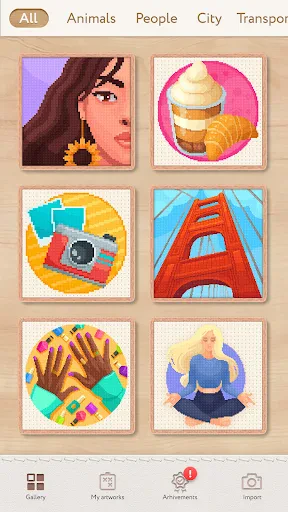
Magic Cross Stitch: Pixel Art is a creative mobile application that seamlessly blends the traditional craft of cross-stitching with modern digital pixel art design. It provides a virtual, hassle-free platform where users can create, follow, and complete intricate cross-stitch patterns without the need for physical materials like fabric, threads, or needles. The app transforms the user's device into a digital embroidery hoop, offering a vast library of patterns ranging from simple icons to complex artworks. It caters to both crafting enthusiasts looking for a convenient creative outlet and newcomers intrigued by the meditative and rewarding process of stitch-by-stitch creation. By digitizing this timeless hobby, Magic Cross Stitch makes artistic expression accessible, portable, and endlessly versatile.
Chapter 1: Function
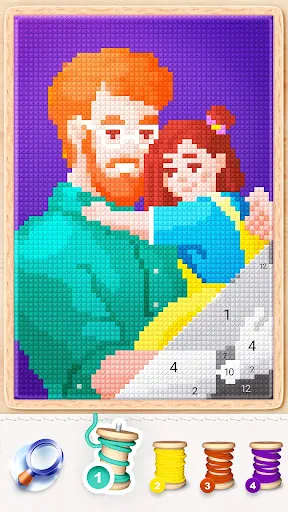
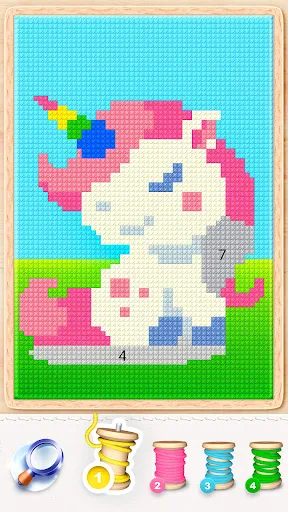
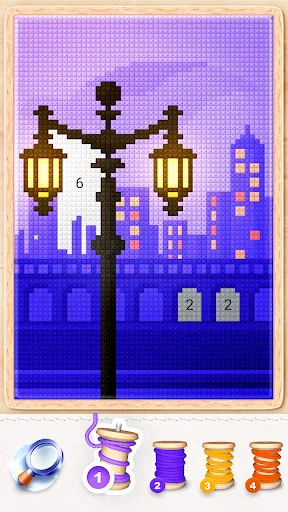
The core function of Magic Cross Stitch: Pixel Art centers on simulating the complete cross-stitch creation process within a digital environment. Users begin by selecting a pattern from an extensive in-app catalog, which includes categories like animals, landscapes, mandalas, and popular culture themes. Each pattern is presented as a pixelated grid, mirroring traditional cross-stitch charts. The primary interactive function involves tapping on corresponding grid squares to 'stitch' them, with each tap filling the square with the correct color, accurately mimicking the placement of a physical stitch. The app provides essential tools such as a color palette selector, a highlighter to mark completed areas, and zoom functionality for detailed work. It also allows users to import personal photos, which the app automatically converts into stitchable pixel patterns. Progress is saved automatically, enabling users to work on projects incrementally. Ultimately, the app's fundamental operation is to guide users from an empty grid to a fully rendered digital tapestry through simple, intuitive touch interactions.
Chapter 2: Value
The value proposition of Magic Cross Stitch: Pixel Art lies in its unique fusion of relaxation, creativity, and digital convenience, offering distinct advantages over traditional crafting. Firstly, it eliminates common barriers to entry like cost, clutter, and the steep learning curve associated with physical cross-stitch. Users gain access to an infinite variety of patterns without purchasing supplies, making it a highly economical and space-saving hobby. The app's key advantage is its portability and ease of use; projects can be worked on anywhere during spare moments, providing a perfect offline or on-the-go creative escape. Secondly, it serves as a powerful tool for mindfulness and stress relief. The repetitive, focused action of tapping to stitch induces a calming, meditative state, helping users unwind and disconnect from daily stressors. The immediate visual feedback and sense of progression with each completed section deliver consistent dopamine rewards, boosting motivation and satisfaction. Furthermore, the app fosters creativity and skill development. By converting photos into patterns, it allows for highly personalized art creation. Users can experiment with colors and complex designs risk-free, building confidence and understanding of composition. The finished digital artworks can be shared directly to social platforms or used as unique custom wallpapers, adding a layer of social and personal utility. In essence, Magic Cross Stitch delivers the therapeutic joy and creative fulfillment of a traditional craft through a modern, accessible, and endlessly flexible digital medium.
Chapter 3: Scenarios
Magic Cross Stitch: Pixel Art primarily targets a diverse range of user groups seeking creative expression, relaxation, or a productive pastime. The first key group is traditional craft and cross-stitch enthusiasts who wish to practice their hobby without the physical setup or while traveling. It allows them to explore new patterns and techniques digitally. The second major audience includes individuals looking for mindfulness apps and stress-relief activities; the app's repetitive, gamified stitching action is ideal for professionals, students, or anyone needing a mental break to alleviate anxiety and improve focus. Thirdly, it appeals to pixel art and digital art fans, as well as gamers who appreciate the retro aesthetic, offering them a interactive way to create art. Everyday use cases are varied: a commuter might spend a 15-minute train journey completing a section of a floral pattern; a parent could use it to relax after putting children to bed; an individual might convert a cherished pet photo into a pattern and stitch it over several evenings as a personalized project. Teachers might also use it in educational settings to teach patience, color theory, or fine motor skills in a digital format. Essentially, any scenario calling for a calming, engaging, and creatively rewarding activity is a perfect fit for this application.
Uninstall Instructions
For step-by-step guidance on how to safely remove this application from your device, please refer to our 《Uninstall Instructions》 document.
Pros
- offers a vast library of licensed pop culture pixel patterns
- one-tap color fill streamlines the digital stitching process
- generates custom patterns from personal photos automatically
- community hub allows sharing and remixing of user creations
- relaxing ASMR sound feedback mimics physical stitching
Cons
- premium licensed pattern packs require separate purchases
- auto-generated patterns can lose detail on complex photos
- social features may feel intrusive for solitary crafters
- large canvas projects drain battery quickly on older devices
- lacks physical material guidance for real-world conversion
Frequently Asked Questions
What is Magic Cross Stitch: Pixel Art?
Magic Cross Stitch: Pixel Art is a digital crafting and relaxation app. It simulates the process of cross-stitch embroidery using a pixel art grid. Users follow numbered color guides to tap and fill in squares, creating detailed digital artwork piece by piece. Its core positioning is to provide a meditative, creative hobby that requires focus but no physical materials.
Is the app free to use, or does it have in-app purchases?
Progress is typically saved locally on your device. To restore progress on a new device, you must use the app's cloud save feature, if available, which often requires logging into an account (like Google Play Games or Game Center). It is recommended to check the app's settings for backup options and ensure you are signed in before switching devices.
What devices and systems is the app compatible with?
The app is free to download and offers a substantial library of free patterns. It operates on a freemium model, where advanced features, exclusive pattern packs, and ad-free experiences are available through in-app purchases. A subscription or one-time purchase may be required to access the full catalog and premium tools.
Can I create and import my own custom patterns?
Magic Cross Stitch: Pixel Art is primarily designed for modern smartphones and tablets. It is available for both iOS and Android operating systems. The app is optimized for touchscreens and does not require any additional external hardware. It is suitable for teens and adults seeking a casual, creative activity.
How do I restore my progress if I change devices?
A core feature of the app is the ability to create custom patterns. You can convert personal photos into pixel art patterns within the app using its built-in tool. The process is automated: you select a photo, and the app generates a color-grid pattern. The complexity and quality of the conversion may depend on the original image resolution and color range.
App Info
Technical Info
Recommended For You

Ulta Beauty: Makeup & Skincare
Beauty

Thrift Savings Plan
Business

HCMToGo
Business

WorkJam
Business

Gmail
Communication

Car Launcher Pro
Auto & Vehicles

ParkMobile: Park. Pay. Go.
Auto & Vehicles

FOREO For You
Beauty

Face Massage, Skincare: forYou
Beauty

کتابراه: کتاب الکترونیک و صوتی
Books & Reference

NovelUP — Novel Downloader
Books & Reference

Cover Hunter - 3v3 Team Battle
Comics

QuickBooks Online Accounting
Business

Upwork for Freelancers
Business

OpenSea: NFT marketplace
Art & Design

Rakuten Viber Messenger
Communication

Kik — Messaging & Chat App
Communication

TMCARS
Auto & Vehicles

NovelBar-Your Reading Haven
Books & Reference

UKG Dimensions
Business