Drawing Pad Pro - Sketchpad
Screenshots


Description
About Drawing Pad Pro - Sketchpad Feature
Drawing Pad Pro - Sketchpad is a professional-grade digital drawing application designed for artists, designers, and creative enthusiasts. It transforms mobile devices and tablets into portable digital canvases, offering a comprehensive suite of tools that emulate the experience of traditional drawing and painting. The app is engineered to bridge the gap between convenience and professional capability, providing a fluid and intuitive interface that caters to both spontaneous sketching and detailed artistic projects. By leveraging advanced touch and stylus input, it delivers a responsive and natural drawing experience, making it a powerful tool for visual creation on the go.
Chapter 1: Function
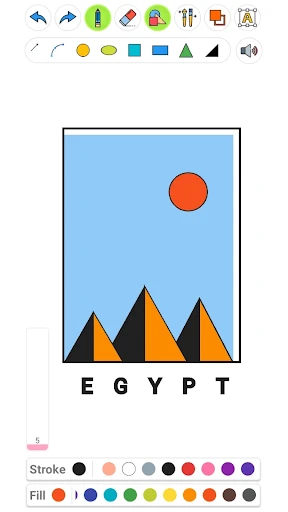
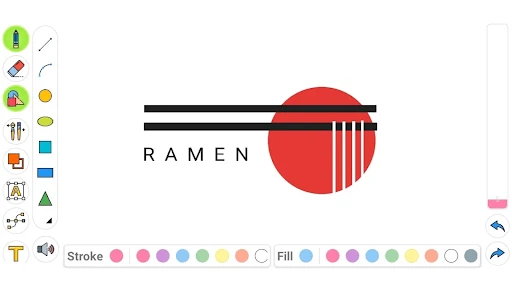
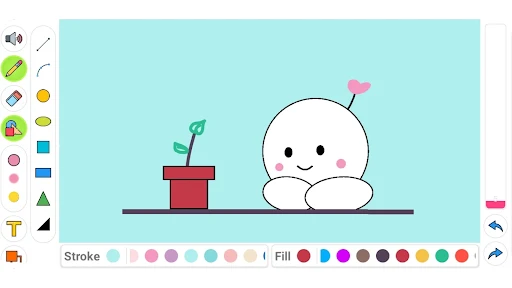
Drawing Pad Pro - Sketchpad is equipped with a robust set of core functions centered on digital creation. It features a wide array of virtual brushes, including pencils, inks, markers, and watercolor brushes, each with customizable settings for size, opacity, and texture to mimic real-world media. The app supports multiple layers with blend modes, enabling complex compositions and non-destructive editing. Essential tools such as undo/redo history, selection tools, transformation options, and color pickers are seamlessly integrated. It offers various canvas templates and export options in high-resolution formats like PNG and PSD, ensuring compatibility with desktop software. Furthermore, the app includes basic shape guides, symmetry drawing modes, and pressure sensitivity support for compatible styluses, providing precise control over every stroke.
Chapter 2: Value
The primary value of Drawing Pad Pro - Sketchpad lies in its ability to deliver a professional digital art studio within a mobile device, offering unparalleled accessibility without sacrificing power. Its key advantage is the exceptional balance between advanced features and user-friendly design, lowering the entry barrier for beginners while satisfying the demands of seasoned professionals. The app's optimized performance ensures lag-free drawing, even with multiple layers and high-resolution canvases, which is critical for maintaining creative flow. Unlike many free alternatives, it provides a cohesive, ad-free experience with a one-time purchase or reasonable subscription model, granting users access to all premium tools and updates. The value extends to its role as a seamless ideation companion; artists can instantly capture inspiration, draft concepts, or complete finished artworks anywhere. By supporting standard file formats for export, it integrates smoothly into broader professional workflows, allowing artwork to be transferred to software like Adobe Photoshop for further refinement. This combination of portability, professional toolset, and workflow integration establishes Drawing Pad Pro as a high-value investment for anyone serious about digital art, effectively replacing the need for physical sketchbooks and enabling a more dynamic and efficient creative process.
Chapter 3: Scenarios
Drawing Pad Pro - Sketchpad primarily serves digital artists, illustrators, graphic designers, and students in creative fields. It is equally valuable for hobbyists and enthusiasts seeking a serious platform for their artistic pursuits. In everyday use, a concept artist might use the app to quickly sketch environment thumbnails during a commute, leveraging layer functions to experiment with lighting and composition. A fashion designer could utilize it to draft clothing sketches and patterns, using the symmetry tool for balanced designs. Students in a drawing class may employ it for anatomy studies or color theory exercises, benefiting from the undo function to learn through iteration. Additionally, professionals such as architects or UI/UX designers find it useful for creating quick wireframes and interface mockups in client meetings. The app is ideal for scenarios requiring immediate visual note-taking, such as a photographer storyboarding a shoot or a writer visualizing characters. Its portability makes it perfect for travel journals, outdoor sketching, and capturing fleeting inspiration, effectively serving as a universal digital sketchbook for a wide spectrum of visual creation needs.
Uninstall Instructions
For step-by-step guidance on how to safely remove this application from your device, please refer to our 《Uninstall Instructions》 document.
Pros
- offers a realistic pencil texture with tilt sensitivity
- unlimited layers with individual blend modes per layer
- customizable radial menu for quick tool access
- exports projects in psd with layer structure intact
- minimalist ui that maximizes canvas drawing space
Cons
- steep learning curve for advanced layer blending
- no built-in shape library or vector tools
- high-resolution canvases drain battery rapidly
- cloud sync limited to its own proprietary service
- pressure sensitivity requires a specific stylus model
Frequently Asked Questions
What is Drawing Pad Pro - Sketchpad?
Drawing Pad Pro - Sketchpad is a digital art application designed for sketching, painting, and illustration. It provides a canvas with a variety of virtual tools like brushes, pencils, and layers, simulating a traditional drawing experience on a digital device. Its core positioning is as a portable and versatile studio for both hobbyists and professional artists to create digital artwork.
Is Drawing Pad Pro free to use?
The app typically follows a freemium model. It can be downloaded for free, offering a basic set of drawing tools and features. Access to advanced brushes, a full layer suite, premium textures, and export options without watermarks usually requires a one-time purchase or a subscription. Specific pricing details are available on the official app store listing.
What devices and systems does it support?
Drawing Pad Pro is primarily designed for tablets and smartphones. It is available on both iOS (via the Apple App Store) and Android (via Google Play Store). For the optimal experience, especially with pressure-sensitive drawing, use on modern tablets with a stylus (like Apple Pencil or S Pen) is recommended. Always check the latest store page for specific version requirements.
How does the layer function work?
The layer function allows you to separate elements of your drawing onto different, stackable transparent sheets. You can draw, edit, and adjust each layer independently without affecting others, which is essential for complex illustrations. The free version may have a layer limit, while the Pro version typically offers unlimited layers, along with blending modes and adjustment options for detailed artwork.
Can I export my artwork in high quality?
Yes, the app supports exporting your finished artwork in high-resolution formats such as PNG and JPEG. Pro features usually include exporting in PSD (for Adobe Photoshop) or with transparent backgrounds. Export settings allow you to control the DPI and image size. Exporting without a watermark is generally a feature of the paid version. For sharing, direct uploads to cloud services or social platforms are often integrated.
App Info
Technical Info
Recommended For You

Watch Duty (Wildfire)
Communication
inCarDoc Pro | OBD2
Auto & Vehicles

PERFUMIST Perfumes Advisor
Beauty

myColorado
Business

MyWalmart
Business

Perfect Viewer PDF&DJVU Plugin
Comics

Rakuten Viber Messenger
Communication

Solo: Your Gig Business App
Business

Tappytoon Manhwa & Novels
Comics

Google Chat
Business

pixivコミック - みんなのマンガアプリ
Comics

봄툰
Comics

Infocar - OBD2 ELM Scanner
Auto & Vehicles

DMV Prueba de Práctica 2024
Auto & Vehicles

Vector Ink: SVG, Illustrator
Art & Design

Messenger - SMS Messages
Communication

Sky Map
Books & Reference

Pi Browser
Communication
Circuit Color
Books & Reference

PhiApp
Beauty