
Duo Mobile
Screenshots

Description
About Duo Mobile Feature – The Essential Guardian for Your Digital Accounts
Duo Mobile is a widely trusted two-factor authentication (2FA) application developed by Cisco. It serves as a critical security layer beyond just a password, generating time-based one-time passcodes (TOTP) and facilitating push notification approvals for secure logins. As a cornerstone of modern digital security, it is extensively adopted by enterprises, educational institutions, and individual users to protect access to various online services, from email and cloud storage to corporate networks and financial platforms.
Chapter 1: Function
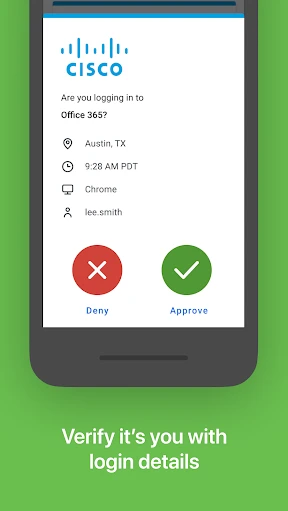
Duo Mobile operates primarily as a software token generator for two-factor authentication. Its core function is to generate secure, time-sensitive six-digit codes that refresh every 30 seconds. These codes are used as a second verification step when logging into an online account. The app securely stores the seed keys for each registered service, locally on the user's device. Beyond passcodes, Duo Mobile's key functionality includes receiving and approving push notifications. When a login attempt is made, a notification is sent directly to the app; the user can simply tap 'Approve' or 'Deny' for instant, one-tap authentication. The app also supports account management, allowing users to add new accounts by scanning a QR code, view all their protected services in one dashboard, and restore accounts via encrypted backups when switching devices.
Chapter 2: Value
The paramount value of Duo Mobile lies in dramatically enhancing account security by effectively mitigating the risks associated with password theft, phishing, and credential stuffing attacks. By requiring a second factor—something the user physically possesses (their phone)—it ensures that a compromised password alone is insufficient for unauthorized access. Its key advantages include robust reliability and a user-centric design. The app functions offline for passcode generation, ensuring access even without an internet connection. The push notification feature offers unparalleled convenience, transforming security from a chore of manual code entry into a simple tap. Backed by Cisco's security expertise, Duo Mobile employs strong encryption to protect seed keys on the device. Furthermore, its widespread institutional adoption means it integrates seamlessly with thousands of applications and services, from Google and Microsoft to countless specialized enterprise systems. For organizations, it provides a manageable and user-friendly gateway to enforcing strong security policies without overwhelming end-users. For individuals, it delivers enterprise-grade protection for personal accounts, all within a free, intuitive, and ad-free interface.
Chapter 3: Scenarios
Duo Mobile's primary user groups span both organizational and individual contexts. Enterprise employees and university students and staff are quintessential users, as their institutions often mandate Duo for accessing internal emails, learning management systems, VPNs, and payroll portals. They use it daily to approve login requests to these protected resources. Individual security-conscious users form another key group, employing Duo Mobile to secure personal email accounts, password managers like LastPass, social media profiles, financial services, and cloud storage platforms such as Dropbox. Common use cases include receiving a push notification to approve a login attempt to a work dashboard from a new device, generating a code to access a GitHub repository, or using a code to complete the setup of a new password manager. In everyday life, it acts as a digital key, providing peace of mind that critical accounts are shielded by an extra, dynamic barrier against unauthorized access.
Uninstall Instructions
For step-by-step guidance on how to safely remove this application from your device, please refer to our 《Uninstall Instructions》 document.
Pros
- offers one-tap push notification approval for logins
- generates offline codes without cellular service
- supports multiple account management in one interface
- integrates with a wide range of enterprise and consumer services
- provides automatic cloud backup for account restoration
Cons
- requires initial setup for each new service integration
- push notifications can be delayed on unstable networks
- locks to one device unless using cloud backup feature
- interface is functional but lacks customization options
- backup feature requires a separate account login
Frequently Asked Questions
What is Duo Mobile and what does it do?
Duo Mobile is a two-factor authentication (2FA) app in the Security category. Its core function is to add an extra layer of security to your online accounts. It generates time-based, one-time passcodes (TOTP) or sends push notifications for approval when you log in to services that support 2FA. This ensures that only you can access your accounts, even if your password is compromised. It acts as a secondary verification step after entering your username and password.
Is Duo Mobile free to use, and are there in-app purchases?
Non-working codes are often due to time sync issues. Duo Mobile's codes rely on your device's accurate time. Ensure your phone's date and time are set to update automatically via network settings. Also, confirm you are entering the code for the correct account, as the app can store multiple accounts. If using push notifications, check your internet connection. If problems persist, try removing and re-adding the account within Duo Mobile, following the service provider's setup instructions. For work/school accounts, contact your IT support.
What devices and systems is Duo Mobile compatible with?
Yes, the Duo Mobile app itself is completely free for end-users to download and use for generating verification codes or approving push notifications. There are no in-app purchases or subscriptions required for the standard authentication functionality. The service is typically provisioned and managed by your organization (like your workplace or school) or the online service (like Google or Facebook) that you are securing with 2FA. They may have their own licensing costs, but the app is free for you.
How do I restore my accounts if I lose my phone or get a new one?
Duo Mobile is widely compatible. It is available for iOS devices (iPhone, iPad) through the App Store and for Android devices through Google Play. It can also be used on Apple Watch for push notifications. The app supports the operating system versions as specified by the respective app stores. It is designed for general user groups, including individuals and employees/students of organizations that deploy Duo Security's broader protection platform.
Why are my verification codes not working or refreshing?
To restore accounts, you must have prepared in advance. Duo Mobile allows you to create a backup to iCloud (iOS) or Google Drive (Android) within the app's settings. When setting up a new device, you can restore from this backup. If you did not back up, you will need to re-register each account on the new device by visiting the website of each service and going through its 2FA setup process again, which often requires a temporary bypass code from the service administrator. Contact your organization's IT help desk for specific recovery steps.
App Info
Technical Info
Recommended For You

Tattoo Design & Tattoo Maker
Beauty

Poseit
Art & Design

My Bible - Verse+Audio
Books & Reference

Speak and Translate Languages
Communication

VoyceMe: Manga and Webtoons
Comics

CARFAX - Shop New & Used Cars
Auto & Vehicles

Dreame-Read Romance Stories
Books & Reference

Yelp for Business
Business

Amazon A to Z
Business

Opera GX: Gaming Browser
Communication

Zebra Comics: Webtoons & Manga
Comics

Ulta Beauty: Makeup & Skincare
Beauty

GroupMe
Communication

TurboScan™ Pro: PDF scanner
Business

Microsoft Designer
Art & Design

Draw Animation - Anim Creator
Art & Design

Recraft
Art & Design

Remodel AI - Home Renovation
Art & Design

Signal Private Messenger
Communication

OBD2 Car Scanner - ELM Torque
Auto & Vehicles