
Concepts: Sketch, Note, Draw
Screenshots


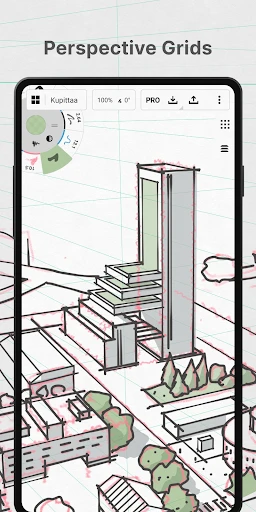

Description
About Concepts: Sketch, Note, Draw Feature
Concepts: Sketch, Note, Draw is a premier digital design and sketching application tailored for creative professionals and enthusiasts. It transcends the limitations of traditional note-taking apps by offering an infinite canvas, vector-based precision, and a highly customizable toolset. Designed to mimic the fluidity of pen on paper while leveraging the power of digital technology, Concepts serves as a versatile workspace for ideation, architectural drafting, illustration, and strategic planning. Its cross-platform availability ensures a seamless workflow across tablets, smartphones, and desktop devices, making it an essential tool for anyone who thinks visually.
Chapter 1: Function
Concepts operates as an advanced, vector-based sketching studio. Its core functionality centers on an infinite, zoomable canvas that liberates users from page boundaries. The app provides a sophisticated set of tools, including pressure-sensitive brushes, shape guides, and a unique Nudge Tool for precise adjustments. A standout feature is its vector-based engine, which allows every stroke to remain editable—users can infinitely adjust line weight, color, and position without loss of quality. The color palette is dynamically customizable with a Copic-style color wheel, and layers offer non-destructive organization. Furthermore, Concepts supports precise measurement and scale setting, catering to technical drawings. Files can be exported in multiple formats, including vectors, ensuring compatibility with professional design workflows.
Chapter 2: Value
The primary value of Concepts lies in its unparalleled fusion of natural sketching feel with powerful digital flexibility. Unlike raster-based apps that pixelate upon zooming, Concepts' vector foundation guarantees crisp, scalable artwork suitable for both casual sketches and professional blueprints. Its key advantage is the editable stroke system, which fundamentally changes the creative process by eliminating the fear of permanent mistakes; every element can be refined at any stage. The app's highly customizable interface and toolset adapt to individual workflows, whether for an artist, designer, or engineer. The infinite canvas encourages expansive, unconstrained thinking, facilitating everything from mind mapping to detailed scene composition. Additionally, its support for Apple Pencil, Surface Pen, and other styli offers a responsive, tactile experience. By bridging the gap between intuitive freehand drawing and precise technical design, Concepts delivers exceptional value as a single, all-encompassing tool that grows with the user's skill level and project complexity, ultimately enhancing productivity and creative expression.
Chapter 3: Scenarios
Concepts is ideally suited for a diverse range of users and daily scenarios. Professional architects and interior designers utilize it for drafting floor plans and creating quick site sketches, leveraging its measurement tools. Industrial and UX designers employ it for wireframing and prototyping, thanks to its vector precision and easy editing. Illustrators and concept artists value the natural brush feel and expansive canvas for developing compositions and storyboards. In educational and business settings, students and strategists use Concepts for visual note-taking, creating complex mind maps, and diagramming processes during lectures or planning sessions. Hobbyists, such as planners and diary keepers, find it perfect for crafting elaborate, artistic journal pages. Essentially, any scenario requiring the translation of ideas into visual form—from a quick annotated sketch to a detailed, to-scale technical drawing—is a perfect use case for Concepts, making it an indispensable tool for visual thinkers across disciplines.
Uninstall Instructions
For step-by-step guidance on how to safely remove this application from your device, please refer to our 《Uninstall Instructions》 document.
Pros
- infinite canvas with zoom for sprawling mind maps
- vector-based strokes remain editable after drawing
- customizable brush library with NCS color picker
- exports layered artwork to multiple professional formats
- minimal UI focuses workspace on the creative process
Cons
- steep learning curve for its unique tool mechanics
- large project files demand substantial device storage
- real-time sync requires a stable
- high-bandwidth connection
- advanced features like perspective guides need a subscription
- gesture-heavy interface can be unintuitive on smaller tablets
Frequently Asked Questions
What is Concepts and what can I use it for?
Concepts is an infinite canvas sketching, note-taking, and design app. It is positioned as a professional-grade tool for designers, architects, and creatives, but is accessible for anyone. Its core function is providing a flexible, vector-based digital whiteboard for freeform ideation, detailed technical drawings, mind mapping, and visual planning. It mimics the feel of real drawing with the precision and editability of digital vectors.
Is Concepts free to use, or does it require purchases?
Concepts operates on a freemium model. You can download and use the app with a robust set of core tools (brushes, layers, basic objects) for free. Advanced features like premium brush packs, custom palettes, advanced export options, and the full object library require a one-time purchase or a subscription. There are no third-party ads. In-app purchases are clearly marked within the app's store section.
What devices and operating systems does Concepts support?
Concepts is optimized for devices with stylus input. It is available on iOS (iPad, iPhone), Android, Windows, and ChromeOS. It supports system-level features like Apple Pencil (with tilt and pressure sensitivity on compatible iPads), Samsung S Pen, and Microsoft Surface Pen. Your work syncs across devices via its own account-based cloud service, allowing you to start on one device and continue on another.
What are the unique technical features of Concepts?
Concepts is built on a vector-based "infinite canvas," meaning strokes are mathematically precise and infinitely scalable without pixelation. Its unique "Nudge Bar" provides quick, contextual editing of stroke width, opacity, and smoothing. It features a dynamic color picker with Copic color library support, and its brushes simulate real-world tools with adjustable taper and pressure response. Exports include high-resolution PNG, PDF, SVG, and DXF for CAD.
How do I recover my drawings if I change devices?
Your drawings are saved locally on your device and can be automatically backed up to your private Concepts Cloud when you create an account. To recover work on a new device, install Concepts, log in with the same account, and your synced projects will be available for download from the cloud. It is recommended to manually export important projects as backup files. For specific recovery issues, contact support via the in-app help menu.
App Info
Technical Info
Recommended For You

Lalatoon - Comics & Webtoon
Comics

Cloned Voices
Comics
ibis Paint
Art & Design

CosmoProf Beauty
Beauty

@Voice Aloud Reader (TTS)
Books & Reference

AR Drawing: Paint & Sketch App
Art & Design

Mangamello - مانجاميلو
Comics

LogMeIn Rescue Customer
Business

Car Key Smart Remote Connect
Auto & Vehicles

Volvo Cars
Auto & Vehicles

Remove Background From Video
Beauty

Pixl - Face Retouch & Blemish
Beauty

Selfie Camera - Photo Effects
Beauty

Mens Hairstyles And Haircuts
Art & Design

Face scan - How old do I look
Beauty

Sephora: Buy Makeup & Skincare
Beauty

Fongo World Edition
Communication

Easy hairstyles step by step
Beauty

OBD2 Car Scanner - ELM Torque
Auto & Vehicles

Hair Color Changer: Hairstyles
Beauty