
Webex Meetings
Screenshots


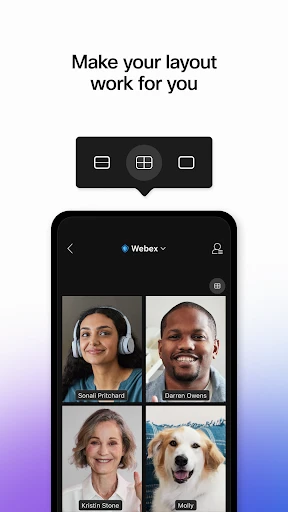

Description
About Webex Meetings Feature - Seamless Collaboration for the Modern Workplace
Webex Meetings is a comprehensive cloud-based video conferencing and collaboration platform developed by Cisco. Designed to facilitate seamless communication for businesses, teams, and individuals, it integrates high-definition video meetings, screen sharing, messaging, and file collaboration into a single, secure application. It supports a wide range of devices, from desktops and laptops to mobile phones and dedicated room systems, enabling participants to connect from anywhere. As a leader in the enterprise collaboration space, Webex Meetings is renowned for its reliability, robust security features, and ability to host meetings ranging from small team huddles to large-scale webinars and virtual events, making it a cornerstone tool for hybrid and remote work environments.
Chapter 1: Function
Webex Meetings delivers a robust suite of core functionalities centered on enabling effective virtual meetings. Its primary feature is high-quality video and audio conferencing, supporting meetings with up to thousands of participants depending on the plan. Users can easily schedule, join, or instantly start meetings via desktop or mobile apps, a web browser, or even a phone call. The platform offers interactive tools like real-time screen sharing, digital whiteboarding, and annotation, allowing for dynamic presentations and collaborative brainstorming. Participants can communicate via integrated chat, raise a virtual hand, and react with emojis. Meeting hosts have granular control through features like lobby admission, participant mute/unmute, breakout sessions for smaller group discussions, and detailed recording capabilities. All these functions are designed to replicate the interactivity of an in-person meeting within a digital space.
Chapter 2: Value
The value proposition of Webex Meetings lies in its enterprise-grade reliability, security, and deeply integrated collaboration experience. A key advantage is its exceptional audio and video intelligence, which includes noise removal and speech enhancement, ensuring clear communication even in suboptimal environments. Security is paramount; Webex offers end-to-end encryption for meetings, compliance with global standards, and sophisticated host controls to prevent unauthorized access, making it a trusted choice for sensitive corporate and government communications. Beyond mere meetings, its value extends into a unified workflow. Seamless integration with the broader Webex suite (Teams, Calling, Contact Center) and common productivity tools like Microsoft 365, Google Calendar, and Slack creates a centralized hub for work. Furthermore, features like AI-powered meeting transcripts, automatic highlights, and post-meeting summaries boost productivity by capturing key takeaways and action items. This combination of unwavering reliability, top-tier security, and intelligent features that streamline the entire meeting lifecycle—from preparation to follow-up—delivers significant ROI by saving time, reducing travel costs, and enhancing team synergy across geographical boundaries.
Chapter 3: Scenarios
Webex Meetings primarily serves business professionals, distributed teams, educational institutions, and large enterprises. Its core user groups include remote and hybrid work teams who rely on it for daily stand-ups, project syncs, and client presentations to maintain productivity and cohesion. Executives and managers utilize it for secure board meetings, company-wide all-hands, and strategic planning sessions. In the education sector, teachers and trainers employ it for virtual classrooms, lectures, and online workshops, leveraging features like breakout rooms and polls. It is also indispensable for sales and customer success teams for conducting product demos and support sessions with clients globally. Common everyday scenarios involve a project manager hosting a weekly review with screen sharing to track progress, a consultant joining a secure client meeting from a mobile device while traveling, a teacher conducting an interactive class with student engagement tools, and a large corporation streaming a quarterly earnings call to thousands of employees and investors. Essentially, any scenario requiring reliable, secure, and interactive communication beyond physical boundaries is an ideal use case for Webex Meetings.
Uninstall Instructions
For step-by-step guidance on how to safely remove this application from your device, please refer to our 《Uninstall Instructions》 document.
Pros
- one-touch meeting join from calendar invites
- real-time translation for international teams
- persistent whiteboard for ongoing projects
- optimized for low-bandwidth mobile connections
- end-to-end encryption for all meeting types
Cons
- complex host controls require training
- high-fidelity audio drains mobile battery
- advanced analytics limited to enterprise plans
- whiteboard lacks shape recognition tools
- webinar mode lacks built-in ticketing system
Frequently Asked Questions
What is Webex Meetings and what does it do?
Webex Meetings is a video conferencing and online meeting application developed by Cisco. Its core function is to host and join virtual meetings, webinars, and team collaborations. It provides features like HD video, screen sharing, digital whiteboarding, and real-time messaging. The app is positioned as a comprehensive solution for business communication, supporting remote work and hybrid team collaboration effectively.
Is Webex Meetings free to use?
Yes, Webex Meetings offers a free plan with core features for personal use or small teams. This includes hosting meetings with up to 100 participants, screen sharing, and 40-minute group meeting limits. For longer durations, more participants, or advanced features like cloud recording and custom branding, paid subscription plans are available. In-app purchases are not typical; subscriptions are managed via the Webex website.
What devices and systems does Webex Meetings support?
Webex Meetings is widely adaptable across devices and operating systems. It supports iOS and Android for mobile use, and Windows and macOS for desktop. You can also join meetings directly from modern web browsers without installation. The app is designed for general business users, educators, and teams, requiring a stable internet connection. No specific additional hardware is mandatory, though a webcam and microphone are recommended for full functionality.
How does Webex Meetings ensure meeting security?
Webex Meetings incorporates several technical security features as a core characteristic. Meetings can be protected with passwords, waiting rooms for host-controlled entry, and end-to-end encryption for data. The host has controls to manage participants, such as muting attendees or removing them. These measures are designed to prevent unauthorized access and safeguard meeting content, aligning with enterprise-grade security standards expected in this category.
What should I do if I have audio or connection issues?
For common audio or connection problems, first check your internet stability and device permissions. Ensure the app has access to your microphone and speaker. You can use the in-app audio test tool before joining a meeting. If issues persist, try switching from VoIP to a phone call for audio. For official troubleshooting and support, visit the Cisco Webex Help Center online. The app itself does not have a direct after-sales maintenance channel within its interface.
App Info
Technical Info
Recommended For You

AutoZone Auto Parts & Repair
Auto & Vehicles

SketchPad - Doodle On The Go
Art & Design

Vivaldi Color Analysis
Beauty

Vivaldi Browser - Fast & Safe
Communication

Customuse: Skins Maker Roblox
Art & Design

LinkedIn: Jobs & Business News
Business

Cartoon Comic Strip Maker
Comics

Vaporwave PRO Wallpapers
Art & Design

ReShot : AI Photo Generator
Art & Design

Salesforce
Business

ElevenReader - Text to Speech
Books & Reference

Goods Unite Us
Books & Reference

Face Beauty Makeup Camera-Self
Beauty

SALLY BEAUTY
Beauty

Moonstories
Books & Reference

Beauty Plus Princess Camera
Beauty

eBay Motors: Parts, Cars, more
Auto & Vehicles

Manga UP!
Comics

Wahy (Holy Quran)
Books & Reference

CLZ Comics comic book database
Comics