
Google Pixel Watch
Screenshots
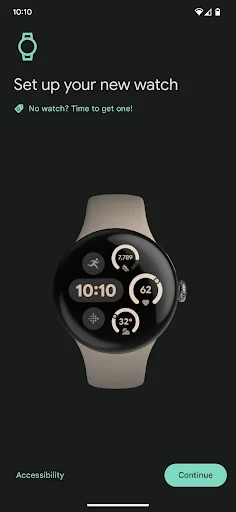
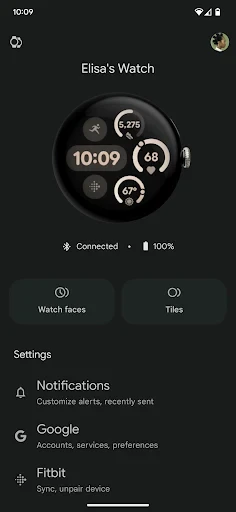
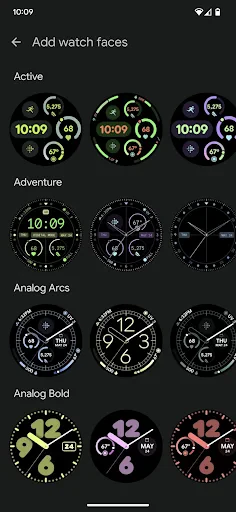
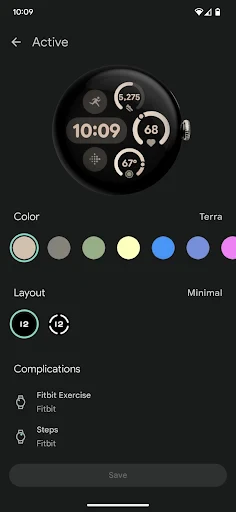

Description
About Google Pixel Watch Feature - Seamless Integration and Intelligent Assistance
The Google Pixel Watch represents Google's inaugural fully integrated smartwatch, merging the hardware design expertise of Google with the intelligent software capabilities of Wear OS and Fitbit. It is positioned as a comprehensive health, fitness, and connectivity companion, designed to work seamlessly within the Google ecosystem. The watch features a sleek, circular domed design with a customizable always-on display, offering users both style and functionality. Its core proposition lies in delivering proactive help, deep health insights, and seamless control over connected devices, all while maintaining a user-friendly interface that prioritizes both wellness and convenience in daily life.
Chapter 1: Function
The Google Pixel Watch consolidates a wide array of functions into a single wrist-worn device. Its core functionality revolves around health and fitness tracking, leveraging Fitbit technology to monitor key metrics such as heart rate, sleep stages, and activity levels including steps, calories burned, and active zone minutes. It provides guided workouts and automatic exercise detection. As a communication hub, it manages notifications, calls, and messages, and supports contactless payments via Google Wallet. For connectivity and control, it integrates deeply with Google services like Google Assistant for voice commands, Google Maps for navigation, and YouTube Music for media playback. It also serves as a remote for smart home devices, allowing users to control lights, thermostats, and more directly from their wrist. The interface is navigated through touch, a rotating crown, and side button interactions.
Chapter 2: Value
The primary value proposition of the Google Pixel Watch is its deep and seamless integration within the Google ecosystem, offering a unified and intelligent experience that is greater than the sum of its parts. Unlike many smartwatches that act as secondary accessories, the Pixel Watch is designed to be a proactive partner. Its key advantage lies in the synergy between Wear OS 3, Fitbit's robust health platform, and exclusive Google features. Users gain access to detailed, long-term health trends and insights powered by Fitbit Premium, fostering a more informed approach to wellness. The inclusion of Google Assistant enables true hands-free operation for queries, tasks, and smart home control. Safety features like Emergency SOS and fall detection add significant peace of mind. Furthermore, its design offers a premium, comfortable feel suitable for both athletic and formal settings. The value is amplified for Pixel phone users, who benefit from effortless setup and feature parity, but it remains a powerful standalone device for any Android user seeking a cohesive, information-rich wearable that prioritizes both health data and everyday utility without compromise.
Chapter 3: Scenarios
The Google Pixel Watch primarily targets tech-savvy individuals and fitness enthusiasts who are already invested in the Android and Google ecosystem, particularly users of Pixel smartphones. It is ideal for the health-conscious user who seeks detailed, actionable insights into their daily activity, sleep quality, and heart health, using the data to guide workout routines and overall wellness goals. In everyday use, a commuter relies on it for Google Maps turn-by-turn navigation and quick glance notifications. A busy professional uses it to manage calendar alerts, discreetly respond to messages, and control presentation slides. During workouts, an athlete utilizes its GPS tracking, heart rate zones, and post-workout recovery metrics. At home, a user activates Google Assistant to set timers, play music, or adjust smart lights. For safety, it provides reassurance for elderly users or those engaging in solo activities through its emergency contact and fall detection features. Essentially, it serves as a versatile tool for anyone looking to streamline their digital life and enhance their physical well-being through connected, intelligent technology worn on the wrist.
Uninstall Instructions
For step-by-step guidance on how to safely remove this application from your device, please refer to our 《Uninstall Instructions》 document.
Pros
- always-on display with automatic brightness adjustment
- deep Fitbit integration for health metric tracking
- uses Google Tensor for responsive
- AI-powered features
- seamless handoff for Google Maps and Wallet
- crown navigation combined with tactile haptics
Cons
- battery life limited to about 24 hours per charge
- exclusively compatible with Android smartphones
- premium pricing compared to similar Wear OS watches
- limited third-party app selection for Wear OS
- no native sleep tracking without Fitbit account
Frequently Asked Questions
What is the Google Pixel Watch and what does it do?
The Google Pixel Watch is a smartwatch developed by Google, categorized under wearable technology. Its core functions include health and fitness tracking (like heart rate monitoring, sleep analysis, workout tracking), notifications, Google Assistant integration, contactless payments via Google Wallet, and music playback control. It is designed to be a comprehensive wearable companion for Android, primarily Pixel, smartphone users.
Is the Google Pixel Watch a standalone device or requires a phone?
The Google Pixel Watch requires a Bluetooth connection to an Android phone (running Android 8.0 or later) for initial setup and full functionality, including app management, message replies, and certain notifications. Models with LTE connectivity can maintain some core functions like calls and streaming without the phone nearby, but it is not a fully independent device. It does not pair with iPhones.
What are the unique features of the Google Pixel Watch?
Unique features include deep integration with Google's ecosystem, such as seamless use of Google Assistant, Maps, Wallet, and YouTube Music. It utilizes Fitbit's advanced health tracking algorithms for metrics like Active Zone Minutes and Sleep Score. The design features a domed, circular glass display with a proprietary band attachment system. It also offers safety features like Emergency Sharing and fall detection.
What common problems do users report with the Pixel Watch?
Commonly reported issues include battery life typically lasting less than 24 hours with always-on display and LTE use, requiring daily charging. Some users experience occasional connectivity drops with Bluetooth. The compatibility is limited to Android phones. Band removal can be initially tricky. For troubleshooting, Google recommends restarting the device, checking the Wear OS app, and ensuring software is updated.
What is the warranty and after-sales support for this device?
The Google Pixel Watch comes with a standard one-year limited warranty from the date of purchase, covering manufacturing defects. Support is provided through Google's official support website and channels, including online help, community forums, and chat/phone support. For hardware service, users may be directed to authorized repair partners. Damage from accidents or wear and tear is not covered. Fitbit Premium services require a separate subscription.
App Info
Technical Info
Recommended For You

Skin Bliss: Skincare Routines
Beauty

Telegram
Communication

Spam Call Blocker for Android
Communication

Learn to Draw Cartoon
Comics

DAT One
Business

Coloring games: speed drawing
Art & Design

AI Outfits: Try on Clothes
Art & Design

UKG Pro
Business

Билеты ПДД 2025 и Экзамен ПДД
Auto & Vehicles

Sweet Editor Camera Lite
Beauty

Repixel: AI Photo Enhancer
Art & Design
Watch Sync App - BT Notifier
Communication

Holy Bible King James + Audio
Books & Reference

Cartoon Photo Editor ・Toon AI
Art & Design

Rhinoplasty App: Nose Editor
Beauty

JobStack for Work | Job Search
Business

FolderSync Pro
Communication

Watch Duty (Wildfire)
Communication

AR Drawing: Sketch, Art, Trace
Art & Design

Future Self Face Aging Changer
Art & Design