
Comickey - AI Comic Maker
Screenshots


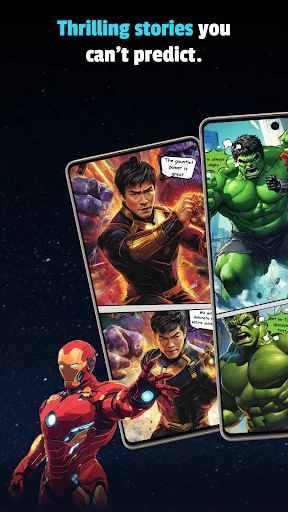


Description
About Comickey - AI Comic Maker Feature
Comickey - AI Comic Maker is a revolutionary mobile application that empowers users to create professional-looking comics and manga with ease, leveraging the power of artificial intelligence. It transforms the traditionally complex and skill-intensive process of comic creation into an accessible, intuitive, and enjoyable experience for everyone, from complete beginners to seasoned artists. By simplifying character design, panel layout, and storyboarding, Comickey opens the door to digital storytelling, allowing users to bring their imaginative narratives to visual life directly from their smartphones or tablets.
Chapter 1: Function
Comickey's core functionality centers on AI-assisted comic creation. Users start by inputting text descriptions or scripts; the app's AI then generates corresponding characters, scenes, and dialogues. It offers a vast library of customizable assets, including diverse character templates with adjustable expressions, poses, and outfits, alongside various backgrounds and props. The app features an intuitive drag-and-drop editor for arranging panels in dynamic layouts. Users can add speech bubbles, sound effect text, and apply filters to achieve specific artistic styles, such as classic manga or modern graphic novel aesthetics. Furthermore, it includes tools for page management, allowing for the compilation of multi-page comic strips or full chapters, which can be exported as high-quality images or PDFs for sharing or printing.
Chapter 2: Value
The primary value proposition of Comickey lies in its democratization of comic creation. It significantly lowers the technical and temporal barriers to entry by automating the most challenging aspects of illustration and design. For individuals without formal drawing skills, it provides a viable outlet for creative expression, turning written ideas into visual stories effortlessly. Its key advantages include immense time savings, as AI generation accelerates the production process from concept to final artwork. The app fosters creativity by allowing rapid experimentation with different characters, styles, and narratives without the need for manual sketching. It also serves as an educational tool, helping users learn the fundamentals of visual storytelling, panel sequencing, and pacing. For professionals or content creators, it acts as a powerful storyboarding tool or a means to quickly produce visual content for social media, blogs, or personal projects. The continuous improvement of its AI models promises increasingly sophisticated and tailored outputs, enhancing the overall quality and personalization of the created comics, making it a cost-effective and innovative solution in the digital content creation landscape.
Chapter 3: Scenarios
Comickey's primary target users are broad, encompassing hobbyists, aspiring comic artists, writers, educators, students, and social media content creators. For hobbyists and aspiring artists with story ideas but limited drawing ability, it is the perfect platform to visualize their narratives. Writers can use it to create visual accompaniments for their stories or scripts, adding a new dimension to their work. In educational scenarios, teachers and students can employ the app to create engaging educational comics, historical reenactments, or science explainers, making learning more interactive and fun. Social media influencers and digital marketers find value in quickly generating eye-catching comic strips or meme-style content to engage their audience. Additionally, parents and children can use it collaboratively for creative family projects, fostering storytelling skills and bonding. Everyday use cases involve users spending short sessions crafting a few panels based on daily inspirations, developing longer comic series over time, or using pre-designed templates for quick, humorous strips to share with friends online, effectively integrating creative storytelling into daily digital life.
Uninstall Instructions
For step-by-step guidance on how to safely remove this application from your device, please refer to our 《Uninstall Instructions》 document.
Pros
- generates complete comic pages from single text prompts
- offers granular control over panel layout and camera angles
- maintains consistent character art across multiple panels
- includes built-in tools for adding speech bubbles and text
- exports print-ready high-resolution pages directly
Cons
- requires specific
- detailed prompts for best artistic results
- character consistency can break with complex scene changes
- advanced layout controls have a significant learning curve
- high-resolution exports are limited per day on free tier
- ai art style is unique and may not suit all comic genres
Frequently Asked Questions
What is Comickey and what can I create with it?
Comickey is an AI-powered mobile application in the entertainment and creative tools category. Its core function is to allow users to generate custom comic strips and manga-style artwork effortlessly. You can create complete comic panels or character illustrations by inputting text descriptions. The app utilizes AI image generation models to transform your ideas into visual stories, requiring no traditional drawing skills. It is positioned as an easy-to-use digital comic creation tool for storytelling and fan art.
Is Comickey free to use or does it have in-app purchases?
Comickey operates on a freemium model. The app is free to download and offers basic functionality. However, access to advanced AI models, higher-resolution exports, faster generation times, or a larger library of styles typically requires in-app purchases or a subscription plan. Some features may be gated behind a daily credit system. For precise, current pricing and subscription tiers, please refer to the official app store listing or the app's in-app purchase section.
What devices and systems is Comickey compatible with?
Comickey is primarily a mobile application. It is designed for smartphones and is available for download on both iOS (via the App Store) and Android (via Google Play) platforms. The app is optimized for touch interfaces. There is no information indicating it requires any additional external hardware. For optimal performance, a stable internet connection is necessary for AI processing, and it is recommended to use devices with updated operating systems.
How does the AI comic generation feature work?
The AI generation feature works by interpreting your text prompts. You describe a scene, character, or action in a text box, and optionally select an art style (e.g., shonen, shojo, realistic). The app's AI model then processes this input to generate corresponding images. You can typically generate single panels or sequences. The technical characteristic involves using a pre-trained diffusion or GAN-based model. The uniqueness lies in its specialization for comic/manga aesthetics, offering styles and panel layouts tailored to that genre.
Can I edit or customize the AI-generated comics?
Yes, Comickey provides basic editing tools for customization. After the AI generates an image, you can usually add speech bubbles, text captions, and simple graphic elements. Some versions may allow for minor adjustments to colors or cropping. However, it is not a full-featured graphic design suite; deep pixel-level editing (like in Photoshop) is not its primary function. The core workflow is AI generation followed by light assembly and annotation to create a complete comic strip page or panel.
App Info
Technical Info
Recommended For You

ComEd
Business

My Mitsubishi Connect
Auto & Vehicles

Burner: Second Phone Number
Communication

Watch Duty (Wildfire)
Communication

Black Magic
Books & Reference

AR Draw Sketch: Trace & Paint
Art & Design

Storytel - Audiobooks & Books
Books & Reference

Blue Letter Bible
Books & Reference

ABP for Samsung Internet
Communication

DeepL Translate
Books & Reference

Infocar - OBD2 ELM Scanner
Auto & Vehicles

Translator Woman's Voice - TTS
Comics

InstaFeet
Beauty

Color Analysis - Dressika
Beauty

Drawing Pad Pro - Sketchpad
Art & Design

Invoice Maker & Estimate Maker
Business

Remodel AI - Home Renovation
Art & Design

Messages
Communication

Marvel Unlimited
Comics

Xcel Energy
Business