Pose Tool 3D
Screenshots


Description
About Pose Tool 3D Feature – A Digital Mannequin for Artists and Animators
Pose Tool 3D is a professional-grade reference application designed for digital artists, illustrators, animators, and character designers. It serves as a versatile virtual mannequin, allowing users to create, customize, and study complex human poses in a three-dimensional space. The app provides a robust and intuitive toolkit for manipulating a detailed 3D human model, enabling precise control over body positioning, lighting, and camera angles to generate the perfect reference for any artistic project.
Chapter 1: Function
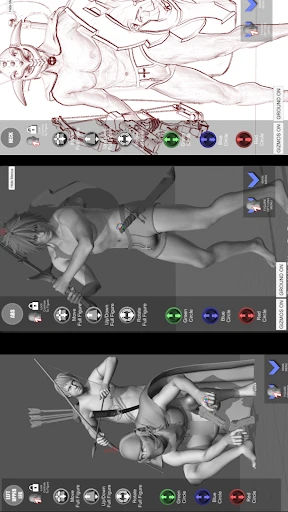
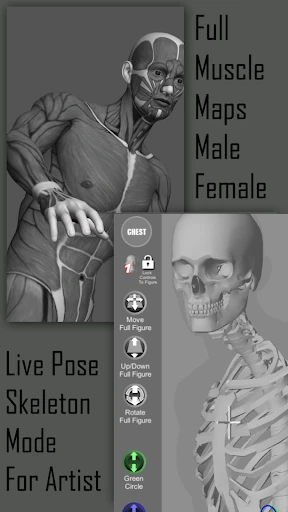
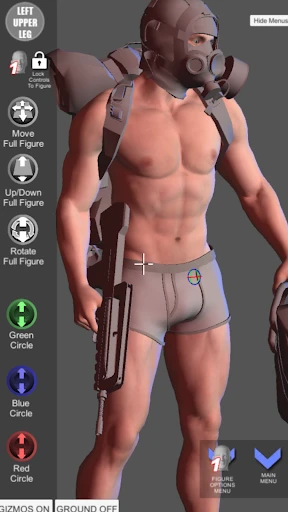
Pose Tool 3D functions as a fully posable digital mannequin. Its core feature is a high-quality, anatomically correct 3D human model, typically gender-selectable, with a comprehensive skeletal rig. Users can directly manipulate individual body parts—such as limbs, fingers, spine, and head—using touch or cursor controls to create any pose imaginable, from simple stances to dynamic action sequences. The app includes pre-set pose libraries for quick access to common positions. Furthermore, it offers advanced controls for setting up custom lighting environments with multiple light sources, adjusting their intensity and color. Users can freely position the camera around the model, zoom in on details, and change perspectives to view the pose from any angle. The final reference can be captured as a high-resolution image or screenshot for direct use in other art software.
Chapter 2: Value
The primary value of Pose Tool 3D lies in its ability to provide an always-available, customizable, and ethically uncompromised reference source, addressing a fundamental need in figurative art and animation. Its key advantages are multifaceted. First, it offers unparalleled convenience and cost savings, eliminating the need for physical mannequins, expensive photo shoots, or reliance on potentially inconsistent online image searches. Artists can craft the exact pose they envision at any time. Second, it provides educational value by allowing users to deconstruct complex anatomy and perspective. By rotating the model and studying proportions from challenging angles, artists can deepen their understanding of human form and spatial relationships, thereby improving their foundational skills. Third, the app enhances workflow efficiency. The ability to save custom poses, create lighting setups, and quickly iterate between different configurations accelerates the pre-production and sketching phases. Compared to static references, this dynamic 3D tool offers superior flexibility, enabling artists to solve compositional and anatomical problems before putting pen to tablet. It acts as a bridge between imagination and accurate representation, fostering both creativity and anatomical precision.
Chapter 3: Scenarios
Pose Tool 3D is primarily targeted at creative professionals and hobbyists whose work involves depicting the human figure. The foremost user group is digital illustrators and concept artists who require accurate pose references for character illustrations, comic book panels, or keyframe art. It is equally indispensable for 2D and 3D animators needing to block out movements or study motion arcs for their characters. Traditional artists, such as painters and sculptors, also benefit from using the app to plan compositions and understand light fall on forms. Furthermore, it is a valuable tool for students learning human anatomy and figure drawing, providing a patient, adjustable model for practice. In everyday use, an illustrator might use Pose Tool 3D to quickly set up a dynamic superhero landing pose with dramatic lighting, capturing it from a low angle for reference. An animator might pose the model in successive positions to visualize a walk cycle. A hobbyist drawing a webcomic could use it to maintain consistent character proportions across multiple panels by referencing the same customized 3D model. In all these scenarios, the app integrates seamlessly into the creative workflow as a foundational planning and reference tool.
Uninstall Instructions
For step-by-step guidance on how to safely remove this application from your device, please refer to our 《Uninstall Instructions》 document.
Pros
- real-time 3D pose manipulation with intuitive bone dragging
- exports models to major 3D software and game engines directly
- includes a vast library of pre-rigged human and creature models
- lightweight standalone app without heavy installation requirements
- supports precise lighting and camera angle adjustments on the fly
Cons
- steep learning curve for users unfamiliar with 3D rigging concepts
- limited texture and material editing capabilities within the app
- no built-in animation timeline for creating motion sequences
- model library updates are infrequent and rely on user imports
- interface feels technical and lacks beginner-friendly tutorials
Frequently Asked Questions
What is Pose Tool 3D and what is its core function?
Pose Tool 3D is a specialized reference application for artists, animators, and designers. Its core function is to provide a fully posable 3D human figure model for studying anatomy, perspective, and lighting. Users can manipulate the virtual mannequin into any stance, adjust camera angles, and set up lighting scenes to create perfect visual references for drawing, painting, or 3D modeling. It serves as a digital replacement for a physical artist's mannequin.
Is Pose Tool 3D free to use or does it have in-app purchases?
Pose Tool 3D typically operates on a freemium model. The app can be downloaded for free, offering access to basic posing features and the core mannequin. However, advanced features such as additional character models (like different body types, animal figures, or hand/foot packs), more lighting tools, pose libraries, or the ability to import/export custom models are usually unlocked through one-time in-app purchases or subscription options within the app.
What devices and operating systems is this app compatible with?
Pose Tool 3D is primarily designed for mobile and tablet devices. It is widely available on both the iOS App Store for iPads and iPhones and the Google Play Store for Android tablets and phones. The app is optimized for touch interfaces, allowing intuitive rotation and posing with fingers. For specific minimum version requirements (e.g., iOS 13.0 or Android 8.0), users should check the current listing on their respective app store.
How does the posing system work and what are its technical limits?
The posing system uses inverse kinematics (IK), allowing you to drag a limb or joint, and the connected parts of the body move realistically. You can rotate, twist, and position individual body parts. Technical limitations include a finite number of joints (the standard human skeleton), and the base model may not have extremely high-resolution muscle deformation like professional 3D software. The app focuses on fast, functional posing rather than hyper-realistic rendering for animation.
Can I save and export my created poses for use in other software?
Yes, Pose Tool 3D allows you to save poses within the app's library for later use. Regarding export, functionality varies. Many versions support taking screenshots or saving images directly to your device's photo library. Some advanced features, potentially via in-app purchase, may enable exporting the 3D pose data (e.g., in OBJ format) or reference images with transparency grids for direct use in digital art software like Photoshop or Clip Studio Paint.
App Info
Technical Info
Recommended For You

PERFUMIST Perfumes Advisor
Beauty

pixivコミック - みんなのマンガアプリ
Comics

Learn To Draw Step By Step
Art & Design

Animic AI: Anime Generator
Art & Design

Holy Bible Time-Verses&Audio
Books & Reference

Realtime Charts for Torque Pro
Auto & Vehicles

AT&T Visual Voicemail
Communication

PaperColor
Art & Design

TeamViewer Remote Control
Business

Autolist: Used Car Marketplace
Auto & Vehicles

漫画 ”Renta”マンガ レンタル漫画アプリ
Comics

Xcel Energy
Business

Penny Puss 2.0
Business

Lezhin Comics - Daily Releases
Comics

Google Meet
Communication

Madison Reed App - Hair Color
Beauty

Email - Email Login
Communication

IRMO AI Video Photo Generator
Art & Design

Google Ads
Business

Invoice2go: Easy Invoice Maker
Business