
Infocar - OBD2 ELM Scanner
Screenshots
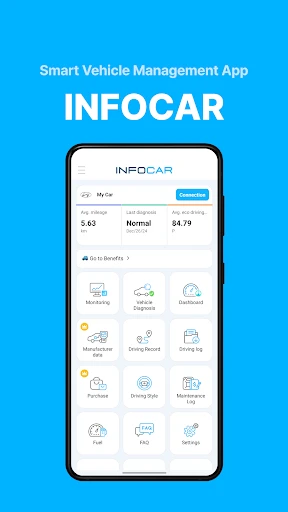
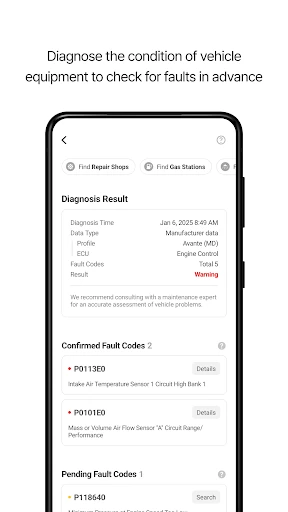
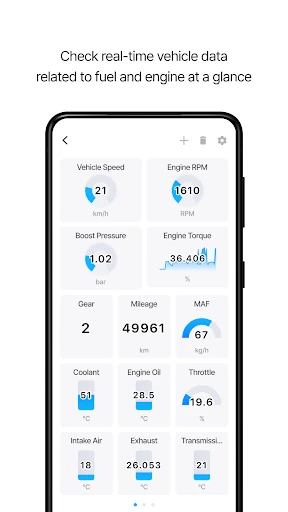

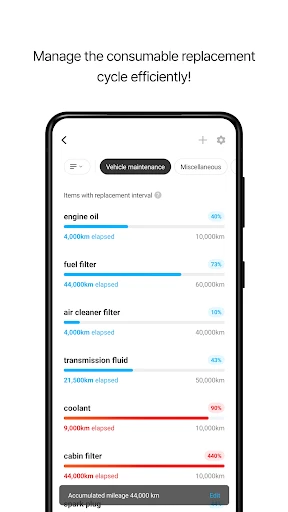
Description
About Infocar - OBD2 ELM Scanner Feature
Infocar - OBD2 ELM Scanner is a professional-grade mobile application designed to interface with standard OBD2 (On-Board Diagnostics) adapters, transforming smartphones into powerful vehicle diagnostic tools. By connecting to a compatible ELM327 Bluetooth or Wi-Fi adapter plugged into a car's OBD2 port, the app provides real-time access to a vehicle's internal computer systems. It caters to car enthusiasts, DIY mechanics, and everyday drivers seeking deeper insights into their vehicle's health and performance beyond the basic dashboard indicators. The app bridges the gap between complex automotive diagnostics and user-friendly mobile technology, offering a portable and cost-effective solution for understanding and monitoring car data.
Chapter 1: Function
Infocar's core functionality revolves around reading, interpreting, and displaying diagnostic data from a vehicle's ECU. Upon establishing a stable connection with an OBD2 adapter, the app can retrieve and clear generic and manufacturer-specific diagnostic trouble codes, pinpointing the root cause of check engine lights. It provides real-time monitoring of numerous vehicle parameters, including engine RPM, coolant temperature, vehicle speed, fuel system status, and oxygen sensor voltages. The app features graphical displays and digital gauges for easy data visualization, allowing users to track sensor readings over time. Furthermore, it can perform essential tests like checking the readiness status of emission monitors and viewing freeze frame data captured at the moment a fault occurs. These functions empower users to perform preliminary diagnostics and understand their vehicle's operational state in detail.
Chapter 2: Value
The primary value proposition of Infocar lies in its ability to demystify car diagnostics, offering significant cost savings, enhanced awareness, and educational benefits. For the average driver, it eliminates the immediate panic and guesswork associated with a check engine light by providing specific trouble codes, which can help avoid unnecessary mechanic visits for minor issues. This transparency can prevent overcharging and enable informed discussions with professional technicians. For DIY enthusiasts, the app is an invaluable toolkit, enabling performance monitoring, pre-purchase vehicle inspections, and verification of repair work. Its real-time data logging is crucial for identifying intermittent problems that may not appear during a static garage test. Compared to expensive standalone scan tools, Infocar leverages ubiquitous smartphone hardware, offering a highly affordable and portable alternative without sacrificing core diagnostic capabilities. The app's intuitive interface presents complex data in an accessible format, turning raw codes and sensor streams into comprehensible information. This empowers users to take a more proactive role in vehicle maintenance, potentially extending the vehicle's lifespan through early fault detection and fostering a deeper understanding of automotive mechanics.
Chapter 3: Scenarios
Infocar's primary target users encompass a broad spectrum of individuals connected by an interest in vehicle maintenance and performance. The DIY home mechanic is a key user, utilizing the app to diagnose engine problems, reset warning lights after repairs, and monitor sensor data while tuning or testing modifications. Everyday drivers concerned with car health and maintenance costs use it to understand warning lights, verify emissions system readiness before inspections, and track fuel efficiency trends over time. Used car buyers can employ the app with a portable adapter for a quick diagnostic scan during a pre-purchase evaluation to uncover hidden mechanical issues. Additionally, ride-share drivers and fleet operators on a budget find value in using the app for routine checks to minimize downtime and operating costs. In everyday scenarios, a user might connect the app to investigate a sudden drop in fuel economy, clear a fault code triggered by a loose gas cap, or monitor engine temperature during a long summer drive. It serves as a first line of defense and a continuous monitoring tool, making advanced vehicle diagnostics a practical part of daily life for the informed vehicle owner.
Uninstall Instructions
For step-by-step guidance on how to safely remove this application from your device, please refer to our 《Uninstall Instructions》 document.
Pros
- real-time engine data displayed on a customizable dashboard
- reads and clears fault codes without needing an internet connection
- logs detailed trip data including fuel consumption and emissions
- supports enhanced manufacturer-specific PID for many car brands
- creates and exports comprehensive vehicle health reports
Cons
- requires a compatible ELM327 Bluetooth adapter for initial setup
- advanced diagnostics limited to specific car makes and models
- real-time graphing can drain smartphone battery quickly
- interface may feel technical for casual users seeking basic codes
- no built-in repair suggestions or community forum for troubleshooting
Frequently Asked Questions
What is Infocar - OBD2 ELM Scanner and what does it do?
Infocar is a mobile app that turns your smartphone into a professional-grade car diagnostic tool. By connecting a compatible OBD2 ELM327 adapter to your vehicle's OBD2 port, it reads engine fault codes, monitors real-time sensor data (like RPM, coolant temp), and can clear check engine lights. It positions itself as a cost-effective alternative to garage scanners for basic diagnostics and vehicle health monitoring.
Is the Infocar app free to use with full features?
The Infocar app itself is free to download and offers basic functions like reading and clearing diagnostic trouble codes (DTCs). However, access to advanced features—such as full real-time parameter graphs, vehicle-specific advanced diagnostics, and certain system tests—typically requires a one-time purchase or a subscription within the app. You must provide your own compatible ELM327 Bluetooth/Wi-Fi adapter.
What devices and vehicles is Infocar compatible with?
Infocar requires an iOS or Android smartphone/tablet with Bluetooth or Wi-Fi. It works with any vehicle manufactured after 1996 in the US (or post-2001 in Europe) that is equipped with a standard OBD2 port. Compatibility for specific data parameters depends on your vehicle's make, model, and the protocols it supports. The app needs a compatible ELM327-based OBD2 Bluetooth or Wi-Fi adapter to connect.
How accurate is the real-time data and diagnosis from Infocar?
The app provides data directly read from your vehicle's ECU via the OBD2 protocol, so readings for standard parameters (e.g., engine speed, load) are accurate. However, it is a generic scanner and may not access all manufacturer-specific codes or advanced modules like transmission or ABS on some cars. For complex issues, professional diagnostic tools are recommended. Results depend on adapter quality and vehicle support.
What should I do if the app cannot connect to my car's adapter?
First, ensure your vehicle's ignition is on (or engine running), the adapter is firmly plugged into the OBD2 port, and Bluetooth/Wi-Fi is enabled on your phone. Try forgetting the adapter in your phone's Bluetooth settings and re-pairing. Restart the app and your phone. Check if the adapter is compatible (ELM327-based). For persistent issues, consult the developer's support channel via the app store listing, as no direct phone support is typically provided.
App Info
Technical Info
Recommended For You

Google Messages
Communication

Zebra Comics: Webtoons & Manga
Comics

Burner: Second Phone Number
Communication

Esports Logo Maker
Art & Design

MTS Urent
Auto & Vehicles

English-Myanmar Dictionary
Books & Reference

Messenger: Text Messages
Communication

Xcel Energy
Business

DailyBible Lite - KJV Version
Books & Reference

Mirror - Fullscreen Mirror App
Beauty

Men's Hair Cuts & Hairstyles
Beauty

Lexus
Auto & Vehicles

Cryptoguru: Trading Simulator
Business

King James Bible - KJV Offline
Books & Reference

Gocrypto: Crypto Trading
Business

CreArt - AI Image Generator
Art & Design

ibis Paint
Art & Design

TeamViewer Remote Control
Business

FX File Explorer: Plus License
Business

Fuelio: gas log & gas prices
Auto & Vehicles