
Resume Builder - CV Engineer
Screenshots

Description
About Resume Builder - CV Engineer Feature
Resume Builder - CV Engineer is a professional mobile application designed to simplify the resume creation process. It provides users with a structured and intuitive platform to craft, design, and format compelling resumes and CVs directly from their smartphones or tablets. The app caters to job seekers across various experience levels, from fresh graduates to seasoned professionals, by offering a blend of expert-guided content, aesthetically pleasing templates, and easy editing tools. Its core mission is to transform the often daunting task of resume writing into a streamlined, efficient, and effective endeavor, empowering users to present their qualifications in the best possible light to potential employers.
Chapter 1: Function
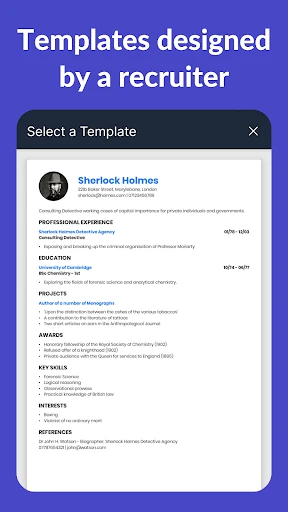
Resume Builder - CV Engineer operates as a comprehensive toolkit for document creation. Its primary function is to guide users step-by-step through building a resume. Users start by selecting from a wide array of professionally designed templates suitable for different industries and roles. The app then provides structured sections for inputting personal information, work experience, education, skills, and certifications. A key functional feature is its content suggestions and pre-written phrases tailored to specific job titles, which help users articulate their achievements powerfully. The built-in editor allows for real-time formatting, font adjustments, and layout tweaks. Furthermore, the app includes functionality to export the final resume in multiple formats, such as PDF and DOC, and offers direct sharing options to email or cloud storage platforms, facilitating easy submission to job portals.
Chapter 2: Value
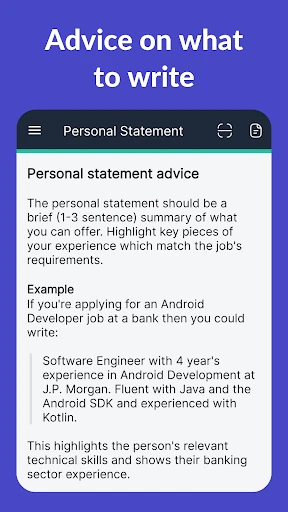
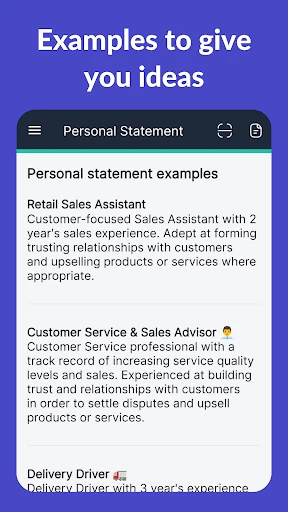
The value proposition of Resume Builder - CV Engineer lies in its ability to democratize professional resume creation by combining expert knowledge with user-friendly technology. Its foremost advantage is the significant time savings it offers; users can produce a polished, ATS-friendly resume in minutes rather than hours. The app provides substantial educational value through its context-aware content suggestions and examples, teaching users how to highlight quantifiable achievements and use industry-relevant keywords effectively. This directly enhances the resume's impact and chances of passing automated applicant tracking systems. Another critical value point is the professional aesthetic achieved through its curated templates, ensuring visual appeal without requiring design skills. The app's mobility is a distinct advantage, allowing users to update their CV anytime, anywhere, which is particularly valuable after an impromptu networking event or upon discovering a new job posting. By consolidating guidance, design, and editing into a single, accessible platform, the app reduces stress, increases confidence, and elevates the overall quality of job applications, offering a high return on investment for active job seekers.
Chapter 3: Scenarios
The primary target users for Resume Builder - CV Engineer are individuals actively engaged in a job search or career transition. This includes recent college graduates entering the workforce for the first time, who benefit immensely from the structured guidance and professional templates to compensate for limited experience. Mid-career professionals seeking advancement or a change in industry form another core user group; they utilize the app to reframe their extensive experience concisely and powerfully. Additionally, freelancers and consultants who frequently need to tailor their CVs for different project proposals find the app's quick-editing features invaluable. Everyday use cases are varied: a user might quickly update their resume on their commute after receiving a job alert, a student could draft their first CV in the campus library using the app's examples, or a professional could tailor multiple versions of their resume for different applications during an evening at home. The scenario also extends to career fairs, where immediate updates can be made, and to preparation for networking events, where having an updated CV ready to share is crucial.
Uninstall Instructions
For step-by-step guidance on how to safely remove this application from your device, please refer to our 《Uninstall Instructions》 document.
Pros
- generates tailored ats-friendly resumes in under five minutes
- one-click design adaptation for different job industries
- real-time content scoring against job description keywords
- offers concise
- action-oriented phrasing suggestions for bullets
- local storage option keeps sensitive data off cloud servers
Cons
- advanced industry-specific templates require a subscription
- limited formatting control for visual customization
- keyword analysis works best for english-language job posts
- offline mode lacks the real-time scoring feature
- bulk export options are restricted to pdf format only
Frequently Asked Questions
What is Resume Builder - CV Engineer?
Resume Builder - CV Engineer is a mobile application designed to help users create professional resumes and CVs quickly. Its core function is to provide structured templates, content suggestions, and formatting tools to simplify the resume-writing process. The app positions itself as a practical tool for job seekers, focusing on generating polished documents suitable for various industries without requiring advanced design skills.
Is Resume Builder - CV Engineer free to use?
The app is free to download and offers basic template access and editing features. However, it includes in-app purchases for premium templates, advanced formatting options, and the ability to export documents without watermarks. No additional physical equipment is required. The app may request permissions for storage to save and export resume files, but it does not mandate access to sensitive personal data beyond what the user inputs.
What devices and systems does the app support?
Resume Builder - CV Engineer is available for both iOS and Android mobile devices. It is optimized for smartphones and tablets, but it is not a native desktop application. The app requires a stable internet connection for initial template downloads and updates, though editing can typically be done offline. It is designed for general job-seeking adults and is not specifically tailored for highly specialized academic or creative portfolios.
How does the app ensure my resume format is correct?
The app uses pre-designed, ATS-friendly templates that adhere to standard resume formatting conventions. It provides structured sections (e.g., work experience, education) with character or space limits to keep content concise. Technical features include automatic alignment, font consistency, and PDF export that preserves layout. However, users should manually verify content accuracy, as the app does not guarantee compliance with every specific regional or industry format requirement.
Can I edit or recover my resume after export?
Yes, resumes created within the app are saved locally on your device, allowing for future edits. If you use cloud backup features (where available), you may recover projects across devices. For after-sales or maintenance issues, such as subscription inquiries or technical bugs, support is typically provided via the app's help section or developer contact within the app store listing. No information is provided about direct human customer service or data recovery guarantees beyond standard app functionality.
App Info
Technical Info
Recommended For You

Mirror - Fullscreen Mirror App
Beauty

Mary Kay® Skin Analyzer
Beauty

Messenger SMS & MMS
Communication

Blink Beauty Cam: Photo Makeup
Beauty

NavRadio+
Auto & Vehicles

7shifts: Employee Scheduling
Business

Recover Deleted Messages App
Communication

Our Daily Bread
Books & Reference

5 Calls: Contact Your Congress
Books & Reference

DMV Practice Test Permit Genie
Auto & Vehicles

Hair Color Changer: Hairstyles
Beauty

Sling: Employee Scheduling App
Communication

EAGLE Security UNLIMITED
Communication

Switch Natural
Beauty

Eyecon Caller ID & Spam Block
Communication

Webmotors: comprar carro
Auto & Vehicles

Invoice Maker - Invoice Fly
Business

Wonder Beauties
Beauty

Aosu
Communication

World History Atlas
Books & Reference