Reolink
Screenshots


Description
About Reolink App Features - Comprehensive Remote Surveillance Management
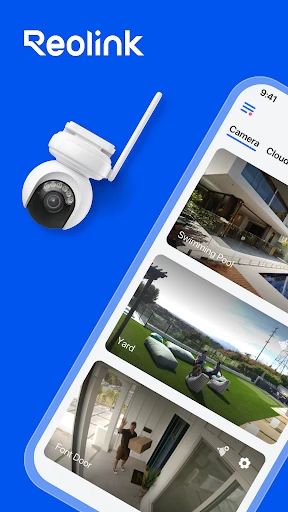
The Reolink app serves as the central command hub for Reolink's ecosystem of security cameras and devices. It enables users to remotely monitor live footage, review recordings, receive alerts, and manage their security system from a smartphone or tablet. Designed with both simplicity and advanced functionality in mind, it seamlessly connects to a wide range of Reolink products, including battery-powered, wired, and doorbell cameras, providing a unified platform for home and business security.
Chapter 1: Function
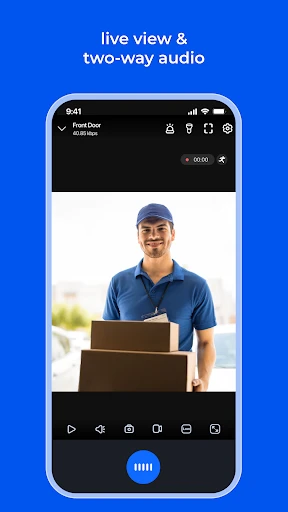
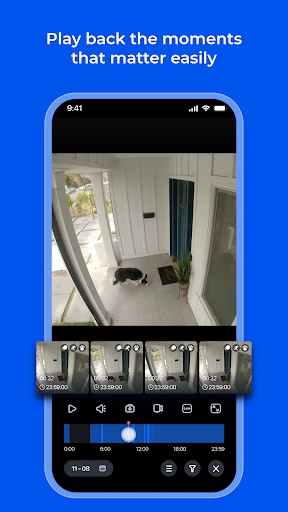
The Reolink app delivers robust core functionalities for complete surveillance control. Primarily, it offers real-time live streaming in high definition, allowing users to view footage from all connected cameras on a single, customizable multi-view screen. Users can effortlessly playback recorded videos stored on local Network Video Recorders (NVRs), SD cards, or the Reolink Cloud. The app features intelligent motion detection alerts, sending push notifications with snapshots when activity is detected. Two-way audio enables communication through supported cameras, while siren activation offers a deterrent. Additional functions include adjusting device settings, managing user permissions, upgrading firmware, and organizing camera views for efficient monitoring.
Chapter 2: Value
The Reolink app's primary value lies in transforming a collection of hardware into a responsive, intelligent, and accessible security network. Its key advantage is exceptional versatility and reliability across diverse setups, from simple standalone camera monitoring to complex multi-camera NVR systems. Unlike many competitors, it provides stable direct local streaming, reducing bandwidth usage and ensuring access even without internet, while also offering optional cloud services for backup and advanced AI features. The user interface strikes a balance between depth and usability, making advanced settings accessible without overwhelming novice users. A significant value proposition is the absence of mandatory subscription fees for basic functionality; live view, playback from local storage, and basic alerts are completely free. For users seeking more, optional cloud subscriptions add advanced person/vehicle detection, cloud storage, and richer alert management. The app's continuous development integrates cutting-edge AI analytics for smarter alerts, reducing false notifications and focusing on genuine threats. This combination of no-cost core service, robust performance, and scalable advanced features delivers outstanding long-term value and user control over their security ecosystem.
Chapter 3: Scenarios
The Reolink app is ideally suited for homeowners, small business owners, and property managers seeking reliable remote surveillance. Home users frequently utilize it to check on their property while at work or traveling, monitor children or pets in common areas, and answer the door via video doorbell features from anywhere. Parents find it invaluable for keeping an eye on nurseries or playrooms. For small business owners such as shopkeepers or café managers, the app enables after-hours monitoring of premises, inventory protection, and staff oversight. Property managers and landlords use it to secure vacant properties, monitor common areas, and conduct virtual check-ins. Pet owners employ it to watch over animals left alone during the day. Furthermore, it serves tech enthusiasts who integrate surveillance into smart home routines, using IFTTT or other integrations. In everyday use, scenarios range from receiving a quick alert and verifying a delivery at the front door, to reviewing a recorded clip of overnight perimeter activity, to using two-way audio to instruct a family member at home.
Uninstall Instructions
For step-by-step guidance on how to safely remove this application from your device, please refer to our 《Uninstall Instructions》 document.
Pros
- offers 24/7 continuous recording without subscription fees
- color night vision provides clear nighttime footage
- local storage ensures data privacy and security
- supports dual-band WiFi for stable connectivity
- wide dynamic range handles challenging lighting
Cons
- initial setup requires technical knowledge
- advanced features need a dedicated NVR system
- battery-powered models lack 24/7 recording
- app interface can be complex for casual users
- limited cloud features compared to subscription services
Frequently Asked Questions
What is Reolink and what does it do?
Reolink is a security camera app designed for remote monitoring. Its core function is to connect to compatible Reolink cameras and NVRs, allowing users to view live footage, receive motion-triggered alerts, and review recorded videos from their mobile devices. It supports features like two-way audio, PTZ control for certain models, and multi-camera management on a single screen. The app serves as the central hub for managing your Reolink security system remotely.
Is the Reolink app free to use?
Yes, the Reolink app is free to download and use for its core functions. There are no subscription fees required for basic live viewing, motion alerts, and playback from cameras with local storage (like microSD cards or NVRs). However, the app offers optional cloud subscription plans for users who want video backup on Reolink's servers, along with advanced AI detection features. In-app purchases are solely for these optional cloud services.
What devices and systems are compatible with the Reolink app?
The Reolink app is compatible with iOS and Android smartphones and tablets. It supports connections to a wide range of Reolink hardware, including Wi-Fi, wired, and battery-powered cameras, as well as Network Video Recorders (NVRs). The app requires a stable internet connection for remote access. For optimal performance, ensure your mobile device's operating system is up to date and check Reolink's official website for specific camera model compatibility.
How does Reolink handle privacy and data security?
Reolink employs local storage and optional end-to-end encryption for data security. Video data is primarily stored on local devices like microSD cards or NVRs, not automatically uploaded to the cloud. For users opting for cloud services, data is transmitted over encrypted channels. The app requires permissions like network access and push notifications for alerts. You control your data; no information is shared with third parties without consent. For detailed technical specifications, refer to Reolink's official privacy policy.
Can I view multiple camera feeds simultaneously on the app?
Yes, the Reolink app supports multi-camera live view. You can add multiple Reolink cameras and NVR channels to the app and view them in different layout formats, such as 1, 4, 9, or 16 feeds on one screen simultaneously. This feature is particularly useful for monitoring large areas like homes or businesses. Performance may depend on your network bandwidth and the specifications of your mobile device. All connected cameras must be properly set up and online within the same Reolink account.
App Info
Technical Info
Recommended For You

Comics Price Guide
Comics

Resume Builder - CV Maker
Business

Color by Number for Adults
Art & Design

Phoenix - Fast & Safe
Communication
TrustDial: Caller, SMS & Block
Communication

Google Chat
Business

Skincare Routine
Beauty
Salesforce Authenticator
Business

CL Theme C1
Auto & Vehicles

Google Chrome
Communication

Mark - AI Logo Generator
Art & Design
TrueCar Used Cars and New Cars
Auto & Vehicles

The Cepher
Books & Reference

Nice Miner: Bitcoin Miner Hash
Business

Sticker.ly - Sticker Maker
Communication

AI Video Generator - Clips AI
Art & Design

Quran for Android
Books & Reference

myColorado
Business

Pashto short stories پښتو قیصی
Comics

Azar: 1 on 1 Video Chat Online
Communication