
Droid Dashcam - Video Recorder
Screenshots


Description
About Droid Dashcam - Video Recorder Feature
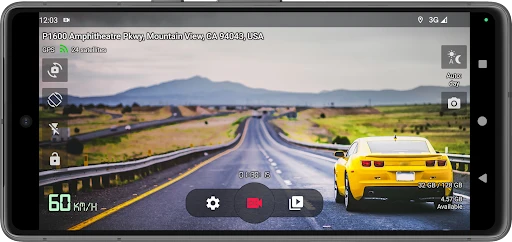
Droid Dashcam - Video Recorder transforms your Android smartphone into a fully functional and reliable dashboard camera. This application leverages your device's existing hardware, such as the camera, GPS, and storage, to provide continuous video recording while driving. It is designed to be an economical and efficient alternative to dedicated dashcam hardware, offering essential features like loop recording, impact detection, and speed overlay. The app operates with a user-friendly interface that minimizes distraction, automatically starting and stopping recording with your vehicle's movement. It serves as a digital witness on the road, aiming to provide crucial evidence and peace of mind for drivers by securely documenting every journey.
Chapter 1: Function
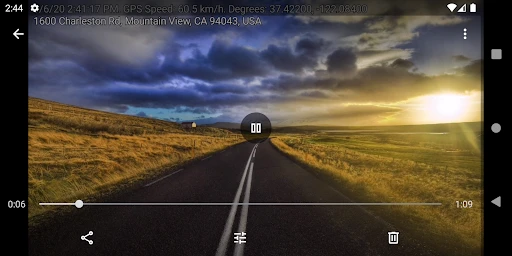
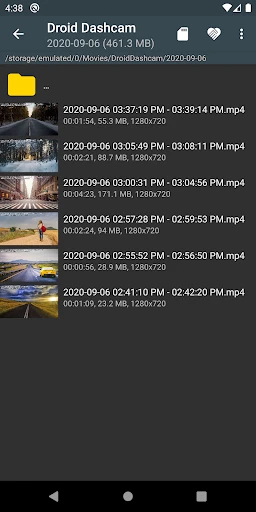
Droid Dashcam - Video Recorder core functionality centers on reliable, hands-free video documentation of drives. Upon activation, typically through automatic launch with Bluetooth or vehicle power, the app engages the rear or front camera to record high-definition video. Its fundamental operation includes loop recording, which automatically overwrites the oldest footage when storage is full, ensuring uninterrupted recording without manual management. The app integrates sensor data to tag videos with GPS coordinates, route maps, and vehicle speed as an overlay. A critical feature is the G-sensor or impact detection, which locks and saves video segments upon sensing a collision, preventing their deletion. Additional functions often encompass manual video saving, adjustable video quality, and support for external storage, creating a comprehensive recording system from a smartphone.
Chapter 2: Value
The primary value proposition of Droid Dashcam - Video Recorder lies in its cost-effectiveness and convenience, eliminating the need for a separate dashcam purchase and installation. Users gain a powerful recording tool by utilizing hardware they already own, which is particularly advantageous for multi-vehicle drivers or occasional renters. Its key advantages extend beyond simple recording. The automated operation, from start to stop, ensures evidence is captured without user intervention, which is vital during unexpected incidents. The data overlays, such as timestamp, speed, and location, provide contextual, verifiable evidence that can be critical for insurance claims or legal disputes, adding a layer of authenticity that standalone video may lack. Furthermore, features like impact detection and automatic file protection offer security, ensuring that crucial moments are preserved. The app also provides flexibility, allowing users to customize recording resolution, sensitivity of the G-sensor, and storage preferences to suit their specific needs and device capabilities. This combination of automation, evidential robustness, and customization delivers significant peace of mind, transforming a common smartphone into a dedicated safety and documentation device for the road.
Chapter 3: Scenarios
Droid Dashcam - Video Recorder is ideally suited for a wide range of drivers and use cases. Daily commuters in urban or high-traffic areas benefit greatly, as the app consistently documents their route, providing evidence for frequent incidents like fender benders, hit-and-runs, or insurance fraud attempts. Ride-share and delivery drivers represent a core user group, as the video log can protect against fraudulent passenger claims and record delivery confirmations. Long-distance travelers and road-trippers can use it to automatically capture their journey and scenic routes while having a safety record on unfamiliar roads. Parents teaching teenagers to drive may install the app as a monitoring tool to review driving habits. Furthermore, fleet managers for small businesses can deploy it on company phones as a cost-effective telematics and driver behavior solution. In everyday use, the app runs automatically when the user drives, silently recording and saving important footage, ready to be retrieved if needed for reviewing an event, sharing a driving clip, or providing concrete evidence after an accident.
Uninstall Instructions
For step-by-step guidance on how to safely remove this application from your device, please refer to our 《Uninstall Instructions》 document.
Pros
- automatically records trips using motion detection
- overlays GPS speed and location on video
- stores footage locally without cloud subscription
- minimalist interface with one-touch recording
- supports high bitrate recording for detail
Cons
- continuous use causes significant phone overheating
- lacks real-time collision alert systems
- battery drains rapidly without constant charging
- no built-in social sharing or cloud backup
- advanced features require rooting the device
Frequently Asked Questions
What is Droid Dashcam and what does it do?
Droid Dashcam is an Android app that transforms your smartphone into a car dashcam. Its core function is to automatically record video of the road ahead while you drive, using your phone's camera. It positions itself as a convenient, cost-effective alternative to dedicated dashcam hardware. The app typically runs in the background, saving footage in loops to manage storage.
Is Droid Dashcam free to use, or are there in-app purchases?
Yes, Droid Dashcam is designed to record video while running in the background or with the screen off to conserve battery. It manages storage primarily through loop recording, where new video continuously overwrites the oldest files once storage is full, unless an incident is detected and a clip is protected from deletion.
What permissions does Droid Dashcam require and why?
Droid Dashcam is generally offered as a freemium app. The basic recording functionality is often free. However, advanced features like higher resolution recording, removing watermarks, extended loop durations, or cloud backup typically require a one-time purchase or a subscription. Check the app's description on the Google Play Store for the current pricing model.
What are the unique features of Droid Dashcam?
Key features include automatic start/stop recording with car Bluetooth or motion detection, loop recording to overwrite old footage, G-sensor support to lock and save videos during collisions, and speed/route overlays on video. Its main technical characteristic is leveraging existing smartphone hardware (GPS, sensors, camera) to provide dashcam functionality without extra equipment.
Does the app run in the background and how does it handle storage?
The app requires permissions for Camera and Microphone for recording, Location/GPS to embed speed and route data, and Storage to save video files. It may also request access to device motion sensors (G-sensor) for crash detection. These permissions are core to its function as a dashcam. You can deny non-essential permissions, but core features may be limited.
App Info
Technical Info
Recommended For You

Keys simulator and cars sounds
Auto & Vehicles

Yelp for Business
Business

Video Call
Communication

FOREO For You
Beauty

CCW – Concealed Carry 50 State
Books & Reference

Dynamic Drive
Auto & Vehicles
HD Camera for Android: 4K Cam
Beauty

English-Myanmar Dictionary
Books & Reference

Drawing Desk: Learn to Draw
Art & Design

Avatar Maker - Avatar Creator
Comics

The Bible in pictures
Comics

Email - Fast and Smart Mail
Communication

Readict -One Click Away Novels
Books & Reference

AI Face Swap Video App-Swapme
Art & Design

YouVersion Bible App + Audio
Books & Reference

أرت نوين
Comics

hoopla Digital
Books & Reference

Pose Tool 3D
Comics

Infocar - OBD2 ELM Scanner
Auto & Vehicles

Asiacell
Business