
Adobe Express: AI Photo, Video
Screenshots



Description
About Adobe Express: AI Photo & Video Feature - Overview
Adobe Express is a versatile, all-in-one content creation application designed for speed and simplicity. It empowers users to quickly produce stunning graphics, videos, and web pages. Leveraging the power of Adobe's professional creative tools and generative artificial intelligence, it transforms complex design and editing tasks into intuitive, one-click operations. Whether for social media posts, marketing materials, or personal projects, Adobe Express provides a rich library of templates, assets, and AI-driven features, making professional-grade visual creation accessible to everyone, from beginners to seasoned creators.
Chapter 1: Function
Adobe Express consolidates a comprehensive suite of creative tools into a single, streamlined application. Its core functions revolve around three pillars: photo editing, video creation, and graphic design. Users can effortlessly edit photos with automatic adjustments, remove backgrounds instantly, and apply sophisticated filters. For video, the app offers tools to trim, merge, and enhance clips, add animated text, and utilize royalty-free music. The graphic design module provides thousands of customizable templates for social media stories, posters, and logos. Central to these functions is the integrated Adobe Firefly generative AI, which allows users to generate unique images, apply text effects, and perform advanced edits through simple text prompts, dramatically simplifying the creative workflow.
Chapter 2: Value
The primary value proposition of Adobe Express lies in its democratization of high-quality content creation. It bridges the gap between professional Adobe software like Photoshop and Premiere Pro and the everyday user's need for quick, polished results. Its key advantages are multifaceted. First, the integration of generative AI (Adobe Firefly) is a game-changer, enabling text-to-image generation, automated background removal, and intelligent template resizing, which saves immense time and lowers the technical barrier. Second, it offers seamless connectivity with the Adobe ecosystem, including access to Adobe Fonts, Stock assets, and cloud storage via Creative Cloud, ensuring brand consistency and resource richness. Third, its cross-platform availability on web and mobile ensures creativity is not confined to a desktop. Furthermore, the app prioritizes user experience with a clean, intuitive interface and context-aware suggestions, guiding users to achieve their vision efficiently. This combination of cutting-edge AI, professional assets, and user-centric design delivers exceptional value by turning creative ideas into reality faster and with less effort than traditional tools.
Chapter 3: Scenarios
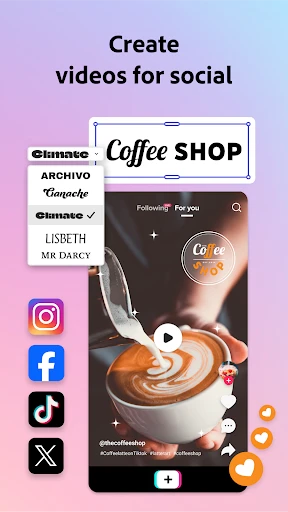
Adobe Express caters to a broad spectrum of users across personal, professional, and educational contexts. Its primary target groups include social media managers and small business owners who need to produce a high volume of engaging promotional content, such as Instagram stories, Facebook ads, or TikTok videos, rapidly and without a dedicated design team. Marketing professionals and freelancers utilize it to quickly mock up concepts, create presentations, and design marketing collateral, benefiting from the brand kit features and template consistency. Educators and students find it invaluable for creating compelling presentations, reports, and classroom materials. Additionally, content creators, bloggers, and hobbyists use the app for personal projects like editing vacation photos, creating digital invitations, or designing custom merchandise. In everyday use, a user might leverage Adobe Express to remove a distracting object from a product photo using generative fill, craft an animated birthday greeting video by merging clips and adding music, or design a professional-looking flyer for a community event by customizing a pre-made template—all accomplished within minutes on a smartphone or computer.
Uninstall Instructions
For step-by-step guidance on how to safely remove this application from your device, please refer to our 《Uninstall Instructions》 document.
Pros
- generates editable templates from a text prompt
- one-click resize adapts content for multiple platforms
- removes video background without a green screen
- brand kits maintain visual consistency across projects
- premium Adobe Fonts and stock are integrated for free
Cons
- requires an Adobe account for full feature access
- advanced AI features need a paid premium subscription
- project organization lacks advanced folder management
- some template styles may appear repetitive over time
- high-resolution exports consume significant device storage
Frequently Asked Questions
What is Adobe Express and what does it do?
Adobe Express is a free, all-in-one content creation app for quick photo and video editing. It leverages Adobe's professional tools to help users design social media graphics, flyers, reels, and more. Its core positioning is to simplify advanced editing with user-friendly templates and AI-powered features, making graphic design accessible for non-professionals.
Is Adobe Express free to use, or are there in-app purchases?
Adobe Express is a cross-platform application. It is available as a mobile app for iOS and Android devices. It also has a fully functional web version accessible through desktop browsers. This allows users to start a project on one device and seamlessly continue editing on another, supporting a flexible workflow.
What are the key AI features in Adobe Express?
Adobe Express operates on a freemium model. The core app is free to download and use, offering a substantial library of templates, assets, and basic editing tools. A Premium subscription unlocks the full asset library, advanced AI features, premium templates, and removes watermarks. In-app purchases are for this subscription plan.
What devices and systems is Adobe Express compatible with?
The app integrates several AI-powered tools. Key features include Generative Fill to add or remove objects from images, Text to Image for generating pictures from descriptions, and AI-powered quick actions like background removal and photo restoration. These features are designed to automate complex edits, significantly speeding up the content creation workflow.
How do I export or share my projects without a watermark?
Projects created with the free version of Adobe Express will include a small Adobe Express watermark on exported images and videos. To remove this watermark, you need an active Adobe Express Premium subscription. With Premium, you can download and share your creations directly to social platforms or save them to your device in high quality without any branding.
App Info
Technical Info
Recommended For You

DMV Prueba de Práctica 2024
Auto & Vehicles

Dreame-Read Romance Stories
Books & Reference

YACReader Remote
Comics

OBD Auto Doctor: OBD2 Scanner
Auto & Vehicles

Slack
Business

AutoZen-Car Dashboard&Launcher
Auto & Vehicles

Al Quran Kareem: القران الكريم
Books & Reference

NHRA.TV
Auto & Vehicles

Valvoline Instant Oil Change
Auto & Vehicles

King James Bible (KJV)
Books & Reference

GoDaddy Studio: Create & Grow
Art & Design

Discord - Talk, Play, Hang Out
Communication

Video AI - AI Hug & Kiss Maker
Art & Design

CarGurus: Used & New Cars
Auto & Vehicles

One Block for Minecraft Maps
Books & Reference

CLZ Comics comic book database
Comics

CEFCO Rewards
Auto & Vehicles

AR Drawing: Sketch, Art, Paint
Art & Design

Abyss Reader
Comics

Manga UP!
Comics