
Webex
Screenshots




Description
About Webex Feature - Seamless Collaboration for the Modern Workplace
Webex is a comprehensive cloud collaboration platform developed by Cisco, designed to power the future of hybrid work. It integrates high-definition video conferencing, team messaging, file sharing, whiteboarding, and telephony into a single, secure application. More than just a meeting tool, Webex serves as a central hub for teamwork, enabling distributed teams to connect, create, and collaborate from anywhere, on any device. Its robust feature set is built on a foundation of enterprise-grade security and intelligence, aiming to make meetings more inclusive, workflows more efficient, and collaboration more natural, thereby transforming how organizations communicate and operate in a digital-first world.
Chapter 1: Function
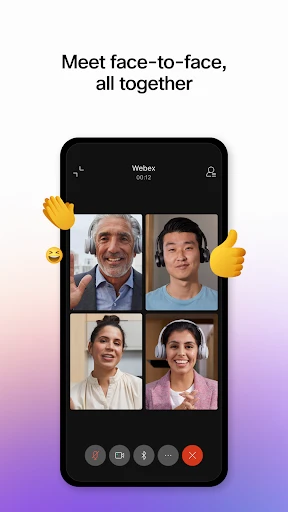
Webex's core functionality revolves around enabling seamless communication and collaboration. Its primary feature is hosting online meetings and video conferences with support for hundreds of participants. These meetings include high-quality video and audio, screen sharing, and interactive tools like digital whiteboards, polls, and Q&A sessions. Beyond meetings, the app provides a persistent team messaging workspace where users can create spaces for projects, share files, and have threaded conversations. It integrates calling capabilities, allowing users to make and receive phone calls directly from the app. Furthermore, Webex offers advanced features such as real-time transcription and translation, meeting recording with automatic highlights, and integration with a wide array of popular productivity and business applications like Microsoft 365, Google Workspace, and Salesforce, creating a unified workflow.
Chapter 2: Value
The value proposition of Webex lies in its ability to create an inclusive, intelligent, and secure collaboration experience that bridges the gap between in-office and remote participants. A key advantage is its superior audio and video intelligence, featuring noise removal and speech enhancement, which ensures clear communication. Its AI-powered capabilities, like Webex Assistant, provide voice commands, real-time transcription, and automated meeting summaries, saving time and improving accessibility. Security is paramount; Webex offers end-to-end encryption for meetings, data loss prevention, and compliance with major global standards, giving enterprises peace of mind. The platform's true value is its holistic approach. It eliminates the need to switch between disparate tools by combining meetings, messaging, calling, and events into one ecosystem. This integration fosters continuous teamwork, reduces context-switching, and boosts productivity. Additionally, its extensive device and platform compatibility, from dedicated hardware to mobile apps, ensures a consistent and reliable experience for every user, making it a scalable solution for businesses of all sizes aiming to empower their hybrid workforce.
Chapter 3: Scenarios
Webex primarily targets enterprise teams, educational institutions, healthcare providers, and organizations of any size transitioning to or operating within a hybrid work model. Its everyday use cases are vast. For a project team, it is the daily hub where members coordinate via group messaging, hop on quick impromptu huddle meetings to solve problems, and co-edit documents on a shared whiteboard during brainstorming sessions. For a sales organization, Webex is used to conduct secure client demos with screen sharing, host large virtual product launch events, and enable sales reps to make business calls from anywhere. In an educational setting, teachers use it to conduct virtual classes with interactive features like breakout rooms and polls, while students collaborate on group projects in dedicated team spaces. Healthcare professionals utilize it for secure telehealth consultations and administrative staff coordination. Essentially, any scenario requiring reliable communication—from a one-on-one check-in and cross-departmental workshops to all-hands company meetings and external webinars—is effectively supported by the Webex platform.
Uninstall Instructions
For step-by-step guidance on how to safely remove this application from your device, please refer to our 《Uninstall Instructions》 document.
Pros
- integrates real-time translation for global team meetings
- offers end-to-end encryption for all meeting types
- provides advanced noise removal using ai
- allows joining via a direct web link without installs
- supports persistent virtual workspaces for projects
Cons
- high-fidelity audio mode demands strong bandwidth
- complex admin controls require technical onboarding
- free plan limits meeting duration to 50 minutes
- advanced analytics only available on enterprise tiers
- virtual workspace feature lacks third-party app integrations
Frequently Asked Questions
What is Webex and what are its core functions?
Webex is a comprehensive cloud-based collaboration platform primarily designed for video conferencing, online meetings, and team communication. Its core functions include hosting HD video and audio meetings, screen sharing, and providing a persistent team messaging space with file sharing. It also integrates features like whiteboarding, polling, and webinar hosting, positioning itself as an all-in-one solution for hybrid work and business communication.
Is Webex free to use, and what are the in-app purchase options?
Common issues include audio/video problems, connectivity errors, or difficulty joining meetings. First, check your internet connection and device permissions for the camera and microphone. Ensure you are using the latest version of the Webex app or a supported browser. Clearing the app's cache or reinstalling can often resolve glitches. For persistent problems, detailed troubleshooting guides and 24/7 support are available on the official Cisco Webex Help Center.
What are common technical issues and how to troubleshoot them?
Yes, Webex offers a robust free plan supporting meetings with up to 100 participants, 40-minute group meeting durations, and standard messaging features. Paid plans (e.g., Business, Enterprise) unlock longer meeting times, more participants (up to 1000), advanced security controls, admin analytics, and 24/7 customer support. In-app purchases are not typical; subscriptions are managed through Cisco's website or sales.
What devices and operating systems does Webex support?
Webex provides broad device and system compatibility. It supports Windows, macOS, iOS, and Android via native apps. You can also join meetings directly from modern web browsers like Chrome, Firefox, and Edge. For conference rooms, it integrates with Cisco and third-party hardware systems. The platform is designed to be accessible for individuals, businesses, and large enterprises across desktops, mobile devices, and dedicated room systems.
How does Webex ensure meeting security and privacy?
Webex employs multiple layers of security, including end-to-end encryption for meetings, data encryption in transit and at rest, and secure data center compliance. Key features include host controls (lobby, lock meeting, remove participants), password protection, and optional waiting rooms. It adheres to global standards like GDPR, ISO 27001, and FedRAMP. Administrators can manage security policies centrally for their organization.
App Info
Technical Info
Recommended For You

Lezhin Comics -การ์ตูนและนิยาย
Comics

Standup Wireless
Communication

StoryGraph
Books & Reference

Keys simulator and cars sounds
Auto & Vehicles

Watch Sync App - BT Notifier
Communication

imo video calls and chat HD
Communication

Mangamello - مانجاميلو
Comics

Mary Kay® MirrorMe™
Beauty

Video Call
Communication

Spirit Fanfiction and Stories
Books & Reference

Pratilipi Comics
Comics

Manga Library - مكتبة المانجا
Comics

Amazon Relay
Business

AR Drawing Paint Sketch Trace
Art & Design

Face scan - How old do I look
Beauty

SketchPad - Doodle On The Go
Art & Design

AutoExpreso Móvil
Auto & Vehicles

Bimma EWD - Wiring Diagrams
Auto & Vehicles

Duo Call - Dual Global Calling
Communication

Kik — Messaging & Chat App
Communication